

Table of Contents
- What Makes a Lightweight Gaming Mouse Competitive-Ready
- Wireless vs Wired Gaming Mouse for FPS Performance
- Gaming Mouse Polling Rate Explained: Why 8K Matters for Shooters
- Best Mouse Grip Styles for Shooters and Hand Size Fit
- Sensor Performance and DPI: What Competitive Players Actually Need
- Weight Distribution and Long-Term Comfort in Tournament Play
- How to Choose the Right Lightweight Gaming Mouse for Your Play Style
- Frequently Asked Questions
Last Updated: October 6, 2026
What Makes a Lightweight Gaming Mouse Competitive-Ready
A lightweight gaming mouse combines low weight with high precision to reduce hand fatigue during extended competitive play while maintaining the responsiveness that separates winners from the rest. At The Techie Den, we understand that competitive shooters need equipment that responds instantly to micro-movements without dragging down aim control during long tournament sessions.
The core advantage is simple: less mass means faster acceleration and deceleration. Your hand tires less over a six-hour competitive match. But weight alone doesn't make a mouse competitive-ready. The sensor must track accurately at high speeds, the polling rate must minimize input lag, and the shape must fit your grip style without forcing your hand into an unnatural position.
Most casual gamers overlook the connection between weight and performance. They assume a heavier mouse feels more "solid" or reliable. That's backward. Professional esports players have standardized on ultralight designs because the data is clear: lighter mice allow for quicker flick shots and more precise tracking adjustments. The best lightweight gaming mouse for competitive shooters combines ultralight construction with tournament-grade sensor performance and wireless reliability.
What separates a competitive mouse from a gaming mouse is precision under pressure. A competitive mouse must deliver consistent tracking at any DPI setting, maintain stable wireless connectivity during critical moments, and provide button response fast enough that your clicks register before your opponent's do.
Wireless vs Wired Gaming Mouse for FPS Performance
Wireless connectivity has become the standard for competitive FPS play, not because of convenience, but because modern wireless technology eliminates the latency disadvantage that plagued earlier generations. A quality wireless gaming mouse now matches or exceeds wired performance while giving you freedom of movement without cable drag.
The polling rate determines input responsiveness. Modern wireless mice support 8K polling, which means the mouse reports its position to your computer 8,000 times per second. That's 0.125 milliseconds between updates. Wired mice offer the same polling rates, so the performance gap has closed entirely. What matters now is the quality of the wireless connection, not whether it's wireless or wired.
Battery life is the practical trade-off. A wireless mouse with a 500mAh battery lasts 50+ hours of active play on a single charge. That's more than a week of casual use or two full tournament weekends. The Mchose A7 V2 Pro Ultra, for example, delivers extended wireless playtime with its high-capacity rechargeable battery while maintaining the ultralight form factor competitive players demand.

Wired mice eliminate battery concerns entirely, but the cable introduces friction against your mousepad and desk. That friction translates to inconsistent movement, especially during fast sweeping motions. Competitive players tolerate this trade-off only if wireless performance is unavailable, which it no longer is.
The practical choice: wireless if your equipment supports 8K polling (most modern competitive mice do), wired only if you play on hardware that doesn't support high-speed wireless protocols.
Gaming Mouse Polling Rate Explained: Why 8K Matters for Shooters
Polling rate is how often your mouse reports its position to your computer. A higher polling rate means more frequent updates, which reduces the window of time between your physical movement and your aim adjustment on screen.
Standard polling rates are 1000Hz (1 millisecond between updates), 4000Hz (0.25ms), and 8000Hz (0.125ms). The difference between 1000Hz and 8000Hz is 0.875 milliseconds. That's not much in absolute terms, but in competitive shooters where matches are decided by milliseconds, it matters.
Here's the practical impact: at 1000Hz polling, if your opponent clicks slightly before you do, there's a window where your mouse position hasn't updated yet. Your aim adjustment hasn't registered. At 8K polling, that window shrinks to nearly nothing. Your flick shot registers faster.
The trade-off is CPU load and USB bandwidth. 8K polling consumes more system resources than 1000Hz. If your PC is running near capacity, 8K polling can cause stuttering in other applications. Most competitive gamers with modern systems (built in the last 3 years) see no performance penalty.
For FPS games specifically, 8K polling is the competitive standard. For other game genres, 4000Hz is sufficient. The best lightweight gaming mouse for competitive shooters supports at least 4000Hz, with 8K as the preferred option for esports-level play.
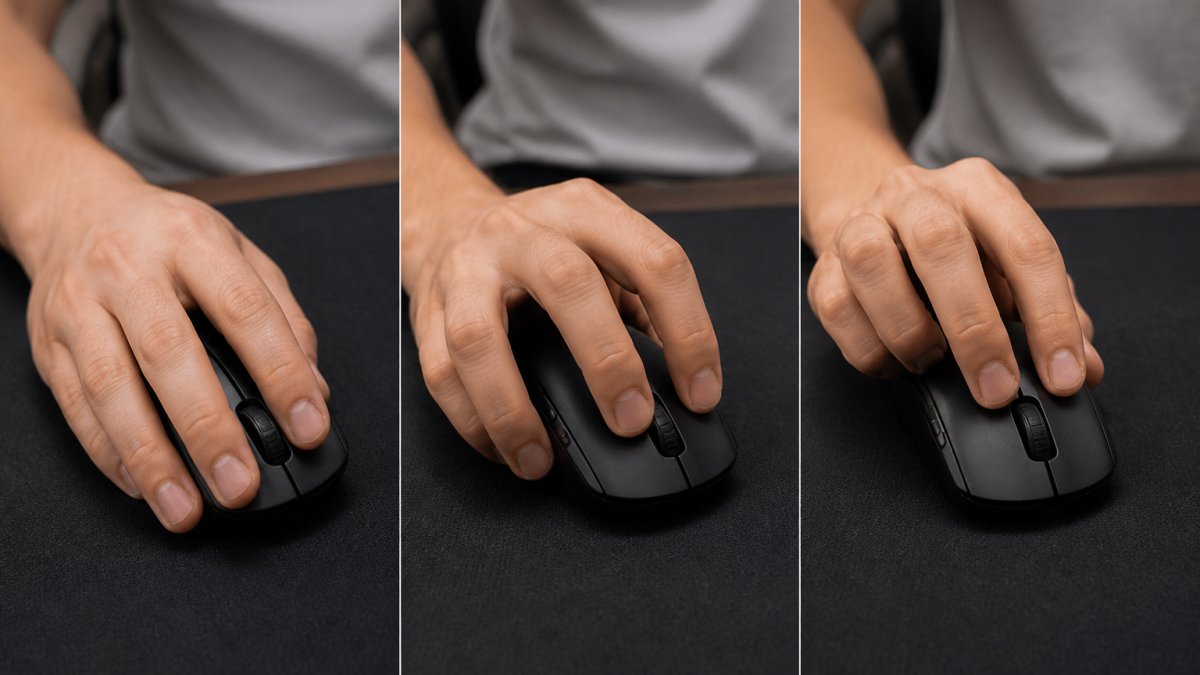
Best Mouse Grip Styles for Shooters and Hand Size Fit
Your grip style determines which mouse shape performs best for your hand. There are three primary grip styles used in competitive FPS play, and choosing the wrong one for your hand size creates fatigue and reduces aim control.
Palm grip uses your entire hand to grip the mouse. Your palm, fingers, and thumb all make contact with the mouse body. This grip distributes pressure across a larger area, reducing hand fatigue during extended play. Players using palm grip typically prefer heavier mice for stability, but a lightweight gaming mouse with proper ergonomic contouring still works well.
Claw grip arches your fingers above the mouse while your palm hovers slightly above the body. Only your fingertips and the heel of your palm make contact. This grip enables faster flick shots because your fingers can move independently without the entire hand moving. It requires more finger strength and works best for medium to large hands.
Fingertip grip uses only your fingertips to control the mouse. Your palm doesn't touch the mouse at all. This is the lightest grip style and allows maximum hand mobility. It works best for smaller hands and requires a compact, lightweight mouse.
Hand size matters more than people admit. A large hand forced into a small fingertip-grip mouse will cramp. A small hand using a full-palm mouse designed for large hands will lack control. The best lightweight gaming mouse for competitive shooters matches your hand size and preferred grip style.
Sensor Performance and DPI: What Competitive Players Actually Need
The sensor is the component that tracks your mouse movement. A quality sensor maintains accuracy across different speeds, surfaces, and DPI settings. A poor sensor exhibits acceleration (the cursor moves further at high speeds than low speeds for the same physical movement) or prediction (the sensor guesses where you're moving instead of tracking actual movement).
Mchose A7 V2 Pro Ultra – Tri‑Mode Lightweight Wireless Gaming Mouse →
DPI stands for dots per inch. It's a sensitivity setting that determines how far your cursor moves for a given physical movement. A 400 DPI setting means the cursor moves 400 pixels for every inch your mouse travels. A 3200 DPI setting means 3200 pixels per inch. Higher DPI = faster cursor movement.
Competitive FPS players typically use DPI between 400 and 1600. Lower DPI requires larger physical movements for the same cursor distance, which some players find more precise. Higher DPI allows smaller movements, which works for players who prefer wrist aiming over arm aiming.
What matters is that your sensor maintains consistent tracking at your chosen DPI. The Mchose A7 V2 Pro Ultra supports up to 42,000 DPI with a PAW3950 Ti sensor, which means it tracks accurately whether you're playing at 400 DPI or 3200 DPI. That consistency is what separates a competitive-grade sensor from a budget sensor.
Acceleration and prediction are the real performance killers. A sensor with even 1% acceleration will throw off your aim during fast sweeping motions. Competitive mice use optical sensors (like the PAW3950 Ti) specifically because optical sensors eliminate acceleration better than other sensor types.
Weight Distribution and Long-Term Comfort in Tournament Play
Weight distribution matters as much as total weight. A mouse that's light overall but poorly balanced will feel twitchy and difficult to control. A mouse with weight concentrated in the back will feel tail-heavy. The best lightweight gaming mouse for competitive shooters distributes weight evenly from front to back.
Tournament play means 6+ hours of continuous use. Hand fatigue compounds over time. A mouse that feels comfortable for 30 minutes might cause wrist strain after 4 hours. The ergonomic design becomes critical during extended sessions.
Cable weight also factors in for wired mice. A heavy cable creates drag that pulls the mouse toward the edge of your mousepad. Wireless eliminates this entirely, which is another reason competitive players prefer wireless setups.
Grip texture affects comfort during long sessions. A smooth coating can become slippery when your hand sweats. A textured coating grips better but can cause friction-related irritation during extended play. The Mchose A7 V2 Pro Ultra uses a balanced grip surface.
Injury prevention is rarely discussed but critical. Repetitive strain injury (RSI) in the wrist and forearm is common among competitive gamers who play 8+ hours daily. An ergonomic lightweight gaming mouse reduces strain by supporting natural hand positioning and distributing pressure evenly. A mouse that forces your wrist into an unnatural angle will cause problems within weeks of intensive play.
How to Choose the Right Lightweight Gaming Mouse for Your Play Style
Start by identifying your grip style and hand size. Measure your hand from wrist to fingertip. Compare that to the mouse dimensions. A mouse that's too small will cramp your hand. A mouse that's too large will feel uncontrollable.
Next, determine your DPI preference. Test several DPI settings in your primary game. Most players settle on a DPI between 400 and 1600. Once you've chosen your DPI, look for mice with sensors that maintain accuracy at that setting.
Check the polling rate support. For competitive FPS play, 4000Hz minimum, 8K preferred. Verify that your PC supports the polling rate without performance degradation. If your system is older, 4000Hz is a safer choice.
Wireless connectivity should be your default preference unless you have a specific reason to use wired. The battery life of quality gaming mice exceeds 50 hours, so charging is a weekly task at most.
Consider your budget realistically. A competitive-grade lightweight gaming mouse costs between $60 and $150. The Mchose A7 V2 Pro Ultra at $80.99 delivers tournament-grade performance at a price point that doesn't require choosing between quality and affordability.
Finally, test the mouse in your actual gaming environment if possible. Borrow from a friend or visit a retailer that allows hands-on testing.
| Consideration | What It Means | Why It Matters |
|---|---|---|
| Grip Style | Palm, claw, or fingertip contact | Determines which mouse shape suits you |
| Hand Size | Measured wrist to fingertip | Prevents cramping and ensures control |
| DPI Range | Typical 400-1600 for competitive play | Affects cursor speed and precision |
| Polling Rate | 4K or 8K Hz for competitive shooters | Reduces input lag during critical moments |
| Sensor Type | Optical preferred for accuracy | Eliminates acceleration and prediction errors |
| Weight | Ultralight reduces fatigue | Enables faster flick shots and tracking |
| Wireless vs Wired | Modern wireless matches wired performance | Wireless offers freedom without latency penalty |
Choosing the right lightweight gaming mouse requires matching three elements: your grip style and hand size, your DPI preference, and the sensor performance that supports your play style.
Frequently Asked Questions
Why do competitive gamers prefer lightweight gaming mice?
A lightweight gaming mouse reduces hand fatigue during long tournament play and enables faster aim adjustments with less effort. Lighter weight means your arm moves the mouse more quickly for flick shots and precise tracking without tiring. Competitive shooters often choose mice under 70 grams to maintain control during overtime matches where fatigue can cost matches.
What is the ideal weight range for a competitive lightweight gaming mouse?
Most competitive players target 50-70 grams for optimal balance between speed and control. Ultralight mice under 50 grams offer maximum agility but may feel unstable for some hand sizes. Heavier mice above 80 grams reduce responsiveness in fast-paced FPS games. Your ideal weight depends on hand size and grip style, test different ranges to find what maintains your aim control without causing hand strain.
Do professional FPS players use wireless or wired gaming mice?
Modern wireless mice with 8K polling rates now match wired performance in latency and response time, making both viable for esports. Many pros use wireless for the freedom of movement and reduced cable drag. Wired mice eliminate battery concerns during tournaments. The choice depends on your setup and preference, what matters most is consistent latency and reliable connectivity throughout your match.
What is the benefit of an 8K polling rate in gaming mice for shooters?
An 8K polling rate (8000 Hz) reduces input lag to 0.125 milliseconds, providing faster response between your hand movement and on-screen aim adjustment. This matters most in competitive FPS where milliseconds decide flick shots and tracking battles. Standard 1000 Hz polling (1 ms delay) works for most players, but 8K polling gives competitive shooters a measurable edge in precision and reaction time during high-speed gameplay.


