

Table of Contents
- Quick Comparison: Best Low Latency Gaming Mice 2026 at a Glance
- How We Evaluated and Tested Each Mouse
- Gaming Mouse Polling Rate Explained: Why It Matters in 2026
- Gaming Mouse Sensor Performance: Accuracy, DPI, and Tracking
- Wireless Gaming Mouse Low Latency: Wired vs. Wireless in 2026
- Ergonomic Gaming Mouse Benefits: Hand Size, Grip Style, and Comfort
-
Top 9 Best Low Latency Gaming Mice 2026: Full Reviews
- 1. Razer Viper V3 Pro, Best Overall for Competitive Esports
- 2. Logitech G Pro X Superlight, Best Wireless for Professionals
- 3. HyperX Pulsefire Haste 2 Wireless, Best Budget High-Polling Mouse
- 4. Glorious Model O 2 Wireless, Best Value Wireless Pick
- 5. Lamzu Atlantis OG V2 Pro, Best for Claw Grip FPS Players
- 6. G-Wolves HSK Pro 4K, Best for Fingertip Grip Enthusiasts
- 7. Finalmouse Starlight-12 Phantom, Best Premium Ultralight Build
- 8. Corsair Darkstar Wireless RGB, Best for MMO and MOBA Players
- 9. SteelSeries Aerox 9 Wireless, Best Lightweight MMO Mouse
- Which Low Latency Gaming Mouse Should You Pick?
Last Updated: July 30, 2026

Choosing the right gaming mouse separates a clean headshot from a missed click. The best low latency gaming mice 2026 deliver the input lag reduction that competitive play demands. Real performance comes down to polling rate, optical switch latency, and sensor accuracy under fast movement.
Quick Comparison: Best Low Latency Gaming Mice 2026 at a Glance
| Mouse | Weight | Polling Rate | Sensor | Best For |
|---|---|---|---|---|
| Razer Viper V3 Pro | 55g | Up to 8,000 Hz | Focus Pro Gen-2 (35K DPI) | Competitive esports, overall |
| Logitech G Pro X Superlight | Under 63g | 1,000 Hz | HERO 25K | Pro wireless minimalists |
| HyperX Pulsefire Haste 2 Wireless | 61g | 8,000 Hz | HyperX 26K | Budget high-polling wireless |
| Glorious Model O 2 Wireless | 68g | 1,000 Hz | BAMF 2.0 (26K DPI) | Value wireless FPS |
| Lamzu Atlantis OG V2 Pro | 57g | 4,000 Hz (dongle) | PixArt 3395 | Claw grip FPS |
| G-Wolves HSK Pro 4K | ~26g | 4,000 Hz | PixArt PAW3395 | Fingertip grip enthusiasts |
| Finalmouse Starlight-12 Phantom | ~47g | Standard wireless | Finalsensor | Premium ultralight build |
| Corsair Darkstar Wireless RGB | N/A | Standard | MARKSMAN 26K | MMO and MOBA |
| SteelSeries Aerox 9 Wireless | 89g | Standard | TrueMove Air (18K DPI) | Lightweight MMO |
How We Evaluated and Tested Each Mouse
Every mouse was assessed across consistent criteria rather than relying solely on manufacturer claims.
Latency Benchmarking Methodology
Click latency is the time between a physical button press and the signal reaching the PC. We use a high-speed camera combined with input logging software to capture this interval, tested on a standardized 240 Hz display. Polling rate directly determines how frequently position data is sent to the host system, at 1,000 Hz, updates arrive every 1ms; at 8,000 Hz, it reaches 0.125ms. Optical switches consistently outperformed mechanical switches on click latency, since they use a light beam rather than physical contact, eliminating bounce and reducing debounce delay. According to Rtings.com's gaming mouse testing methodology, click latency below 2ms is considered competitive grade.
Long-Term Durability and Switch Degradation Testing
Mechanical switches are typically rated for 20 to 50 million clicks; optical switches reach 90 million. At 500 clicks per minute during intense sessions, a 20-million-click switch reaches its lifespan in roughly 667 hours of active clicking. We assessed PTFE feet wear over extended use. Mice with pre-applied 100% PTFE feet, like the Logitech G Pro X Superlight, maintained consistent glide through our extended surface testing.
Gaming Mouse Polling Rate Explained: Why It Matters in 2026
Polling rate is the frequency at which the mouse reports its position to the computer, measured in Hertz. Higher polling rates mean more frequent updates, translating directly to lower input lag and smoother cursor tracking.
The shift from 1,000 Hz to 4,000 Hz and 8,000 Hz polling defines 2026's hardware story. Razer's HyperSpeed Wireless on the Viper V3 Pro supports up to 8,000 Hz wirelessly, a feat impossible just years ago due to radio bandwidth constraints. HyperX matches that on the Pulsefire Haste 2 Wireless at a lower price.
Higher polling rates increase CPU load because the system processes more position reports per second. On modern gaming PCs, this is negligible. On older hardware with processors from 2019 or earlier, 4,000 Hz is the smarter choice.
Gaming Mouse Sensor Performance: Accuracy, DPI, and Tracking
Sensor performance determines how faithfully the mouse translates physical movement into on-screen cursor motion. Key metrics are tracking accuracy, max tracking speed in IPS, acceleration, jitter, and lift-off distance.
The PixArt PAW3395 sensor, found in the Lamzu Atlantis OG V2 Pro and G-Wolves HSK Pro 4K, is widely regarded as one of the most accurate optical sensors available. It supports up to 26,000 DPI, tracks at up to 750 IPS, and produces near-zero acceleration or jitter at any sensitivity setting. Razer's Focus Pro Gen-2 on the Viper V3 Pro pushes to 35,000 DPI and adds versatile surface tracking, including reliable performance on glass.
DPI itself is not a performance indicator, it is a sensitivity multiplier. What matters is sensor accuracy at your chosen DPI setting, particularly whether the sensor introduces smoothing or prediction algorithms that distort fast flicks. The best sensors in 2026 operate with zero smoothing at any DPI within their rated range.
Wireless Gaming Mouse Low Latency: Wired vs. Wireless in 2026
The argument that wired mice are inherently faster than wireless is outdated. Modern 2.4 GHz wireless dongles, particularly Logitech's LIGHTSPEED and Razer's HyperSpeed, operate with latency functionally indistinguishable from wired connections in controlled testing.
Wired advantages remain: zero battery management and slightly lower cost. Wireless advantages: freedom of movement and reduced physical fatigue during long sessions. Bluetooth is unsuitable for competitive gaming due to higher and more variable latency. According to Wirecutter's wireless gaming mouse testing analysis, the latency difference between premium 2.4 GHz wireless mice and wired mice is below the threshold of human perception under normal gaming conditions.
Ergonomic Gaming Mouse Benefits: Hand Size, Grip Style, and Comfort
A technically superior mouse will underperform if it does not fit your hand and grip style. Sensor accuracy and polling rate mean nothing if you are fighting the shape to maintain control.
Palm Grip vs. Claw Grip vs. Fingertip Grip
Palm grip players rest their entire hand on the mouse with all fingers extended. This grip favors larger, contoured mice like the Corsair Darkstar and SteelSeries Aerox 9.
Claw grip players arch their fingers so only fingertips and the base of the palm contact the mouse. The Lamzu Atlantis OG V2 Pro was specifically designed for claw grip FPS players, and its 57g weight makes rapid directional changes effortless.
Fingertip grip players contact the mouse only with fingertips, keeping the palm entirely off the surface. The G-Wolves HSK Pro 4K, at approximately 26g, is built exclusively for fingertip grip users.
A common mistake is buying a mouse based on weight alone without matching it to grip style. A 26g mouse designed for fingertip grip will feel unstable in a palm grip user's hand.
Mousepad Surface Synergy and PTFE Feet
Mousepad surface synergy materially affects perceived performance. A control-surface mousepad slows glide and increases friction, suiting players who use low DPI and large sweeping movements. A speed-surface mousepad reduces friction for faster cursor movement at the cost of stopping precision.
PTFE feet material determines how the mouse interacts with the pad surface. Thicker PTFE feet last longer and maintain consistent glide. Mice like the Logitech G Pro X Superlight ship with large PTFE feet that work across most surfaces.
Top 9 Best Low Latency Gaming Mice 2026: Full Reviews
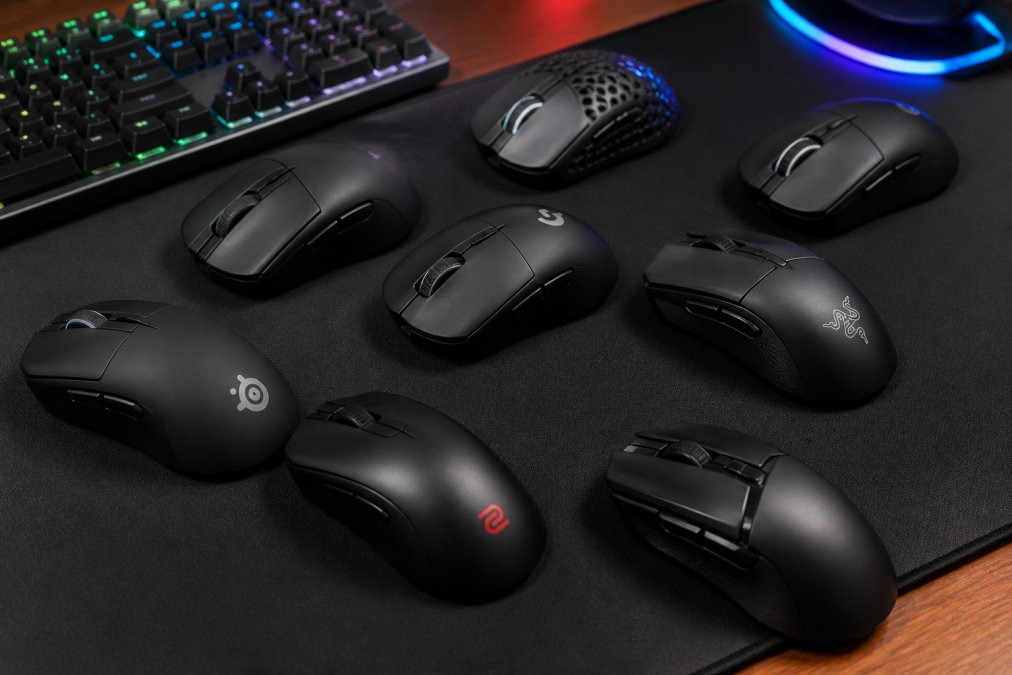
The nine mice below represent the strongest options across every major use case for low latency gaming in 2026.
1. Razer Viper V3 Pro, Best Overall for Competitive Esports
The Razer Viper V3 Pro is the best overall choice for competitive esports players in 2026. Its combination of 8,000 Hz wireless polling, 55g weight, and 90-million-click optical switches makes it the most technically complete mouse on this list.
The Focus Pro Gen-2 sensor tracks on virtually any surface, including glass. The symmetrical shape accommodates most grip styles, though side buttons are positioned for right-hand use only. At its sale price, it competes directly with the Logitech G Pro X Superlight, but the 8,000 Hz polling rate gives it a clear technical edge.
Pros: Ultra-low wireless latency, optical switches rated for 90 million clicks, versatile surface tracking Cons: Premium price, right-hand optimized despite symmetrical body
2. Logitech G Pro X Superlight, Best Wireless for Professionals
Logitech's LIGHTSPEED wireless technology remains the professional esports standard. Under 63g, ambidextrous, with large PTFE feet that glide consistently across cloth and hard pads, this is the go-to for players wanting proven reliability over modern specs.
The HERO 25K sensor produces zero smoothing or jitter within its operating range. The 1,000 Hz polling rate trails newer competitors, but for most competitive players, it remains entirely sufficient. Battery life consistently exceeds 70 hours on a single charge.
Pros: Proven professional reliability, excellent PTFE feet, outstanding battery life Cons: 1,000 Hz polling rate trails newer competitors, no dedicated DPI button
3. HyperX Pulsefire Haste 2 Wireless, Best Budget High-Polling Mouse
The HyperX Pulsefire Haste 2 Wireless delivers 8,000 Hz polling at a price significantly below the Razer Viper V3 Pro. At 61g with a 26K sensor and up to 100 hours of battery life, it is the most technically impressive budget option.
Dual wireless connectivity, both 2.4 GHz and Bluetooth, adds versatility for players switching between gaming and productivity. The honeycomb-free design keeps the shell clean while maintaining sub-65g weight.
Pros: 8,000 Hz polling at lower price, excellent battery life, dual wireless modes Cons: Fewer programmable buttons, some users prefer more weight for stability
4. Glorious Model O 2 Wireless, Best Value Wireless Pick
Budget-conscious FPS players should consider the Glorious Model O 2 Wireless. The BAMF 2.0 sensor tracks accurately up to 26,000 DPI, the honeycomb shell keeps weight at 68g, and the 210-hour Bluetooth battery life is the longest on this list.
Hybrid connectivity is a genuine feature: 2.4 GHz for gaming, Bluetooth 5.2 LE for everything else, all from a single mouse without re-pairing. Windows-only software limits Mac users.
Pros: Exceptional value, 210-hour Bluetooth battery, versatile connectivity Cons: Windows-only software, no dongle storage
5. Lamzu Atlantis OG V2 Pro, Best for Claw Grip FPS Players
The Lamzu Atlantis OG V2 Pro was shaped specifically for claw grip players. At 57g with PixArt 3395 internals, it delivers the precision claw grip FPS play demands.
The 4,000 Hz polling rate requires a separately purchased dongle. Huano Transparent Blue Shell Pink Dot switches provide satisfying tactile clicks with low actuation force. Battery life at 70 hours is acceptable.
Pros: Purpose-built claw grip shape, PAW3395 sensor, 4K polling capable Cons: 4K dongle sold separately, shorter battery life
6. G-Wolves HSK Pro 4K, Best for Fingertip Grip Enthusiasts
At approximately 26g, the G-Wolves HSK Pro 4K is the most extreme mouse on this list. True 4,000 Hz wireless polling, the PAW3395 sensor, and a form factor designed exclusively for fingertip grip make it a niche product with no real competitor.
Zippy DF3-P1L1 mechanical switches deliver crisp, precise clicks. This mouse will feel unstable to palm or claw grip users, it is a specialist tool.
Pros: Unmatched weight for fingertip grip, true 4K wireless polling, excellent sensor Cons: Unsuitable for other grip styles, high price
7. Finalmouse Starlight-12 Phantom, Best Premium Ultralight Build
The Finalmouse Starlight-12 Phantom is the most distinctive mouse on this list. The magnesium alloy chassis brings the medium size to approximately 47g with build quality no plastic-shell competitor matches. Kailh GM 8.0 switches provide excellent click latency, and 160-hour battery life is impressive.
Limited availability means retail pricing is inconsistent; secondary market prices frequently exceed official retail. Buy at retail if you can find it; avoid secondary market premiums when the Viper V3 Pro or Superlight offer comparable performance at stable prices.
Pros: Magnesium chassis build quality, 160-hour battery, excellent click latency Cons: Limited availability, no customization software, scroll wheel inconsistency on some units
8. Corsair Darkstar Wireless RGB, Best for MMO and MOBA Players
MMO and MOBA players have different requirements from FPS players. The Corsair Darkstar addresses them directly with fifteen programmable buttons, including a six-button radial side cluster with tilt gesture capability.
The MARKSMAN 26,000 DPI sensor delivers competitive-grade tracking. Triple connectivity, 2.4 GHz Slipstream, Bluetooth 5.0, and USB-C wired, covers every use case. The 80-hour battery life with RGB disabled is solid.
Pros: 15 programmable buttons, triple connectivity, solid sensor performance Cons: Button layout learning curve, RGB reduces battery life noticeably
9. SteelSeries Aerox 9 Wireless, Best Lightweight MMO Mouse
The SteelSeries Aerox 9 Wireless solves a genuine problem: MMO mice are almost always heavy. At 89g with 18 programmable buttons, including a 12-button side keypad, it is the lightest full-featured MMO mouse available in 2026.
The TrueMove Air sensor tracks accurately up to 18,000 DPI, sufficient for MMO gameplay. The 180-hour battery life leads this entire list.
Pros: Lightest MMO mouse available, 180-hour battery, 18 programmable buttons Cons: Side buttons lack tactile markers, mixed scroll wheel feedback
Which Low Latency Gaming Mouse Should You Pick?
Choosing among the best low latency gaming mice 2026 comes down to three variables: your grip style, primary game genre, and polling rate requirements.
FPS and battle royale players should prioritize the Razer Viper V3 Pro for maximum polling rate performance, the HyperX Pulsefire Haste 2 Wireless for the same polling rate at lower price, or the Lamzu Atlantis OG V2 Pro specifically for claw grip technique. MMO and MOBA players will find the Corsair Darkstar or SteelSeries Aerox 9 far more useful than any lightweight FPS mouse.
The Logitech G Pro X Superlight remains the safest all-around recommendation for competitive play because of its proven professional track record and consistent wireless reliability, even though its 1,000 Hz polling rate trails the field.
For fingertip grip specialists willing to invest in a niche tool, the G-Wolves HSK Pro 4K has no real competition. For players wanting premium build quality and finding it at retail, the Finalmouse Starlight-12 Phantom delivers material quality that plastic-shell mice cannot match.
As documented in PC Gamer's guide to gaming mouse specs, sensor accuracy and polling rate consistency matter more than peak DPI figures for competitive gaming outcomes. Match the mouse to your technique first, then optimize for specs.
| Use Case | Top Pick | Runner-Up |
|---|---|---|
| Competitive FPS / Battle Royale | Razer Viper V3 Pro | HyperX Pulsefire Haste 2 Wireless |
| Budget Competitive | HyperX Pulsefire Haste 2 Wireless | Glorious Model O 2 Wireless |
| MMO / MOBA | Corsair Darkstar Wireless RGB | SteelSeries Aerox 9 Wireless |
| Claw Grip FPS | Lamzu Atlantis OG V2 Pro | Razer Viper V3 Pro |
| Fingertip Grip | G-Wolves HSK Pro 4K | Lamzu Atlantis OG V2 Pro |
| Premium Ultralight | Finalmouse Starlight-12 Phantom | Logitech G Pro X Superlight |
| Professional Wireless | Logitech G Pro X Superlight | Razer Viper V3 Pro |
Frequently Asked Questions
What makes a gaming mouse low latency?
A low latency gaming mouse minimizes the delay between your physical movement and the on-screen response. Key factors include a high polling rate (how often the mouse reports its position, up to 8000 Hz on top models), optical switches that reduce click latency versus mechanical switches, a high-precision sensor with minimal jitter and smoothing, and a reliable wireless dongle or wired connection that avoids input lag. Together these elements deliver the ultra-low latency competitive gaming demands.
Is wireless or wired better for low latency gaming mice in 2026?
In 2026, flagship wireless gaming mice using 2.4 GHz technology, such as Razer HyperSpeed or Logitech LIGHTSPEED, match or effectively equal wired mice for input lag in real-world competitive play. Modern wireless connectivity with a dedicated USB dongle achieves esports-standard response times. Wired still offers a theoretical edge and never needs charging, but the gap is negligible for most gamers. Wireless wins on freedom of movement; wired wins on simplicity and zero battery concerns.
What polling rate and DPI are best for competitive gaming?
For competitive gaming, a polling rate of 1000 Hz is the established esports standard, while 4000 Hz and 8000 Hz options, available on mice like the HyperX Pulsefire Haste 2 Wireless and G-Wolves HSK Pro 4K, further reduce response time for top-tier play. DPI is largely personal preference; most pro players use 400-1600 DPI. Higher DPI does not equal better sensor performance, sensor accuracy, lift-off distance, and zero acceleration matter far more for precise tracking.
How does grip style affect which low latency gaming mouse I should buy?
Grip style is one of the most overlooked factors when choosing among the best low latency gaming mice. Palm grip users need a larger, fuller-bodied mouse like the Logitech G Pro X Superlight. Claw grip players benefit from a mid-sized mouse with a raised rear hump, making the Lamzu Atlantis OG V2 Pro a strong fit. Fingertip grip users demand the lightest possible mouse with a compact shell, the G-Wolves HSK Pro 4K is designed specifically for this style. Matching grip to shape reduces fatigue and improves control.
Do optical switches really reduce click latency compared to mechanical switches?
Yes. Optical switches use a light beam to register clicks rather than physical metal contact, which eliminates the brief debounce delay built into mechanical switches to prevent double-clicking. This translates to measurably lower click latency, a meaningful advantage in fast-paced competitive gaming where fractions of a millisecond matter. Razer's optical switches, for example, are rated for 90 million clicks on the Viper V3 Pro, also offering long-term durability with less switch degradation over time compared to traditional mechanical designs.
Are expensive gaming mice actually worth it for reducing lag?
Not always, but the gap between budget and flagship models is real at the extremes. A well-built mid-range mouse like the HyperX Pulsefire Haste 2 Wireless delivers 8000 Hz polling and a 26K sensor at a competitive price point, offering genuine low latency gaming performance without a flagship price tag. Ultra-premium options like the Finalmouse Starlight-12 Phantom add exotic materials and marginal spec improvements. For casual or weekend gamers, a mid-range pick delivers excellent value; only dedicated competitive players may benefit from top-tier flagships.
Finding the right low latency gaming mouse requires matching technical specs to your specific grip style and game genre, not just buying the highest polling rate available. The Techie Den carries precision-engineered gaming peripherals, including tri-mode wireless mice and high-performance gaming accessories, designed to give you a real competitive edge. Browse the full selection at The Techie Den and add the mouse that fits your setup to cart today.
This article was written using GrandRanker


