

Table of Contents
- Why Expensive Gaming Chairs Often Fail Your Back
- What to Look For in Gaming Chair Alternatives for Back Pain
- Best Office Chairs for Back Pain: What Actually Supports Your Spine
- Gaming Chair vs Office Chair: Which One Wins for Back Support?
- Budget Ergonomic Office Chair Options Under $100
- Lumbar Support Cushion for Gaming Chair: A $20 Fix That Works
- Common Mistakes When Buying Alternatives for Back Pain
- Conclusion: Pick the Right Setup for Your Back
- Frequently Asked Questions
Last Updated: October 8, 2026
Why Expensive Gaming Chairs Often Fail Your Back
A $500 racing-style chair with a bucket seat and aggressive side bolsters looks the part, but it can push your shoulders forward and flatten the natural curve of your lower spine. That is the core problem with most premium gaming chairs: they are styled after car seats, not built around how a human spine actually sits for eight hours.
People spend big on a chair because the marketing promises lumbar support, then wonder why their back still aches after a long session. The bucket shape forces a slouch. The headrest pillow sits too low for most body types. And the "lumbar cushion" that ships in the box is a soft pillow, not real support.
Expensive does not mean ergonomic. It means expensive.
The good news: the alternatives to expensive gaming chairs for back pain are often cheaper and better designed. We'll walk through what actually supports your spine, which options work, and where most buyers go wrong.
What to Look For in Gaming Chair Alternatives for Back Pain
The single most important feature is adjustable lumbar support that hits the inward curve of your lower back, not a pillow that squashes flat. Everything else is secondary.
Here is the checklist we use when evaluating any chair:
- Adjustable seat height so your feet rest flat and knees sit at roughly 90 degrees
- Firm lumbar curve that matches the inward arch of your lower spine
- Seat depth that leaves two to three fingers of space behind your knees
- Breathable material so you are not shifting around from heat
- Armrests that adjust or flip up so your shoulders stay relaxed
- A slight recline (around 100 to 110 degrees) to take pressure off the discs
For back pain specifically, the lumbar support matters more than the brand name on the backrest. A chair with a fixed, poorly placed curve will hurt you no matter what it costs.
Best Office Chairs for Back Pain: What Actually Supports Your Spine
The best office chairs for back pain share one trait: they let you adjust the lumbar region independently of the seat. That single feature separates a chair that helps from one that just looks supportive.
Task chairs built for offices tend to win here because they are designed for long sitting sessions, not gaming aesthetics. Look for a chair where you can raise or lower the lumbar pad, tilt the seat pan slightly, and lock the backrest at a comfortable angle.
Mesh backs are common in this category for a reason: they breathe, so you stay put instead of fidgeting. A firm mesh with a built-in lumbar curve does more for your lower back than a plush leather racing seat ever will.
If your budget is tight, do not chase premium materials. Chase adjustability. That is where your back gets its support.
OSHA computer workstation ergonomics guidance
Gaming Chair vs Office Chair: Which One Wins for Back Support?
For back support, an office chair wins in most cases. Gaming chairs prioritize a reclined, bucket-seat posture that suits short bursts of play. Office chairs prioritize sustained, neutral posture that suits long hours.
That does not make every gaming chair bad. A gaming chair with genuine adjustable lumbar support and a flatter seat can work fine. The problem is that most gaming chairs copy the racing aesthetic, which trades ergonomics for looks.
Here is the honest breakdown:
| Feature | Typical Gaming Chair | Typical Office Chair |
|---|---|---|
| Lumbar support | Soft pillow, often fixed | Adjustable, firm curve |
| Seat shape | Bucket, side bolsters | Flat, wide |
| Recline range | Deep recline | Moderate, lockable |
| Best for | Short sessions, style | Long hours, back health |
| Posture | Reclined, slouched | Neutral, upright |
If your back hurts after gaming, the bucket seat is usually the culprit. Switching to a flatter seat with real lumbar support fixes the posture problem at the source.
Budget Ergonomic Office Chair Options Under $100
You do not need to spend hundreds to get proper support. A budget ergonomic office chair under $100 can deliver the core features that matter: adjustable height, a firm lumbar curve, and a seat that does not force you into a slouch.
Ergonomic Chair Adjustable Swivel with Flip-up Armrest. →
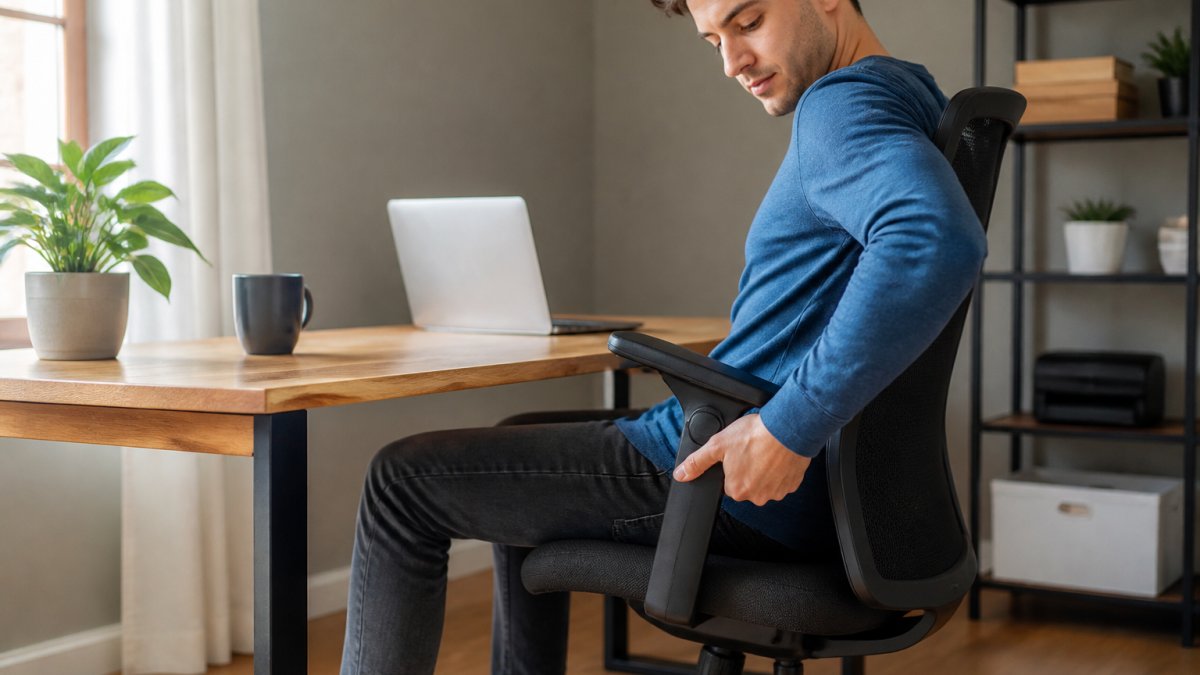
Our own ergonomic office chair selection includes the Ergonomic Chair Adjustable Swivel with Flip-up Armrest at $76.99. It hits the essentials: adjustable height from 18 to 22 inches, a 90-degree flip-up armrest that saves space, and a slightly concave cushion shaped to the hip. It supports up to 275 lbs and rolls on silent casters that protect your floor.

What most budget chairs miss is a genuinely adjustable lumbar pad. This one relies on its backrest curve rather than a moving pad, so it suits average body types well but may not fit everyone. If you are very tall or very short, test the fit before committing.
Lumbar Support Cushion for Gaming Chair: A $20 Fix That Works
A lumbar support cushion for a gaming chair is the cheapest fix on this list. If you already own a chair you like and just need better lower-back support, a firm cushion can transform it.
The trick is choosing the right one. Memory foam that squashes to nothing does not help. You want a cushion with a firm core that holds the inward curve of your lower back and stays put when you shift.
Placement matters as much as the cushion. Set it at the small of your back, roughly level with your belt line, not up under your shoulder blades. If it slides down, look for one with a strap that wraps around the backrest.
This approach works best when your chair already has decent height and seat depth. A cushion cannot fix a seat that is too deep or a chair that will not adjust.
Common Mistakes When Buying Alternatives for Back Pain
The biggest mistake is buying for looks and hoping ergonomics follow. Racing stripes and carbon-fiber trim do nothing for your spine.
Here are the traps we see most often:
- Trusting the included pillow. Those soft lumbar pillows flatten within weeks. Firm support beats plush every time.
- Ignoring seat depth. A seat that is too deep forces you to scoot forward, which rounds your lower back.
- Skipping the height adjustment. If your feet dangle or your knees rise above your hips, your back pays for it.
- Buying without measuring your desk. A chair that will not tuck under your desk pushes your screen too far away, and you lean in to compensate.
- Assuming price equals support. As covered above, the two are not linked.
Fix these and you remove most of the reasons your back hurts after a long session.
Conclusion: Pick the Right Setup for Your Back
Your back does not care what your chair costs. It cares whether the lumbar region is supported, the seat fits your body, and you can adjust the setup to your height.
Start with the cheapest fix first. If you already own a chair, try a firm lumbar cushion. If you are buying new, prioritize adjustability over materials and skip the racing aesthetic unless it genuinely fits you. Our Ergonomic Chair Adjustable Swivel with Flip-up Armrest is a solid starting point at $76.99, with adjustable height, flip-up armrests, and a 275-lb weight capacity that covers most users.
Frequently Asked Questions
What is a good alternative to an expensive gaming chair for back pain?
A quality office chair with adjustable lumbar support often works better than a gaming chair for back pain. Look for one with a height range that lets your feet rest flat, a backrest that follows your spine's curve, and armrests you can flip up or adjust. Budget ergonomic office chairs under $100 can deliver these features without the racing-style markup. Adding a lumbar support cushion to any chair is another low-cost fix that targets lower back pressure directly.
Are office chairs better than gaming chairs for back pain?
For most people, yes. Office chairs are designed for long sitting sessions and typically include adjustable lumbar support, seat depth, and armrest height. Gaming chairs often prioritize a reclined, bucket-seat shape that can round your shoulders and push your head forward. If you already own a gaming chair, a lumbar support cushion can improve it, but an office chair with proper adjustability usually gives your back better long-term support.
Can an ergonomic office chair help with lower back pain?
An ergonomic office chair can reduce lower back pain when it fits you correctly. The key is adjustability: seat height so your knees are at 90 degrees, lumbar support that fills the gap above your beltline, and a backrest angle that keeps your spine neutral. A budget ergonomic office chair with these adjustments can work as well as a premium model. Pair it with a lumbar support cushion for extra pressure relief during long sessions.
How can I make a budget chair more comfortable for my back?
Start with a lumbar support cushion placed at your lower back, just above your beltline. Raise your seat so your thighs are parallel to the floor, and add a footrest if your feet dangle. Flip-up armrests let you pull closer to your desk, which reduces forward leaning. Take a standing break every 30 minutes. These small changes turn a basic chair into a setup that supports your back without a big spend.
Back pain from a bad chair rarely fixes itself, and the longer you sit in the wrong setup, the more it compounds. At The Techie Den, we stock ergonomic seating and accessories built to support long sessions, including the adjustable swivel chair with flip-up armrests, breathable PU leather, and a load capacity of 275 lbs. Get started with The Techie Den and build a setup your spine can actually live with.


