

Table of Contents
- Why Hand Size Matters for Gaming Mouse Performance
- How to Measure Hand Size for a Mouse
- Wireless Gaming Mouse for Small Hands: What to Prioritize
- Gaming Mouse for Fingertip Grip: Precision and Control
- Gaming Mouse for Claw Grip: Balance Between Speed and Comfort
- Key Features to Look for in a Gaming Mouse for Small Hands
- Common Mistakes to Avoid When Choosing a Gaming Mouse
- Frequently Asked Questions
Last Updated: October 10, 2026
Why Hand Size Matters for Gaming Mouse Performance
Hand size fundamentally affects how you control a gaming mouse. A mouse that feels perfect for someone with large hands can become unwieldy and exhausting for someone with smaller hands. At The Techie Den, we understand that gaming performance isn't just about sensor quality or DPI, it's about finding the right gaming mouse small hands need that fits your grip naturally.
When your hand doesn't match the mouse shape, you compensate with tension. Your fingers stretch too far to reach buttons, your wrist angles awkwardly, and fatigue sets in after just a few hours. This tension directly impacts aim consistency, reaction time, and long-session comfort. A properly sized gaming mouse reduces muscle strain and lets you focus entirely on gameplay instead of fighting your equipment.
The right fit also determines which grip style works best for you. Your hand dimensions influence whether you should use a palm grip, claw grip, or fingertip grip, and each grip style demands different mouse characteristics.
How to Measure Hand Size for a Mouse
Measuring your hand accurately takes two minutes and determines everything that follows. Start by placing your hand flat on a piece of paper with your fingers relaxed and slightly spread.
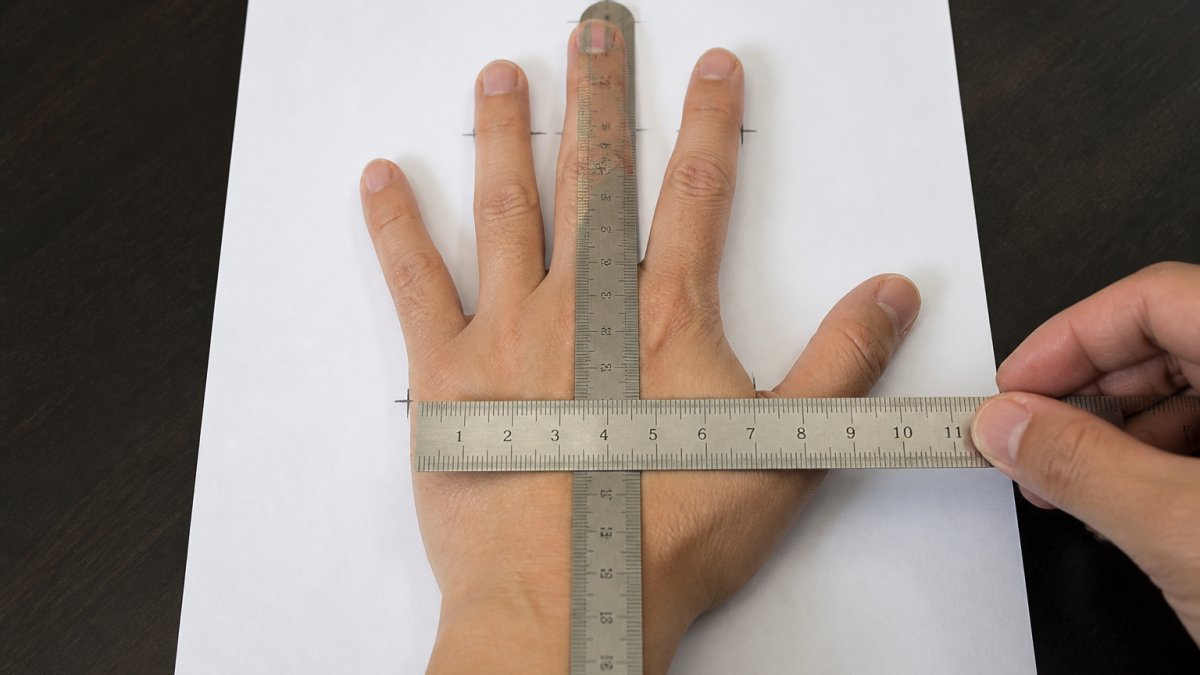
Next, measure across your palm at its widest point, typically where your knuckles sit.
Most gamers with small hands fall into these ranges: hand length under 180mm and palm width under 75mm. Once you have these numbers, you can match them against specific mouse dimensions.
Mapping Hand Size to Grip Style and Mouse Selection
Your measurements determine which grip style will feel most natural and which mouse profile to prioritize:
Fingertip Grip (Hand length: 160-180mm, Palm width: 65-75mm): Fingertip players need compact mice under 120mm long and under 60mm wide. Your fingers do most of the work, so button placement is critical, side buttons should sit 35-45mm from the front edge. The Mchose A7 V2 Pro Ultra (118mm length, 58mm width) aligns with these specs. Test reach by placing your hand in fingertip position on the mouse; your ring and pinky fingers should rest on the side buttons without stretching.

Claw Grip (Hand length: 170-190mm, Palm width: 70-80mm): Claw grip requires a pronounced arch support and moderate length. Look for mice between 110-130mm long and 62-68mm wide.
Palm Grip (Hand length: 175-195mm, Palm width: 75-85mm): Palm grip players need longer mice (125-135mm) with gentle curves and wider bodies (65-72mm) to support your entire palm.
Quick Fit Test Before Purchase
Once you've identified your hand measurements and grip style, use this checklist to evaluate any mouse:
-
Button reach: Place your hand in your preferred grip. Can you touch the side buttons without shifting your hand or stretching your fingers? If you need to move your hand forward or backward to access buttons, the mouse is too long or too short.
-
Palm contact: In your grip style, does your palm make the contact level you expect? Fingertip players should have minimal palm contact; claw players should have light contact on the rear; palm players should have full contact. Gaps between your hand and the mouse body indicate a poor fit.
-
Wrist angle: Your wrist should remain neutral (straight, not bent up, down, or to the side). If you feel pressure on the inside or outside of your wrist, the mouse width or height doesn't match your hand.
-
Finger fatigue during reach: Curl your fingers into your grip position. If your ring or pinky finger feels stretched or cramped, the mouse is too wide or the buttons are positioned too far apart.
These tests take 30 seconds per mouse and reveal fit issues that specifications alone cannot.
Wireless Gaming Mouse for Small Hands: What to Prioritize
Wireless connectivity matters more for small-handed gamers than most guides acknowledge. A lightweight wireless mouse eliminates cable drag, which can feel heavier in smaller hands and reduce maneuverability.
Weight becomes critical for small hands because lighter mice require less muscle effort to move quickly. Every extra gram compounds fatigue over long sessions. Look for mice weighing under 65 grams if possible.
Polling rate affects responsiveness, especially at higher sensitivities where small hand movements translate to larger cursor movements. The Mchose A7 V2 Pro Ultra delivers performance at $80.99.
Performance Across Game Genres for Small Hands
Wireless mice perform differently depending on the game type. Testing the same mouse across multiple genres reveals whether it truly suits your small-hand needs:
Fast-Paced FPS (Counter-Strike 2, Valorant, Overwatch 2): In these games, small hands benefit from mice under 120mm because you need rapid, precise micro-adjustments. A lighter mouse (under 60 grams) reduces the effort required for flick shots and tracking. The Mchose A7 V2 Pro Ultra's 42,000 DPI sensor handles the high sensitivity settings many small-handed FPS players use to compensate for limited hand movement range. Test button responsiveness: side buttons should activate without accidental presses during intense firefights. Wireless latency should be imperceptible.
MOBA and Strategy (League of Legends, Dota 2, StarCraft II): These games demand sustained precision over longer periods and frequent ability rotations.
Mchose A7 V2 Pro Ultra – Tri‑Mode Lightweight Wireless Gaming Mouse →
General-Purpose and Casual Gaming (Minecraft, Elden Ring, Baldur's Gate 3): These games are less latency-sensitive, so wireless performance is less critical. However, comfort during extended sessions (3+ hours) becomes paramount.
Wireless vs. Wired Trade-offs for Small Hands
Wireless mice offer mobility and reduced cable drag, but wired mice provide guaranteed latency and eliminate charging concerns. For small-handed gamers:
- Wireless advantage: Lighter effective weight (no cable drag), freedom of movement, tri-mode flexibility. Disadvantage: battery management, slightly higher latency (though imperceptible at 8000Hz polling), higher cost.
- Wired advantage: Zero latency, no charging required, typically lower cost. Disadvantage: cable drag adds perceived weight, cable can snag on desk edges, limits mouse movement range.
Budget and Premium Wireless Options
Not all small-hand wireless mice cost $80. Mid-range wireless options ($40-$60) often deliver adequate sensors for casual and competitive play. Premium models ($70-$120) add lighter construction, more programmable buttons, and higher DPI ceilings. For small hands specifically:
- Budget wireless (under $50): Acceptable for casual gaming and MOBAs; sensor precision may lag in competitive FPS. Weight often 65-75 grams.
- Mid-range wireless ($50-$80): Sweet spot for most small-handed gamers. Combines 8000Hz polling, 16,000+ DPI, and ergonomic design. Weight typically 55-65 grams.
- Premium wireless ($80+): Adds ultra-light construction (under 55 grams), higher DPI ceilings (42,000+), and advanced customization. Justifiable only if you play competitive FPS or require specific ergonomic features.
The Mchose A7 V2 Pro Ultra sits in the mid-to-premium range at $80.99, offering strong value for small-handed competitive players.
Gaming Mouse for Fingertip Grip: Precision and Control
Fingertip grip players rest only their fingertips on the mouse, keeping their palm elevated. This grip demands a smaller mouse profile because your fingers need quick access to the button area without stretching. Look for mice with pronounced side curves and a narrower body width, ideally under 60mm.
Sensor accuracy becomes paramount with fingertip grip. Since your palm isn't anchoring the mouse, any tracking inconsistency shows up immediately in your aim. The up-to-42,000 DPI sensor in the Mchose A7 V2 Pro Ultra provides the precision tracking fingertip players need, especially for games requiring pixel-perfect positioning.
Button placement affects fingertip grip more than other styles. Your fingers should reach the side buttons without stretching or shifting your grip. A compact gaming mouse small hands players use ensures buttons sit exactly where your fingers naturally rest.
Gaming Mouse for Claw Grip: Balance Between Speed and Comfort
Claw grip sits between palm and fingertip styles, your fingers curve like a claw while your palm hovers slightly above the mouse. This grip balances control and speed, making it popular among competitive players with smaller hands. You need a mouse with a pronounced arch to support the curved finger position without forcing your hand into an unnatural angle.
Mouse length matters for claw grip. Too short and your palm hangs off the back, creating instability. Too long and your fingers stretch excessively. A length between 110-130mm typically works well for small hands using claw grip. The Mchose A7 V2 Pro Ultra's ergonomic shape supports this grip style effectively.
Comfort during extended sessions depends on how well the mouse supports your palm arch. Look for mice with contoured sides that guide your hand into the proper claw position without requiring constant adjustment.
Key Features to Look for in a Gaming Mouse for Small Hands
Beyond hand size matching, several technical features separate good small-hand mice from poor ones. DPI range matters: you want adequate DPI maximum, though 42,000 DPI provides flexibility across game genres. Acceleration and angle snapping should be adjustable or disabled, these settings can throw off aim if not properly configured.
Build quality affects longevity, especially with smaller mice that experience higher hand pressure concentration. Look for reinforced side panels and reliable click mechanisms rated for millions of clicks. The Mchose A7 V2 Pro Ultra uses durable construction designed for extended e-sports play.
Customization options let you tailor the mouse to your preferences. Programmable buttons, adjustable DPI settings, and customizable RGB lighting add value without affecting core performance. A rechargeable battery with adequate capacity ensures you won't need charging mid-gaming session.
Common Mistakes to Avoid When Choosing a Gaming Mouse
The biggest mistake is prioritizing brand reputation over actual fit. A premium mouse from a well-known manufacturer won't perform well if it doesn't match your hand size. Measure first, then filter options by dimension, not just reviews.
Another common error is ignoring grip style when selecting a mouse. A mouse optimized for palm grip will feel wrong in claw grip, regardless of how good the sensor is. Match your grip style first, then consider other features.
Many small-handed gamers overlook weight until fatigue becomes unbearable. A 90-gram mouse feels dramatically heavier in small hands than in large ones. Prioritize mice under 70 grams whenever possible.
Finally, avoid buying without testing return policies. Even with careful measurement, fit surprises happen. A 30-day return window gives you time to test the mouse through several gaming sessions before committing.
Frequently Asked Questions
What size gaming mouse should I get if I have small hands?
Most people with small hands benefit from mice under 130mm in length. Measure your hand from wrist to fingertip, then compare it to the mouse dimensions listed in product specs. A gaming mouse for small hands should feel natural in your grip without requiring you to stretch your fingers to reach buttons. Weight also matters, lighter mice (under 80 grams) reduce fatigue during long gaming sessions.
How do I know if a gaming mouse is too big for my hand?
A mouse is too large if your fingers can't comfortably reach the side buttons, or if your palm doesn't make full contact with the body. You'll notice reduced control and hand fatigue during extended play. Test by holding the mouse in your normal grip, your thumb and pinky should rest naturally on the side buttons without stretching. If you feel cramped or have to adjust your hand position frequently, size up your search criteria.
What mouse grip is best for small hands?
Fingertip grip works well for small hands because it requires less mouse real estate and gives you precise aiming control. Claw grip is also viable if you prefer a balance between speed and stability. Palm grip can be challenging with small hands since it demands more surface area. Test your natural grip style, don't force a technique just because pros use it. The best grip is the one that feels comfortable and lets you maintain control for hours.
Is the Mchose A7 V2 Pro Ultra a good choice for small hands?
The Mchose A7 V2 Pro Ultra is designed as a lightweight, ergonomic gaming mouse with high DPI precision, making it suitable for small-handed gamers who want wireless performance. Its tri-mode connectivity lets you switch between 2.4GHz wireless, Bluetooth, and wired modes depending on your setup. At $80.99, it offers competitive value for e-sports focused play. Check the exact dimensions against your hand measurement before purchasing to ensure proper fit.
Finding the right gaming mouse for small hands requires matching dimensions to your hand measurements and grip style. The Mchose A7 V2 Pro Ultra combines lightweight design, precision tracking up to 42,000 DPI, and tri-mode connectivity at $80.99, delivering the performance small-handed gamers need without unnecessary bulk. At The Techie Den, we stock gaming peripherals built for serious play. Explore our full selection of gaming mice and accessories to find your perfect match.


