

Table of Contents
- What Casual Weekend Gamers Actually Need in a Mouse
- Best Low Latency Gaming Mice 2026: Speed Without the Pro Price Tag
- Comfortable Ergonomic Gaming Mouse for Long Sessions
- Budget-Friendly Wireless Gaming Mice That Still Perform
- Top Pick: Mchose A7 V2 Pro Ultra for Weekend Play
- Wired vs Wireless: What Matters for Weekend Gaming
- Maintenance and Longevity Tips for Casual Gamers
- Conclusion
- Frequently Asked Questions
Last Updated: September 26, 2026
What Casual Weekend Gamers Actually Need in a Mouse
If you play a few hours on Saturday and Sunday, the best gaming mouse for casual weekend gamers doesn't need a $150 esports mouse with a 42,000 DPI sensor and a charging dock. You need a mouse that feels comfortable, connects reliably, and doesn't cost more than the game you're playing. That's the core of finding the best gaming mouse for casual weekend gamers: comfort and consistency beat raw specs every time.
At The Techie Den, we've watched the peripheral market drift toward pro-gamer marketing that leaves weekend players paying for features they'll never use. Casual gamers need three things: a shape that fits your hand, a connection that doesn't drop mid-match, and a sensor that tracks accurately on whatever surface you already own.
The good news is that budget-friendly wireless gaming mice now deliver all three without the pro price tag. Below, we break down what actually matters, plus our top pick for weekend play.
Best Low Latency Gaming Mice 2026: Speed Without the Pro Price Tag
Low latency matters more than DPI for casual play, but "low latency" is a chain, not a single spec. Every mouse input travels the same path: the optical sensor captures movement, the microcontroller packages it, the wireless link (or cable) carries it, the USB receiver hands it to the operating system, the game engine processes it, and the display finally shows it. A weak link anywhere in that chain ruins the feel, which is why a 1,000Hz mouse on a 60Hz monitor can feel identical to an 8,000Hz mouse on the same panel.
Here's what each link actually does, and what a weekend player should care about:
- Sensor frame rate and IPS: The sensor samples the surface thousands of times per second and reports how fast it can track (inches per second). Any modern optical sensor handles casual flick speeds without spinning out; the number to ignore is the marketing DPI ceiling.
- Polling rate: 1,000Hz reports position every 1 millisecond. 4,000Hz and 8,000Hz cut that to 0.25ms and 0.125ms. The gain is real on a 240Hz+ display and effectively invisible on the 60Hz or 144Hz panels most casual setups use.
- Click latency: Mechanical switches actuate in the low single-digit milliseconds. Optical switches remove debounce delay entirely, but the difference between a good mechanical switch and an optical one is smaller than the difference between a stable 2.4GHz link and a congested one.
- Lift-off distance (LOD): How high you can lift the mouse before the sensor stops tracking. A low LOD (around 1mm) prevents cursor jump when you reposition. Most gaming mice let you set this in software; casual players should set it low and forget it.
- Wireless link quality: 2.4GHz with a dedicated dongle beats Bluetooth for gaming because Bluetooth shares bandwidth with audio and other devices. If your mouse stutters only when your headset is on, the link, not the sensor, is the problem.
The two things most guides skip. First, your monitor's refresh rate caps perceived responsiveness. A 60Hz panel redraws every 16.7ms, so shaving 0.5ms off mouse latency is invisible. Second, your mousepad surface and its cleanliness affect tracking more than the last few milliseconds of sensor latency, a worn or dusty pad causes jitter that no polling rate can fix.
How to sanity-check responsiveness without a lab. A common pattern among casual players is the "slow-pan test": open a document or a game menu, move the cursor slowly across the screen, and watch for stutter, cursor jump, or lag behind your hand. Then repeat with a fast flick. If the slow pan is smooth but the flick overshoots, your DPI or in-game sensitivity is too high, not your polling rate. If both stutter, check the wireless link and the pad before blaming the mouse.
Comfortable Ergonomic Gaming Mouse for Long Sessions
Ergonomics decide whether you can play for three hours without your wrist aching. A comfortable ergonomic gaming mouse for long sessions matches your grip style: palm, claw, or fingertip.
Budget-Friendly Wireless Gaming Mice That Still Perform
Budget-friendly wireless gaming mice have caught up to wired models in everyday performance. The trade-off is usually build materials and battery capacity, not tracking accuracy.
What to look for at this price point:
Mchose A7 V2 Pro Ultra – Tri‑Mode →
- Tri-mode connectivity: 2.4GHz for gaming, Bluetooth for laptop work, wired as backup.
- Onboard memory: Saves your button mapping and DPI settings to the mouse itself.
- Battery life: 40+ hours of wireless playtime means charging once a week, not every night.
| Feature | Why It Matters | Casual Priority |
|---|---|---|
| Tri-mode connectivity | Works across PC, laptop, tablet | High |
| Battery life (40+ hrs) | Fewer charging interruptions | High |
| Onboard memory | Settings travel with the mouse | Medium |
| RGB lighting | Aesthetic only | Low |
| 8K polling rate | Marginal gain for casual play | Low |
Top Pick: Mchose A7 V2 Pro Ultra for Weekend Play
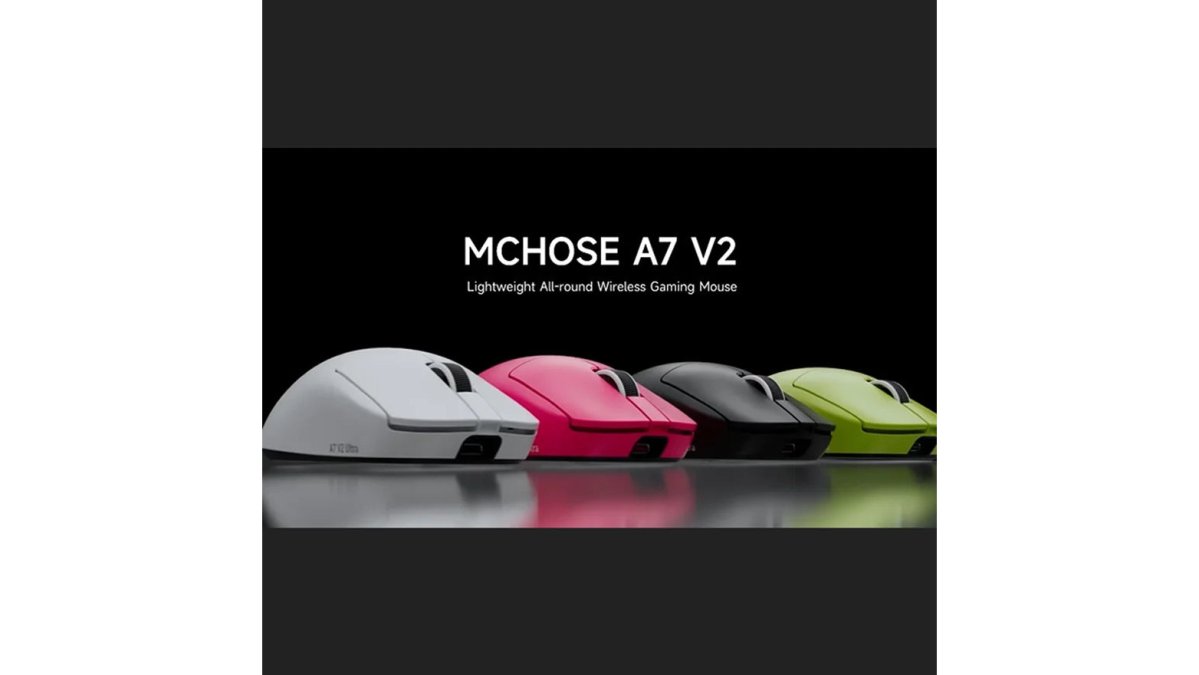
The Mchose A7 V2 Pro Ultra is our top pick for casual weekend gamers because it delivers pro-level control without pro-level pricing. At $80.99, it covers every box a weekend player actually needs.

Wired vs Wireless: What Matters for Weekend Gaming
Most guides frame this as a performance question. For a weekend player, it's a setup question, and the answer depends less on latency than on how many devices you juggle and how your desk is arranged.
The trade-offs nobody lists:
- Battery management is a habit, not a feature. A 500mAh battery at 1,000Hz typically lasts a week or two of casual play; at 4,000Hz or 8,000Hz it can drop to a few days. Charging once a week is fine. Charging every other night is friction.
- Bluetooth adds latency and shares bandwidth. It's fine for spreadsheets and web browsing, less ideal for fast-paced games. Use 2.4GHz for play, Bluetooth for work.
- Dongle placement matters. A 2.4GHz receiver buried behind a metal desk or next to a USB 3.0 hub can stutter. A short extension cable that puts the dongle near the mousepad fixes most interference complaints.
- Sleep and wake behavior varies. Some wireless mice take a fraction of a second to wake from deep sleep. If yours does, disable aggressive sleep in the software or accept a small first-move delay.
Maintenance and Longevity Tips for Casual Gamers
A gaming mouse can last years with basic care. The two failure points are the mouse feet and the sensor lens.
- Replace mouse feet when glide feels rough. Worn feet scratch your mousepad and hurt tracking accuracy.
- Clean the sensor lens monthly. Dust causes cursor jitter and erratic tracking.
- Wipe the shell with a dry microfiber cloth. Skip alcohol, which can degrade soft-touch coatings.
- Update firmware occasionally. Firmware updates fix connectivity bugs and improve battery reporting.
- Store it on a mousepad, not bare desk. Surface calibration stays consistent and the feet last longer.
Conclusion
Finding the right mouse for weekend play comes down to comfort, reliable connectivity, and value, not spec-sheet bragging rights. The Mchose A7 V2 Pro Ultra delivers tri-mode connectivity, an up-to-42,000 DPI sensor, a lightweight ergonomic shape, and a 500 mAh rechargeable battery, all for $80.99. It's built for players who want one dependable mouse for gaming and everyday use. Get started with The Techie Den and upgrade your weekend sessions with gear that performs without the pro price tag.
Frequently Asked Questions
What features should a casual gamer look for in a mouse?
Prioritize comfort, reliable wireless connectivity, and a sensor that handles everyday games. Look for an ergonomic design that fits your grip style (palm, claw, or fingertip), a lightweight chassis to reduce fatigue, and programmable buttons for quick actions. Battery life and plug-and-play setup matter more than extreme DPI. A mouse like the Mchose A7 V2 Pro Ultra offers tri-mode connectivity and up to 42,000 DPI, which is more than enough for weekend sessions. Focus on value and durability over esports-grade specs.
Do casual gamers need high-DPI gaming mice?
High DPI is not essential for casual play. Most weekend gamers use sensitivities between 800 and 1600 DPI, which any modern optical sensor handles well. A mouse with up to 42,000 DPI, like the Mchose A7 V2 Pro Ultra, gives you headroom, but you will rarely need to push it that high. Instead, look for stable tracking accuracy, low lift-off distance, and a comfortable shape. Spending more on a high-DPI sensor only makes sense if you also value other features like low latency and build quality.
Is a wireless or wired mouse better for weekend gaming?
Wireless mice have closed the latency gap, so for casual weekend gaming, a wireless model offers freedom and a cleaner desk without noticeable input lag. Modern 2.4GHz connections deliver polling rates and click latency that rival wired. Battery life is the main trade-off, but a 500 mAh battery can last days of typical use. If you prefer zero charging hassle, a wired mode on a tri-mode mouse like the Mchose A7 V2 Pro Ultra gives you both options. Choose wireless for convenience, wired for set-and-forget simplicity.
How much should a casual gamer spend on a gaming mouse?
You can get a capable casual gaming mouse for under $100. The Mchose A7 V2 Pro Ultra at $80.99 offers tri-mode connectivity, a 42,000 DPI sensor, and ergonomic design, making it a strong value. Avoid paying for esports-grade features you will not use, such as ultra-high polling rates or exotic materials. Instead, put your budget toward comfort, build quality, and battery life. A mid-range price often delivers the best balance of performance and longevity for weekend play.


