

Table of Contents
- Gaming Mouse vs Office Mouse: Core Differences
- Comparison Table: Gaming and Office Mice Side by Side
- DPI vs Polling Rate Explained
- Best Low Latency Gaming Mice 2026
- Benefits of Programmable Mouse Buttons
- Can a Gaming Mouse Work for Office Use?
- Conclusion: Choosing the Right Mouse for Your Needs
Last Updated: August 21, 2026
Gaming Mouse vs Office Mouse: Core Differences
A gaming mouse and an office mouse serve fundamentally different purposes, and understanding those differences helps you choose the right tool for your workflow. The core difference lies in performance priorities. Gaming mice prioritize responsiveness, precision, and customization to give players a competitive edge in fast-paced environments. Office mice prioritize comfort, battery efficiency, and reliability for extended daily use in professional settings. These competing goals shape every design choice, from sensor technology to ergonomic form factors.
Gaming mice feature high DPI settings (often 16,000 DPI or higher), low polling rates measured in milliseconds, and precise optical or laser sensors designed to track rapid hand movements without lag. Office mice typically operate at lower DPI ranges (800-3,200 DPI) with standard polling rates, optimized for steady cursor control and energy efficiency rather than speed.
The differences extend beyond raw specifications. Gaming mice often include programmable buttons for in-game macros, customizable RGB lighting, and lightweight designs to reduce fatigue during competitive play. Office mice prioritize ergonomic shapes for all-day comfort, longer battery life for wireless models, and silent click mechanisms to avoid disturbing colleagues.

Understanding these distinctions matters because using the wrong mouse type can actually hurt your performance. A gaming mouse in an office setting wastes battery life and adds unnecessary complexity. An office mouse in competitive gaming introduces lag and limits customization options you need for precise control.
Comparison Table: Gaming and Office Mice Side by Side
| Feature | Gaming Mouse | Office Mouse | Winner |
|---|---|---|---|
| DPI Range | 3,200-42,000+ | 800-3,200 | Gaming |
| Polling Rate | 1ms-8ms | 8ms-16ms | Gaming |
| Sensor Type | Optical/Laser (high precision) | Optical (standard) | Gaming |
| Programmable Buttons | 6-12+ | 2-3 | Gaming |
| Weight | 50-95g (lightweight) | 100-150g | Gaming |
| Battery Life | 20-70 hours | 12-24 months | Office |
| Ergonomic Design | Performance-focused | Comfort-focused | Office |
| Click Latency | Sub-1ms | 5-10ms | Gaming |
| RGB Lighting | Yes (standard) | No | Gaming |
| Best For | Competitive gaming, esports | Daily office work, productivity | , |
This table shows why gaming mice dominate competitive environments while office mice excel in professional settings. The gaming mouse wins on responsiveness metrics; the office mouse wins on battery efficiency and comfort for stationary work.
DPI vs Polling Rate Explained
DPI (dots per inch) measures cursor sensitivity and precision. A higher DPI means the cursor moves farther across your screen with smaller physical hand movements. Gaming mice support DPI ranges up to 42,000, allowing players to adjust sensitivity on the fly during matches. Office mice typically max out around 3,200 DPI because precision at that level exceeds what's needed for email, spreadsheets, and document editing.
Polling rate determines how often your mouse reports its position to your computer, measured in hertz (Hz). A 1ms polling rate equals 1,000 Hz, meaning the mouse sends position data 1,000 times per second. Gaming mice typically run at 8,000 Hz (0.125ms) or higher for competitive play, while office mice operate at 125 Hz (8ms) without noticeable lag in normal workflows.
The practical difference: in gaming, a 1ms polling rate can mean the difference between a precise headshot and a miss. In office work, the difference between 8ms and 1ms is imperceptible. Your brain doesn't register the difference when moving between spreadsheet cells or clicking links.
Best Low Latency Gaming Mice 2026
Low latency gaming mice eliminate input lag, the delay between your hand movement and the cursor response on screen. This category demands sub-1ms click latency and polling rates of 8,000 Hz or higher.
The Mchose A7 V2 Pro Ultra represents the current standard for low-latency gaming performance. This tri-mode wireless gaming mouse delivers up to 42,000 DPI with the PAW3950 Ti sensor, ensuring pixel-perfect tracking across competitive titles. The 8,000 Hz polling rate provides response times that professional esports players rely on.

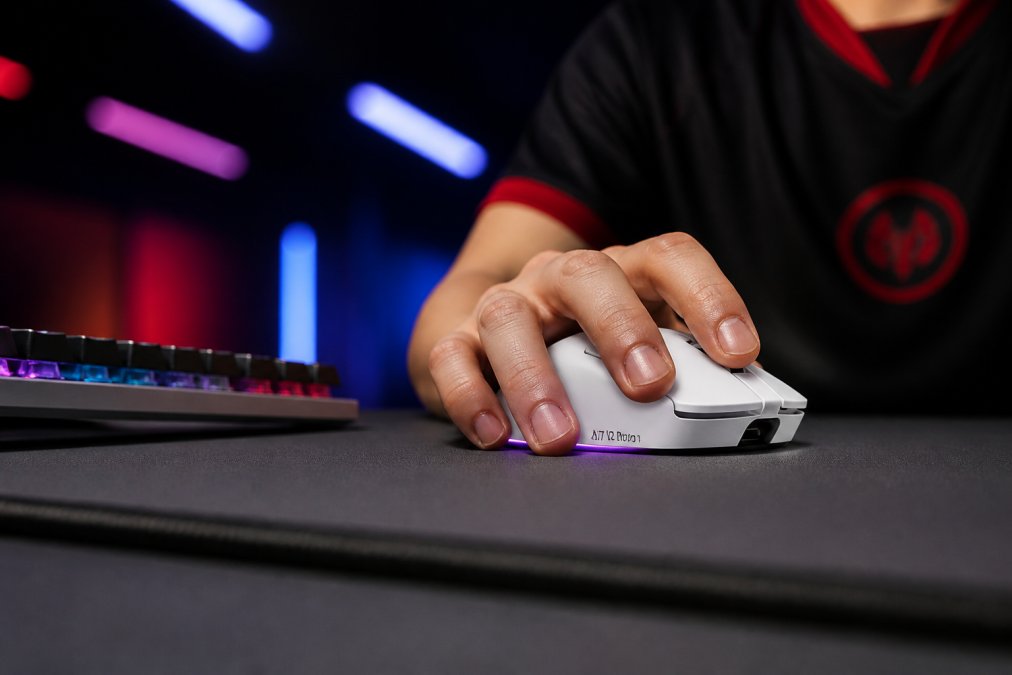
The Mchose A7 V2 Pro Ultra is available at The Techie Den for $80.99, positioning it as a high-performance option. For serious gamers, this mouse delivers the low-latency performance necessary for competitive play.
Office mice simply cannot compete in this space. Their standard sensors and polling rates introduce measurable lag that gaming mice eliminate. If you're serious about competitive gaming, a dedicated low-latency gaming mouse isn't optional, it's a requirement.
Benefits of Programmable Mouse Buttons
Programmable buttons transform a gaming mouse from a pointing device into a productivity tool. Most gaming mice include 6-12 programmable buttons (beyond the standard left, right, and scroll), each configurable to execute macros, hotkeys, or game-specific commands.
In gaming, programmable buttons reduce the need to reach for your keyboard during intense moments. Assign abilities, item usage, or communication commands to side buttons, keeping your hand on the mouse and your focus on the screen. In competitive shooters, this means faster ability execution. In strategy games, it means faster unit commands and map control.
The secondary benefit applies to office workflows. Programmable buttons can launch applications, open frequently-used files, or execute complex keyboard shortcuts with a single click. A designer might assign buttons to Undo, Redo, and Save. A developer might map buttons to compile, run, or deploy commands. This workflow acceleration compounds over thousands of daily clicks.
Office mice lack programmable buttons entirely. They're designed for simplicity, left click, right click, scroll. This limitation is intentional; office environments prioritize reliability and ease-of-use over customization. But if you need button customization, you need a gaming mouse.
Can a Gaming Mouse Work for Office Use?
Technically, yes. A gaming mouse functions as a standard mouse in office environments. Your email, spreadsheets, and documents work fine with a gaming mouse. Practically, however, there are trade-offs worth considering.
Battery life is the primary concern with wireless gaming mice. Gaming mice optimized for performance often sacrifice battery efficiency. A gaming mouse might last 20-70 hours on a charge; a standard office mouse lasts 12-24 months. If you're working 8 hours daily, you'll charge a gaming mouse weekly. An office mouse charges once or twice yearly.
The second trade-off is ergonomics. Gaming mice prioritize a performance grip, usually a palm or claw grip suited to rapid hand movements. Office mice prioritize an ergonomic grip designed for stationary, all-day use. Extended office work with a gaming mouse can cause hand fatigue or strain, particularly if you're not accustomed to the performance-oriented design.
RGB lighting and programmable buttons add visual clutter and complexity to a professional desk setup. Many offices have dress codes for equipment aesthetics; a gaming mouse with glowing RGB lighting stands out (sometimes negatively) in conservative environments.
The cost consideration also matters. A quality gaming mouse like the Mchose A7 V2 Pro Ultra costs $80.99, while a solid office mouse costs $20-40. Paying premium prices for gaming performance you don't need wastes money.
However, if you work from home and game casually, a gaming mouse covers both use cases adequately. The performance overhead doesn't hurt office work; it just remains unused. In this scenario, one mouse handles everything.
Conclusion: Choosing the Right Mouse for Your Needs
Your choice between a gaming mouse and an office mouse should align with your primary use case. If you spend 90% of your time in office work, an office mouse delivers better battery life, ergonomic comfort, and reliability. If you split your time between office work and competitive gaming, a gaming mouse like the Mchose A7 V2 Pro Ultra handles both adequately, though with battery trade-offs.
The key metrics, DPI, polling rate, sensor precision, programmable buttons, and ergonomic design, exist for a reason. Gaming mice optimize for responsiveness and customization; office mice optimize for comfort and efficiency. Neither is objectively "better"; they're optimized for different workflows.
For gamers seeking low-latency performance, The Techie Den offers the Mchose A7 V2 Pro Ultra at $80.99. This tri-mode wireless gaming mouse delivers the 42,000 DPI, 8,000 Hz polling rate, and precision sensor that competitive play demands. With 70-hour battery life and onboard memory for configuration storage, it's engineered for serious players. Upgrade your gaming setup with a mouse built for precision, responsiveness, and durability, and experience the performance difference that low-latency gaming mice deliver.
Frequently Asked Questions
What DPI should I use for gaming? Most competitive gamers use 400-1,600 DPI for precision aiming. Lower DPI (400-800) provides better control for long-range engagements; higher DPI (1,600-3,200) suits faster, close-quarters gameplay. Test different settings to find your preference, there's no universal "correct" DPI.
Can I use an office mouse for gaming? Technically yes, but it's not ideal. Office mice have higher click latency (5-10ms vs. sub-1ms for gaming mice) and lower polling rates, introducing measurable lag. For casual gaming, it works fine. For competitive play, a dedicated gaming mouse is necessary.
How long do gaming mice batteries last? Wireless gaming mice typically last 20-70 hours per charge, depending on polling rate and RGB settings. Lower polling rates and disabled RGB extend battery life significantly. Most gaming mice charge via USB-C in 1-2 hours.
Are programmable buttons worth the cost? If you game competitively or need workflow automation in office software, yes. Programmable buttons save time and improve performance. For casual use, they're a nice-to-have feature, not essential.
What's the difference between optical and laser sensors? Optical sensors use LED light and work best on most surfaces. Laser sensors use laser light and work on virtually any surface, including glass. For gaming, optical sensors are standard and sufficient. Laser sensors offer no practical advantage for most players.
EXTERNAL SOURCES:
According to gaming peripherals research from TechRadar, polling rate and DPI are the most critical specifications for competitive gaming performance. Research from esports equipment analysis by PC Gamer confirms that sub-1ms click latency directly impacts competitive accuracy in fast-paced titles. ergonomic guidelines from the American Chiropractic Association emphasize that proper mouse ergonomics prevent repetitive strain injuries during extended work sessions.
Frequently Asked Questions
Is a gaming mouse good for office use?
Yes, a gaming mouse can work for office tasks, though it's not always necessary. Gaming mice excel at precision and responsiveness, which benefit productivity work. However, they often cost more than office mice and may have unnecessary features like RGB lighting or high DPI settings. For general office use, an ergonomic office mouse is typically sufficient and more budget-friendly. The choice depends on your budget and whether you value the extra precision and customization options.
What is the difference between DPI and polling rate in gaming mice?
DPI measures how sensitive your mouse is to movement, higher DPI means the cursor moves farther with less physical motion. Polling rate measures how often your mouse reports its position to your computer, measured in hertz. A 1000 Hz polling rate means 1,000 position updates per second. For gaming, both matter: high DPI lets you make quick adjustments, while high polling rate reduces input lag and ensures smooth tracking. Office tasks typically need lower DPI and standard polling rates.
Do gaming mice really make a difference in performance?
For competitive gaming, yes, gaming mice reduce click latency, improve sensor accuracy, and offer faster response times through higher polling rates and precision sensors. For casual gaming and office work, the difference is less noticeable. Most people won't perceive the gap between a 125 Hz and 1000 Hz polling rate in everyday tasks. However, gaming mice often provide better ergonomics and build quality, which can reduce fatigue during long sessions regardless of activity type.
What are programmable buttons on a gaming mouse used for?
Programmable buttons let you assign custom commands, macros, or frequently used functions to extra mouse buttons. In gaming, this means binding abilities, weapons, or game commands without moving your hand. In office work, you can map buttons to productivity shortcuts like copy, paste, or application switching. This reduces reliance on the keyboard and can speed up both gaming and professional workflows. Most gaming mice include software to customize these assignments.
Can I use a regular office mouse for gaming?
You can use an office mouse for casual gaming, but it won't perform well in competitive scenarios. Office mice typically have lower polling rates (60-125 Hz), higher click latency, and less precise sensors. This creates noticeable lag in fast-paced games. For casual gaming, an office mouse is acceptable. For competitive play or esports, the performance gap becomes significant. If you need a mouse for both office and gaming, a gaming mouse is the better investment since it handles both uses effectively.
This article was written using GrandRanker


