

Table of Contents
- Why Ergonomic Desk Accessories Matter for Your Health
- How to Set Up an Ergonomic Workstation: The Foundation
- Quick Comparison: Top Ergonomic Accessories at a Glance
- Best Ergonomic Mouse for Carpal Tunnel Prevention
- Lumbar Support and Seat Cushions: Your Lower Back's Best Friend
- Ergonomic Office Setup Checklist: What You Actually Need
- Where to Buy: Finding Quality Ergonomic Desk Accessories Online
- Conclusion
Last Updated: August 14, 2026
Why Ergonomic Desk Accessories Matter for Your Health
Lower back pain, neck strain, and wrist fatigue are the silent costs of poor workspace design. These aren't minor discomforts, they're productivity killers that compound over months and years. When you buy ergonomic desk accessories online, you're making an investment in musculoskeletal health that directly affects how long you can work without pain.
The connection is straightforward: improper desk setup forces your body into unnatural positions. Your cervical spine tilts forward when monitors sit too low. Your lumbar spine rounds when chairs lack support. Your wrists bend at awkward angles when keyboards sit too high. Each of these positions creates repetitive strain that builds into chronic injury over time.
This guide from The Techie Den covers the essentials of workspace comfort and how to select the right ergonomic desk accessories to prevent these problems. Whether you're working from home full-time or spending hours at an office desk, the right accessories transform your setup from a pain generator into a productivity engine. Below, we'll show you exactly what matters, which products deliver real results, and where to find them online.
How to Set Up an Ergonomic Workstation: The Foundation
An ergonomic workstation starts with three non-negotiable principles: monitor alignment, keyboard and mouse positioning, and lumbar support. Get these right, and everything else follows.
Your monitor should sit at eye level when you're sitting upright with neutral posture. If it's too low, your cervical spine flexes forward, the exact position that causes neck pain and headaches. If it's too high, you're extending your neck backward, which creates different but equally problematic strain. The top of the screen should align with your eye level when you're looking straight ahead.
Your keyboard and mouse should sit at elbow height, roughly 28-30 inches from the floor for most people. Your elbows should bend at 90 degrees, and your wrists should be neutral, not bent up, down, or to the side. This neutral wrist position is critical for preventing carpal tunnel and other repetitive strain injuries. When your wrist bends, you're compressing the median nerve that runs through your carpal tunnel. Repeat that compression thousands of times per day, and you develop inflammation and pain.
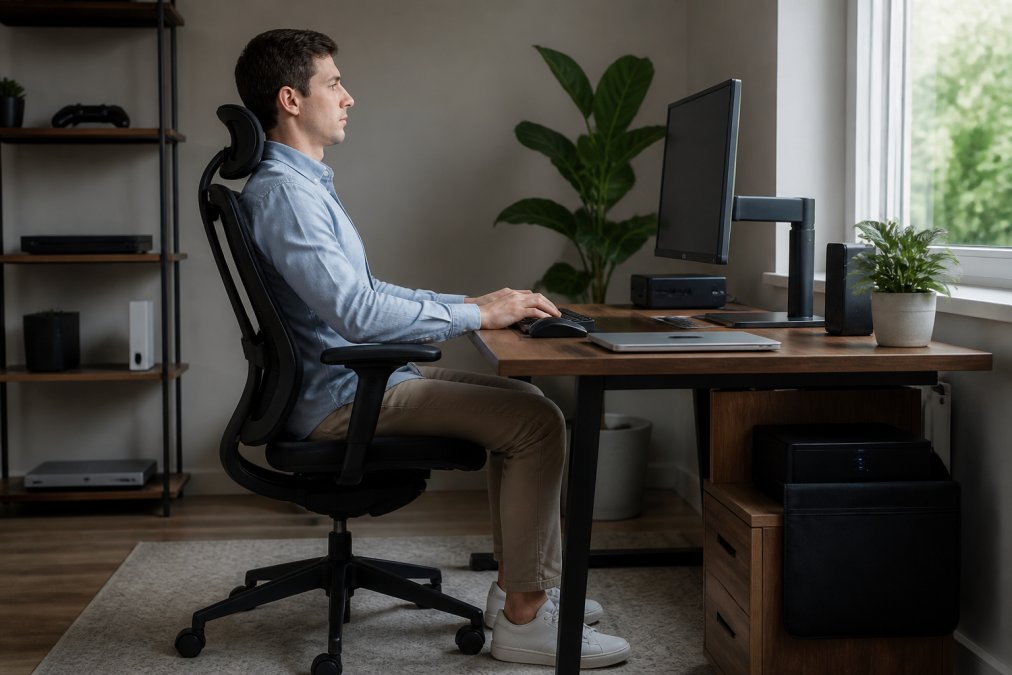
Your chair should support your lumbar spine, the natural inward curve of your lower back. Most office chairs don't do this well. Your feet should sit flat on the floor or a footrest, not dangling. When your feet dangle, your hamstrings tighten and your pelvis tilts backward, flattening your lumbar curve and overloading your lower back discs.
Cable management matters more than people realize. Cables running across your desk create visual clutter and force you to reach awkwardly around them. Organize cables behind your monitor or under your desk using clips and ties. This keeps your workspace clean and removes obstacles that might cause you to twist or reach in unnatural ways.
The foundation of ergonomic setup isn't complicated, but it requires intentional choices. Most people default to whatever feels immediately comfortable, which usually means slouching. Proper ergonomic posture feels slightly stiff at first because your muscles aren't used to supporting your spine correctly. After a few days, it becomes automatic.
Quick Comparison: Top Ergonomic Accessories at a Glance
| Accessory Type | Key Benefit | Typical Price Range | Best For |
|---|---|---|---|
| Ergonomic Mouse | Neutral wrist position, reduces carpal tunnel risk | $30-$100 | Anyone typing 6+ hours daily |
| Lumbar Support Cushion | Lower back support, reduces disc pressure | $25-$80 | Desk workers with lower back pain |
| Monitor Arm/Riser | Eye-level alignment, reduces neck strain | $40-$150 | Home offices, dual-monitor setups |
| Adjustable Keyboard Tray | Elbow-height positioning, wrist neutrality | $50-$200 | Tall users, fixed desk heights |
| Footrest | Proper leg support, reduces hamstring tension | $30-$100 | Users with dangling feet, shorter stature |
| Ergonomic Keyboard | Wrist alignment, reduced repetitive strain | $50-$150 | Heavy typists, programmers |
| Sit-Stand Desk Converter | Dynamic movement, reduces static posture strain | $100-$500 | Office workers seeking movement variety |
Best Ergonomic Mouse for Carpal Tunnel Prevention
An ergonomic mouse is one of the highest-ROI purchases you can make for your wrist health. Standard mice force your wrist into a pronated position, rotated inward, which compresses the median nerve and contributes to carpal tunnel syndrome. A vertical or contoured ergonomic mouse keeps your wrist in neutral alignment, dramatically reducing strain.
The Mchose A7 V2 Pro Ultra from The Techie Den ($80.99) is built specifically for this. It features a lightweight, ergonomic shape that supports your hand in a neutral position without forcing pronation. The tri-mode connectivity (2.4GHz wireless, Bluetooth, and wired) means you can switch between devices without reaching for a different mouse. At 42,000 DPI with the PAW3950 sensor, it delivers precision tracking that eliminates the need to move your mouse as far to control your cursor, less movement means less strain.

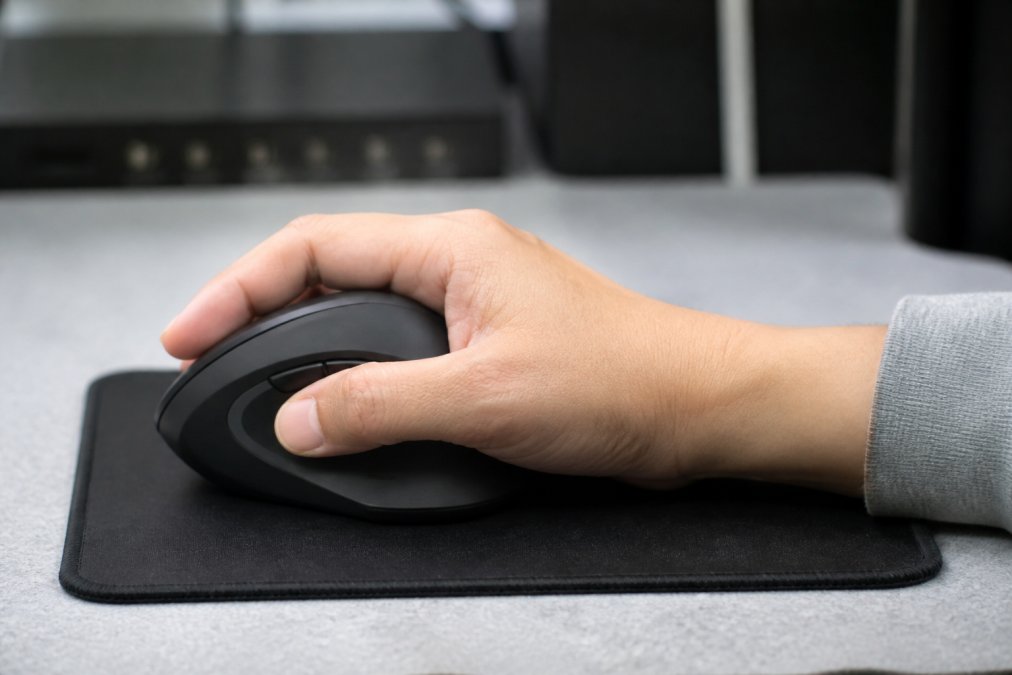
What separates this mouse from cheaper alternatives: the weight and balance. A lightweight mouse (under 100 grams) reduces the sustained tension in your forearm muscles. You're not fighting gravity to move a heavy object across your desk all day. The contoured design also prevents you from gripping too tightly, a common mistake that increases forearm fatigue.
The battery life matters more than specs suggest. A 500mAh rechargeable battery gives you extended wireless playtime, so you're not constantly swapping batteries or hunting for a charger. Wireless mice eliminate the cable drag that forces you to compensate with awkward wrist angles.
Lumbar Support and Seat Cushions: Your Lower Back's Best Friend
Your lower back carries the weight of your entire upper body when you're sitting. Without proper support, your lumbar discs compress unevenly, and your erector spinae muscles (the muscles running along your spine) work overtime to stabilize you. After hours of this, lower back pain develops.
A lumbar support cushion addresses this directly. It fills the gap between your lower back and the chair, maintaining the natural inward curve of your lumbar spine. This distributes pressure more evenly across your discs and reduces muscle fatigue.
The Ergonomic Chair Adjustable Swivel with Flip-up Armrest from The Techie Den ($76.99) includes built-in lumbar support with a backrest height adjustable from 125mm to 800mm. The contoured back follows your spine's natural shape, and the flip-up armrests let you adjust arm support without taking up extra desk space. The 275-pound weight capacity and 360-degree swivel make it suitable for most body types and desk configurations.

What matters in a lumbar support chair: adjustability. Everyone's spine is different. A fixed-height lumbar support might feel perfect for one person and useless for another. The adjustable backrest on this model lets you dial in exactly where you need support. The synthetic leather is also easy to clean, sweat and dust accumulate on chairs quickly, and a wipeable surface keeps your setup hygienic.
Seat cushions add an extra layer of support. A good seat cushion (separate from your chair) contours to your sitting bones and reduces pressure on your tailbone and lower back. Look for memory foam or gel-based cushions that conform to your shape without going flat after a few months.
Ergonomic Office Setup Checklist: What You Actually Need
Not every ergonomic accessory is essential. Some are nice-to-haves that improve comfort incrementally. Others are foundational, without them, your setup will never feel right.
Essentials (non-negotiable):
- Monitor at eye level (use a riser if needed)
- Keyboard and mouse at elbow height
- Chair with lumbar support
- Feet flat on floor or footrest
- Ergonomic mouse (neutral wrist position)
- Cable management (organized, not crossing your workspace)
High-impact additions (worth the investment):
- Lumbar support cushion (if chair support is inadequate)
- Monitor arm (if you use dual monitors or need height adjustment)
- Adjustable keyboard tray (if your desk height is fixed and wrong for you)
- Footrest (if your feet dangle)
Nice-to-haves (improve comfort, not essential):
- Wrist rest for keyboard
- Ergonomic keyboard
- Sit-stand desk converter (for dynamic movement variety)
- Document holder (reduces neck rotation for data entry)
- Desk lamp with proper lighting
The order matters. Fix monitor height and keyboard position first, these are foundational to neutral posture. Then add lumbar support. Then address any remaining strain with specialized accessories.
Common mistake: buying expensive ergonomic keyboards and mice before fixing monitor and desk height. You can have the most expensive mouse in the world, but if your monitor forces you to look down and your keyboard sits too high, your wrist and neck will still hurt. Start with positioning, then add accessories.
Where to Buy: Finding Quality Ergonomic Desk Accessories Online
The Techie Den offers a curated selection of ergonomic desk accessories designed for real office work and gaming setups. Rather than stocking generic budget options, we focus on products that deliver measurable comfort improvements and durability.
The Wooden Table with CPU Storage Shelf & Side Bag ($79.99) provides a complete desk foundation. The L-shaped design distinguishes between work and personal spaces, and the CPU storage shelf keeps your tower organized without taking up floor space. The 50-inch desktop accommodates dual monitors, laptops, and office supplies without forcing you to reach across clutter. Medium-density chipboard construction resists wear, and the powder-coated steel frame with X-bracing provides stability that cheaper desks lack.

For charging and cable management, the 320W Charger USB-C Fast Desktop 8-port ($38.99) consolidates multiple devices into one power solution. Eight output ports (three USB-A, three USB-C, plus two additional C ports) mean you can charge your laptop, phone, tablet, and peripherals simultaneously without hunting for multiple outlets. The 320W output handles high-power devices like laptops while maintaining safe charging speeds for phones and watches. GaN technology reduces heat generation, which extends the charger's lifespan.
The 3-in-1 Wireless Charging Station for Apple Watch ($96.99) eliminates cable clutter on your desk. If you use multiple Apple devices, this single station charges your iPhone, Apple Watch, and AirPods simultaneously. Magnetic alignment means your devices charge correctly every time without fumbling with connectors. The Type-C input keeps your charger compatible with modern power supplies.
When buying ergonomic desk accessories online, prioritize products with clear specifications and return policies. Look for retailers that offer returns within 30 days so you can test the product and confirm it solves your problem before committing long-term.
Conclusion
Ergonomic desk accessories aren't luxuries, they're injury prevention investments. The small upfront cost of proper monitor alignment, lumbar support, and an ergonomic mouse prevents expensive medical bills and lost productivity from chronic pain.
The Techie Den provides everything you need to build a workspace that supports your health. From the Ergonomic Chair Adjustable Swivel with Flip-up Armrest to the Mchose A7 V2 Pro Ultra mouse, our products are selected for real-world comfort and durability. Start with the essentials, monitor height, keyboard position, and lumbar support, then add specialized accessories as needed. Your lower back and wrists will thank you. Add to cart and transform your workspace into a pain-free, productive environment.
Frequently Asked Questions
What are the most important ergonomic desk accessories to buy online?
Start with three essentials: an ergonomic mouse that supports neutral wrist position, lumbar support for your chair, and a monitor arm to position your screen at eye level. These address the most common musculoskeletal health issues, repetitive strain injury, lower back pain, and cervical spine misalignment. Add cable management solutions and a footrest once your core setup is solid. The Mchose A7 V2 Pro Ultra mouse ($80.99) reduces wrist fatigue with its ergonomic shape and precision tracking, while an adjustable chair like our Ergonomic Chair with Flip-up Armrest ($76.99) provides customizable lumbar support.
How do ergonomic desk accessories prevent carpal tunnel?
Carpal tunnel develops from repetitive motion and poor wrist alignment. The best ergonomic mouse for carpal tunnel keeps your wrist in a neutral position rather than bent or twisted during use. Ergonomic keyboards split the key layout to reduce strain on your forearms. Monitor arms positioned at eye level prevent you from reaching or twisting. Together, these accessories minimize repetitive strain injury by reducing the pressure on the median nerve in your wrist. Proper positioning during long work sessions is critical, even small adjustments compound over time.
Are ergonomic desk accessories actually worth the cost?
Yes, when chosen strategically. Poor ergonomics cost money through lost productivity, medical visits, and potential long-term disability. Studies show that workspace comfort directly correlates with productivity enhancement. A $76.99 ergonomic chair or an $80.99 mouse prevents costly musculoskeletal issues and reduces fatigue during 8-hour workdays. Investing in proper ergonomic assessment of your current setup first, identifying which accessories address your specific pain points, ensures you spend money on items that actually solve your problems rather than generic upgrades.
Can I set up an ergonomic workstation on a budget?
Absolutely. Prioritize the three highest-impact accessories: an ergonomic mouse ($80.99), lumbar support cushion, and monitor riser. These address neutral posture, repetitive strain injury prevention, and eye level adjustment, the biggest pain points. Skip expensive standing desks initially; focus on proper sitting ergonomics first. Cable management ($38.99 for a multi-port charger) keeps your desk organized without major expense. The Wooden Table with CPU Storage ($79.99) provides workspace without premium pricing. Start with what solves your current discomfort, then add accessories as your budget allows.
This article was written using GrandRanker


