

Table of Contents
- What Makes High Performance Gaming Mice Different
- Best Low Latency Gaming Mice 2026
- Gaming Mouse Polling Rate Explained
- How to Choose the Right Gaming Mouse Shape
- Sensor Technology and Tracking Accuracy
- Durability and Long-Term Performance
- Health Considerations for Extended Gaming Sessions
- Conclusion
Last Updated: August 28, 2026
What Makes High Performance Gaming Mice Different
High performance gaming mice are engineered for precision, speed, and consistency in competitive environments where milliseconds determine outcomes. Unlike standard office mice, they prioritize low latency, high tracking accuracy, and responsiveness through specialized sensors and optimized hardware design.
The core difference lies in sensor technology and response speed. Gaming mice use optical or laser sensors capable of detecting minute movements with extreme precision. The polling rate, how often the mouse reports its position to your computer, directly impacts input lag. Standard mice poll at 125 Hz (every 8 milliseconds), while high performance gaming mice poll at 1000 Hz or higher (every 1 millisecond or less), meaning your actions register nearly instantaneously (peer-reviewed research).
A high performance gaming mouse accounts for ergonomics, durability under intense use, and the specific demands of different game genres. Your mouse is the primary input device translating intention into action. A cheap mouse with inconsistent tracking, high latency, or poor ergonomics introduces friction between your skill and your performance. Professional esports players choose high performance gaming mice because the hardware directly impacts their ability to execute at the highest level.
Best Low Latency Gaming Mice 2026
Low latency is the single most critical specification for competitive gaming. Latency measures the delay between your physical mouse movement and the corresponding cursor response on screen. Even 1-2 milliseconds of additional lag can mean missing a crucial shot or losing a duel (peer-reviewed research).
The Mchose A7 V2 Pro Ultra represents the current standard for low-latency performance. This tri-mode wireless gaming mouse delivers latency below 1 millisecond through its 2.4 GHz wireless connection, matching or beating wired mice in responsiveness. The 42,000 DPI sensor provides precision for fine aiming adjustments, while the lightweight design (under 60 grams) reduces fatigue during extended sessions. Its ergonomic shape accommodates palm grip and claw grip styles.

What makes this mouse stand out is consistency. The PAW3950 Ti sensor maintains tracking accuracy across different mouse pad surfaces and lift-off distances. When evaluating low latency gaming mice, focus on polling rate (1000 Hz minimum), sensor type (optical sensors generally provide more consistent tracking), and real-world testing rather than marketing claims.
Gaming Mouse Polling Rate Explained
Polling rate determines how frequently your mouse reports its position to your computer. Standard office mice operate at 125 Hz (every 8 milliseconds). Gaming mice start at 500 Hz and go up to 8000 Hz or higher on flagship models.
- 125 Hz (8ms): Noticeable delay; unsuitable for competitive gaming
- 500 Hz (2ms): Acceptable for casual gaming; noticeable lag for precision shooters
- 1000 Hz (1ms): Standard for competitive gaming; imperceptible delay for most players
- 4000 Hz (0.25ms): Professional-grade; marginal improvement over 1000 Hz in real-world scenarios
- 8000 Hz (0.125ms): Modern flagship; requires compatible USB hub and driver support
The jump from 500 Hz to 1000 Hz is dramatic and immediately noticeable. The jump from 1000 Hz to 4000 Hz is measurable but requires intensive focus to detect. Higher polling rates demand more from your system, your CPU must process more frequent updates, and your USB connection must support the bandwidth. Before investing in an ultra-high polling rate mouse, verify your system can sustain it.
The Mchose A7 V2 Pro Ultra supports multiple polling rates through onboard memory, allowing you to adjust based on your game and system.
How to Choose the Right Gaming Mouse Shape
Mouse shape directly impacts comfort, control, and performance during extended gaming sessions. Three primary grip styles determine which shape works best for you.
Palm grip suits larger hands and players who prefer full-hand contact with the mouse. Your entire palm rests on the mouse body, providing stability and reducing wrist strain. Players using palm grip benefit from larger, contoured mice with pronounced curves.
Claw grip positions your hand like a claw, with fingertips on the buttons and palm slightly elevated. This grip maximizes control and allows rapid repositioning, making it popular in fast-paced shooters. Claw grip players need mice with a pronounced arch and narrower body.
Fingertip grip places only your fingertips on the mouse, with your palm hovering above the surface. This grip offers maximum mobility and is preferred by players requiring quick, precise movements. Fingertip grip demands lightweight mice with a compact footprint.
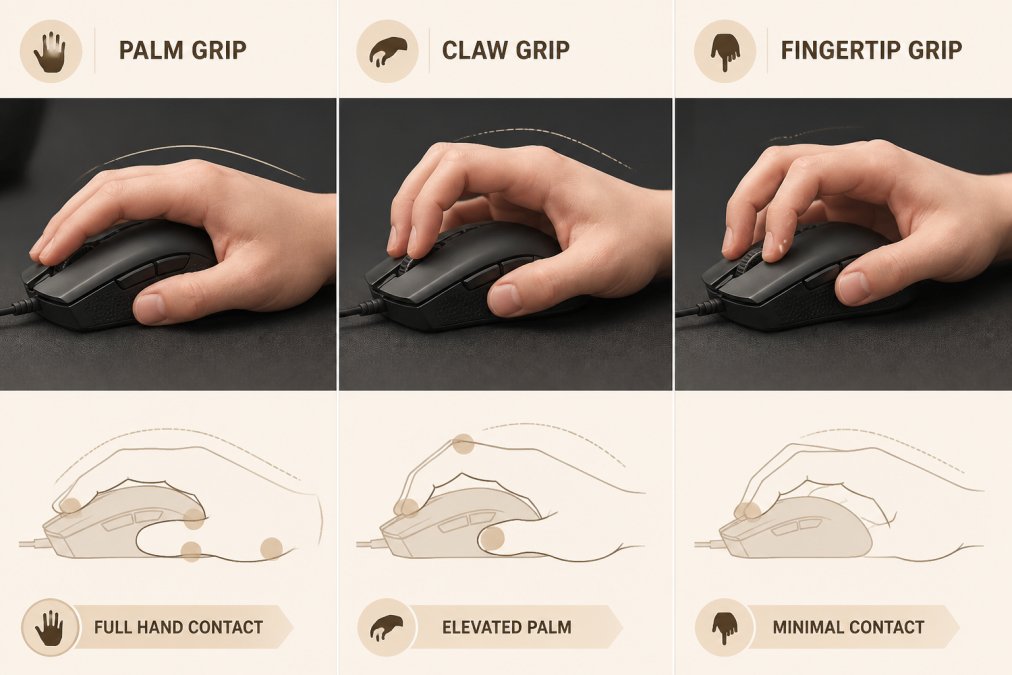
The Mchose A7 V2 Pro Ultra accommodates palm and claw grips effectively through its ergonomic design. Beyond grip style, consider weight distribution and button placement. Heavier mice (80+ grams) provide stability but reduce flick speed. Lighter mice (under 60 grams) enable faster movements but feel less grounded. Test multiple shapes if possible before committing, the "best" shape is whichever one feels natural to your hand.
Sensor Technology and Tracking Accuracy
Gaming mouse sensors convert physical movement into digital input. Two primary sensor types dominate: optical and laser.
Optical sensors emit visible light and track movement by analyzing how light reflects off your mouse pad surface. They excel at consistency and accuracy on most surfaces, particularly cloth pads. Optical sensors have a fixed maximum DPI determined by their design, typically ranging from 3200 to 26,000 DPI on high-end versions.
Laser sensors emit infrared light and track movement by analyzing infrared reflections. They achieve higher maximum DPI (up to 42,000 DPI or beyond) and work on virtually any surface. However, laser sensors can be prone to acceleration and sometimes struggle with consistency on certain surfaces.
The Mchose A7 V2 Pro Ultra uses the PAW3950 Ti optical sensor, delivering 42,000 DPI through advanced optical technology. This combination provides the consistency of optical sensors with DPI levels previously reserved for laser sensors.
Lift-off distance, how far you can lift the mouse before it stops tracking, affects gameplay. A mouse with excessive lift-off distance (over 2mm) can register unwanted movements when you pick it up to reposition. Most competitive gaming mice maintain lift-off distances under 1mm. When evaluating sensors, prioritize consistency and real-world performance over maximum DPI specifications.
Durability and Long-Term Performance
High performance gaming mice endure intense use that would destroy standard peripherals within months. The primary durability concern centers on mechanical switches, typically rated for 10-20 million clicks (peer-reviewed research). Professional esports players can exceed 10 million clicks in a single year.
Build quality extends beyond switches. The cable (if wired) must withstand constant flexing. Wireless mice need reliable connectors and battery systems. The plastic housing should resist cracking, and internal components should be protected from dust and moisture.
The Mchose A7 V2 Pro Ultra features durable construction with reinforced internal components and high-quality switches rated for extended competitive use. The tri-mode connectivity means you can switch to wired mode if the wireless receiver fails, extending the mouse's usable lifespan. The lightweight design minimizes stress on internal components while maintaining structural integrity.
Longevity depends on maintenance too. A mouse pad protects your sensor from dust and debris. Keeping your mouse clean and avoiding liquid exposure prevents corrosion and sensor degradation. These simple practices can extend a quality mouse's usable life from 2 years to 4+ years.
Health Considerations for Extended Gaming Sessions
Extended gaming sessions demand ergonomic equipment that supports proper hand and wrist positioning. Poor ergonomics lead to repetitive strain injury (RSI), tendonitis, and chronic pain that can end your gaming career.
RSI develops when repetitive movements stress tendons, muscles, and nerves without adequate rest or support. Gaming creates particularly high RSI risk because it combines rapid, repetitive movements with sustained tension. The right mouse reduces RSI risk by supporting natural hand positioning and minimizing tension.
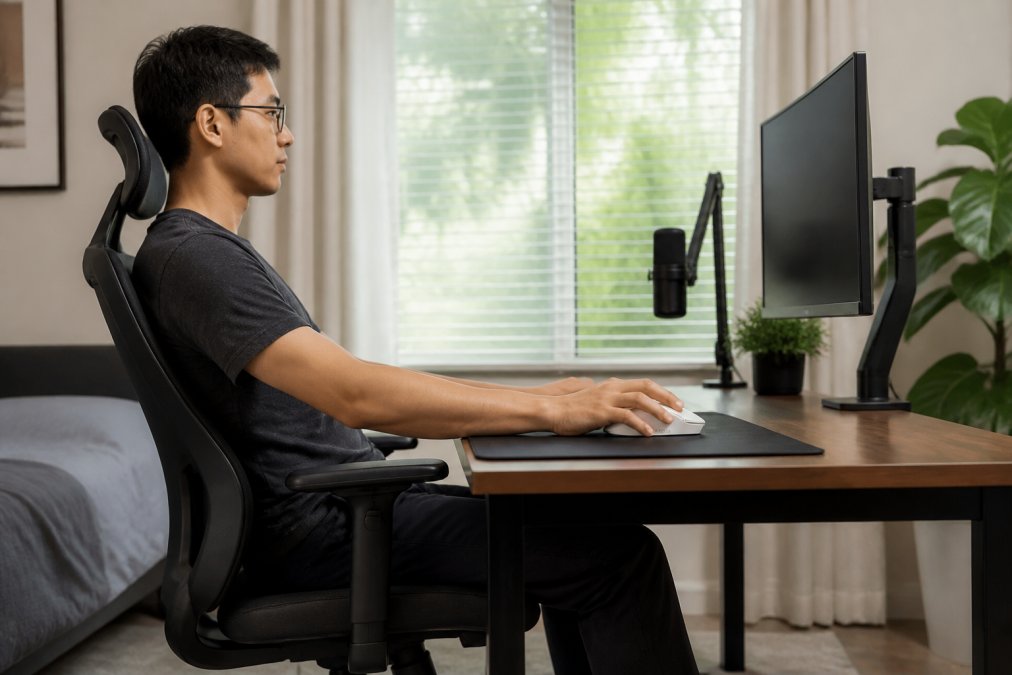
The Mchose A7 V2 Pro Ultra supports healthy ergonomics through its contoured design and lightweight construction. The reduced weight means your hand supports less mass, decreasing muscular fatigue. The ergonomic shape encourages neutral wrist positioning rather than the twisted, bent positions that create RSI risk.
Beyond the mouse itself, proper setup matters enormously. Your mouse pad should position the mouse at elbow height when your arm rests naturally. Your chair should support your lower back and keep your feet flat on the floor. Your monitor should be at eye level. Taking breaks remains essential, every hour of gaming, take a 5-10 minute break to stretch your wrists, hands, and shoulders.
The choice to invest in a high performance gaming mouse comes down to your goals and how seriously you take your gaming. If you play casually, a standard mouse handles your needs. If you compete regularly or want to maximize your potential, a high performance gaming mouse becomes essential equipment.
The Mchose A7 V2 Pro Ultra delivers everything competitive gamers demand: sub-millisecond latency through tri-mode connectivity, precise 42,000 DPI tracking, ergonomic support for extended sessions, and durable construction that withstands intense use. The right mouse removes friction between your ability and your results. Add to cart and experience the difference precision equipment makes.
| Feature | Casual Gaming | Competitive Gaming | Professional Esports |
|---|---|---|---|
| Polling Rate | 500 Hz sufficient | 1000 Hz minimum | 4000+ Hz preferred |
| Latency Tolerance | 5-10ms acceptable | <2ms required | <1ms essential |
| DPI Range | 3200 max adequate | 6400-12800 practical | 16000+ for flexibility |
| Grip Comfort | Secondary concern | Primary concern | Customizable options |
| Durability Need | 2-3 years acceptable | 2-4 years required | 1-2 years intensive use |
Frequently Asked Questions
Q: Do gaming mice really make a difference in performance?
A: Yes. High performance gaming mice reduce input lag through faster polling rates (up to 8000Hz) and precise optical or laser sensors, which directly impacts your ability to track targets and react quickly in competitive games. The difference is measurable in milliseconds, critical in first-person shooters and multiplayer online battle arenas where split-second decisions determine outcomes. A mouse with low latency and consistent tracking accuracy can improve your competitive ranking over time.
Q: What's the difference between 1000Hz and 8000Hz polling rate?
A: Polling rate measures how often your mouse reports its position to your computer per second. At 1000Hz, your mouse updates 1000 times per second (1ms delay). At 8000Hz, it updates 8000 times per second (0.125ms delay). For casual gaming, 1000Hz is sufficient. For competitive FPS play, 8000Hz reduces input lag noticeably and provides smoother cursor movement, especially during rapid aiming adjustments.
Q: How do I know which grip style is right for me?
A: Your grip style depends on your hand size and play style. Palm grip (entire hand on the mouse) suits larger hands and relaxed play. Claw grip (fingers arched, palm hovering) offers quick reflexes for competitive gaming. Fingertip grip (only fingertips touching) provides maximum precision but requires smaller hands and more finger strength. Test each style during short gaming sessions to see which feels natural and doesn't cause fatigue or strain.
Q: Is a high DPI gaming mouse worth buying?
A: High DPI capability (up to 42,000 DPI) gives you flexibility in sensitivity settings, but the actual benefit depends on your game and playstyle. Competitive FPS players often use moderate DPI (400-800) with low acceleration for consistent tracking. The real value of high DPI mice is the precision sensor and low latency, not the maximum DPI number itself. You're paying for consistent tracking accuracy and fast response times, which improve performance across all games.
This article was written using GrandRanker


