

Last Updated: October 22, 2026
Quick Summary
Gaming mouse feet, also called mouse skates or glide pads, are small pads on the bottom of a gaming mouse that reduce friction against your mousepad. They directly affect how your mouse moves: faster glide means quicker aiming, while consistent friction gives you the control needed for precision gameplay.
- PTFE skates offer a practical balance between glide speed and stopping power and remain the standard choice for most gaming mice.
- Glass skates provide minimal friction and extremely fast glide but demand more deliberate control and work best on hard pads.
- PTFE skates typically break in over 1-2 weeks, with new feet feeling slightly slower until the surface smooths through use.
- Worn skates create inconsistent glide that degrades aim over time, so replace feet before they are completely worn.
- Test skate friction consistently using a kitchen scale and thread to measure static and dynamic friction in grams of pull force.
Table of Contents
- What Gaming Mouse Feet Do and Why They Matter
- PTFE Mouse Feet: Speed and Control Balance
- Glass Mouse Skates: Minimal Friction Performance
- How to Test Mouse Skate Friction Consistently
- Mouse Feet Compatibility: What Fits Your Setup
- Common Mistakes When Choosing Gaming Mouse Feet
- Maintenance and Long-Term Wear Expectations
- Frequently Asked Questions
What Gaming Mouse Feet Do and Why They Matter
Gaming mouse feet, also called mouse skates or glide pads, are small pads on the bottom of a gaming mouse that reduce friction against your mousepad.
The difference between worn feet and fresh skates is noticeable within seconds: the mouse responds faster, tracks more smoothly, and needs less effort to move, which matters in competitive shooters and in long sessions where hand fatigue affects performance.
The "best" gaming mouse feet aren't one-size-fits-all, your choice depends on your mousepad type, the games you play, and whether you prioritize speed or stopping power.
PTFE Mouse Feet: Speed and Control Balance
PTFE, also known as Teflon, is the most common material for gaming mouse feet.
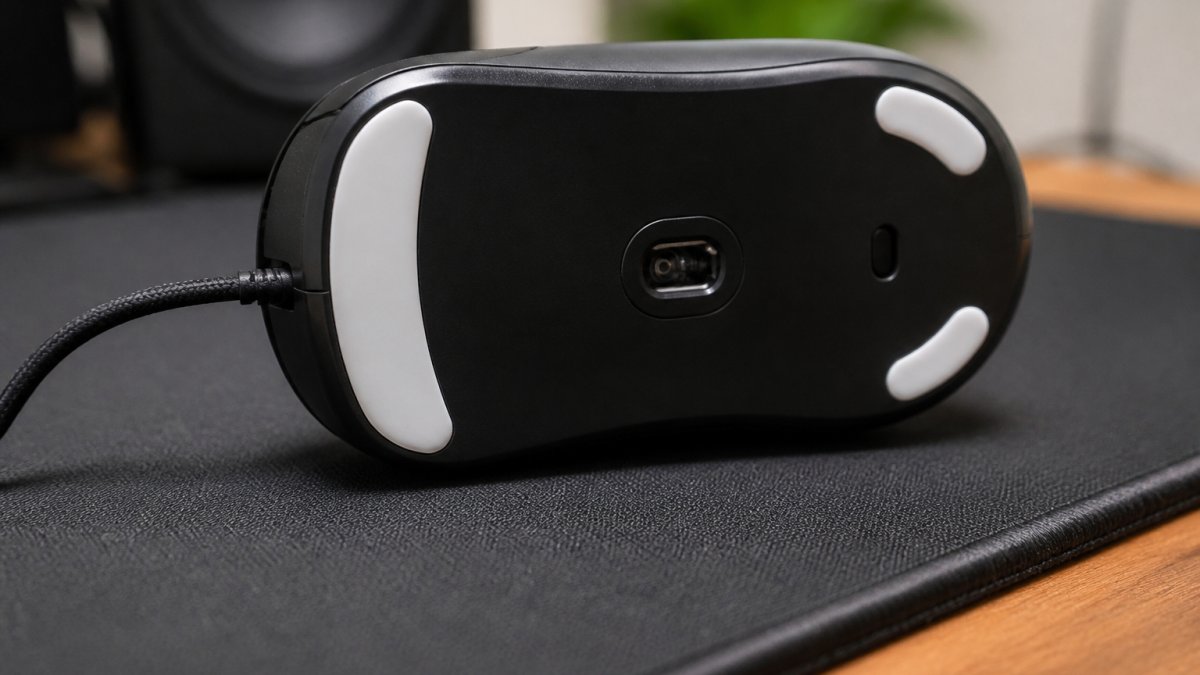
PTFE feet perform differently by pad: on cloth they glide smoothly with enough friction to stop quickly, while on hard pads the same feet feel faster due to less resistance.
PTFE skates typically break in over 1-2 weeks. New feet feel slightly slower because the surface is rougher; once they smooth out through use, glide improves noticeably. This is normal, not degradation.
Thickness matters too. Thicker feet (around 0.6-0.8mm) last longer and glide more consistently; thinner feet feel faster initially but wear down quicker. If you replace feet regularly, thicker options save money long-term.
Glass Mouse Skates: Minimal Friction Performance
Glass skates represent the opposite end of the spectrum from PTFE. They offer minimal friction and extremely fast, smooth glide with less resistance to movement.
The advantage of glass is consistency.
However, glass comes with real trade-offs. The ultra-low friction demands more deliberate control to stop precisely, and in fast-paced games requiring instant flick-aim stops, glass can feel slippery.
Compatibility matters with glass too. Glass skates work on hard mousepads and some cloth pads but feel unstable on very soft or heavily textured cloth, since the minimal contact area lets any pad irregularity affect glide.
How to Test Mouse Skate Friction Consistently
Most skate reviews are vibes: someone drags a mouse across a pad, says it feels "fast," and moves on, telling you nothing comparable across skates, pads, or setups. The fix is a simple bench test you can run at home with a kitchen scale, a ruler, and a phone camera. It won't match a lab, but it separates static from dynamic friction and compares skates on equal footing.
The two numbers that actually matter
Static friction is the force required to break the mouse free from rest; dynamic (kinetic) friction is the force required to keep it sliding. A skate can have low dynamic friction (fast glide) but relatively high static friction (a sticky first millimeter), which feels very different from low numbers on both. Measure both, or you'll mischaracterize a skate.
A repeatable pull test
You need: a digital kitchen scale that reads in 1-gram increments, a length of non-stretch thread or fishing line, a smooth ruler, and a phone on a tripod for slow-motion video.
- Set the scale flat on your desk. Tape the thread to the tail of the mouse and tie the other end to the scale's hook or tared platform.
- Place the mouse on your pad at a marked start line. Zero the scale.
- Pull the scale horizontally and slowly until the mouse just breaks free. Note the peak reading, that's your static friction proxy in grams.
- Continue pulling at a steady pace and record the average reading while the mouse slides. That's your dynamic friction proxy.
- Run 5 trials per skate, discard the high and low, and average the rest.
Because you're measuring grams of pull force rather than "feel," numbers are comparable across sessions. A 5-gram difference between skates is meaningful; a 1-gram difference is probably noise. Keep the same mouse, pad, and load every time.
The slide-distance test
If you don't want to buy a scale, the slide test is next best. Place the mouse behind a start line, give it a consistent push (a rubber band launcher or fixed-angle ramp beats your hand), and measure how far it travels before stopping. Do 10 runs per skate and average the distance. This captures dynamic friction well but says little about static friction.
What to control so the test means something
- Pad temperature and humidity. Friction changes with both. Test in the same room conditions each session and note them.
- Pad cleanliness. Dust and skin oil raise friction. Wipe the pad and skates before each test block.
- Mouse angle. Keep the mouse square to the pull direction. A skewed pull loads the skates unevenly and inflates the reading.
- Break-in. New PTFE skates are rougher for the first week or two. Test after break-in if you want steady-state numbers, or test before and after to quantify the change.
Reading your results
Low static plus low dynamic friction is a speed setup, good for tracking-heavy games and low-sensitivity play. Low dynamic but higher static friction gives a planted feel at rest and fast glide once moving, suiting flick-heavy aiming. High numbers on both mean a control-oriented setup. Once you have grams-of-pull numbers for two or three skates on your own pad, you can match the skate to how you actually aim.
Mouse Feet Compatibility: What Fits Your Setup
Compatibility is where most skate upgrades go wrong, with three layers: whether the skate physically fits your mouse, whether the adhesive survives installation, and whether the material matches your mousepad. Get any one wrong and the glide you feel won't match the glide you read about.
Fit: dot, full-size, and proprietary shapes
Skates come in three fit categories, and your mouse determines which you can use.
- Dot skates are small circles, typically 6-8 mm across, placed at the corners or along the edges of the mouse base. They work on almost any mouse because you position them yourself, and they're the easiest way to tune contact area, more dots means more surface contact and slightly more friction; fewer dots means less contact and faster glide. The trade-off is that dots concentrate pressure, so on soft cloth pads they can sink in and feel draggy.
- Full-size skates are shaped to the mouse's original foot wells. They distribute load evenly and give the most consistent glide, but they only fit the model they were cut for. If your mouse has recessed foot wells, a full-size skate that doesn't match the well depth will sit proud or recessed and change the glide.
- Proprietary shapes are manufacturer-specific outlines that third-party makers replicate. Before buying, confirm the skate is listed for your exact model, not just the brand. A skate cut for one revision of a mouse can miss the foot wells on a later revision.
If you're going third-party, measure your existing feet with calipers before ordering. Length, width, and thickness all matter; a skate 0.1 mm too thick can lift the mouse enough to change sensor behavior on some pads.
Adhesive and installation
Adhesive quality separates skates that last from ones that peel at the edge within a month. Two rules:
- Remove old adhesive completely. Residual glue prevents the new skate from sitting flush. Use a plastic scraper or an old credit card, then wipe the foot well with isopropyl alcohol and let it dry fully, usually a couple of minutes.
- Press evenly and give it time. Apply the skate, press across the whole surface with a soft cloth, and let the adhesive cure for the manufacturer's stated time before heavy use. Rushing this step is the most common cause of edge lift.
Pad matching
Skate performance is pad-dependent, so match material to surface:
- Cloth pads pair well with PTFE. Dots on soft cloth can sink and feel slow; full-size PTFE skates spread the load and glide more evenly. Glass on soft cloth is the riskiest pairing, the hard skate can catch on texture and feel inconsistent.
- Hybrid pads (cloth weave with a harder coating) work with both PTFE and glass. PTFE gives a balanced feel; glass gives a faster, more slippery glide with less stopping power.
- Hard pads (glass, aluminum, hard polymer) are where glass skates shine, but PTFE on a hard pad also feels faster than it does on cloth because there's less surface resistance. If you move from cloth to hard, expect your existing skates to feel quicker without any change to the skates themselves.
A quick compatibility checklist
Before you buy: confirm the skate is listed for your exact mouse model and revision; check thickness against your foot wells; confirm the material suits your pad type; and budget for isopropyl alcohol and a plastic scraper for removal. If any of those four boxes is unchecked, the skate isn't compatible yet, it's a gamble.
Common Mistakes When Choosing Gaming Mouse Feet
The biggest mistake is assuming faster always means better. Players chase the fastest skates, then struggle to stop the mouse precisely.
Another common error is ignoring your mousepad type. A skate that works on a hard pad might feel wrong on cloth, and vice versa.
Many players replace feet too infrequently. Worn skates create inconsistent glide that degrades aim over time.
People also underestimate installation quality. Crooked feet, partial adhesion, or misaligned skates create uneven glide.
Competitive players often change too many variables at once. Swap mice, mousepad, and skates simultaneously and you can't tell which change affected performance.
Maintenance and Long-Term Wear Expectations
Mouse feet degrade through normal use. The adhesive weakens over time, and the surface wears smooth, changing how the skate feels.
The first sign of wear is reduced glide speed.
Cleaning your mousepad extends skate lifespan.
Storage conditions matter for longevity. Extreme heat softens adhesive while cold makes it brittle, and humidity weakens it over time.
Replacement frequency depends on play intensity. Casual players might replace feet periodically.
When replacing feet, remove the old ones completely, residual adhesive prevents proper bonding.
Choosing the right gaming mouse feet requires understanding your specific setup and play style.
Frequently Asked Questions
Do gaming mouse feet actually make a difference in performance?
Yes. Gaming mouse feet reduce surface friction between your mouse and mousepad, which affects glide speed, stopping power, and consistency during play. The material and condition of your mouse skates directly influence tracking responsiveness and aiming precision. Worn or low-quality feet create uneven friction that degrades control, especially in competitive games where micro-adjustments matter.
Are PTFE or glass mouse skates faster?
Glass mouse skates offer extremely fast, minimal-friction glide. PTFE (virgin-grade) balances speed with stopping power, making it widely recommended for most players. Your choice depends on your game and playstyle. Competitive shooters often prefer PTFE for control; players prioritizing raw speed may choose glass. Test both on your specific mousepad before committing.
How do I know which mouse feet will fit my gaming mouse?
Check your mouse's documentation or manufacturer website for skate specifications: size (dot skates vs. full-size), shape, and adhesive type. Measure your current feet or contact the mouse maker directly. Compatibility varies by model. Installing incompatible feet can affect mouse balance and glide. Always verify before purchasing replacement skates.
How often should I replace gaming mouse feet?
Replacement frequency depends on usage and mousepad texture. Heavy players typically replace feet periodically; casual users less frequently. Signs of wear include uneven glide, flat spots on the skates, and inconsistent friction. Regular inspection helps you catch degradation early. Worn feet reduce responsiveness and create dead spots that hurt aiming consistency.


