

Table of Contents
- What "Professional Gaming Gear" Actually Means
- Gaming Mouse Polling Rate Explained: Why 1000Hz Matters
- Benefits of High Refresh Rate Monitors for Competitive Play
- Budget vs Premium Gaming Gear Comparison: What You Actually Get
- Diminishing Returns: When Pro Gear Stops Helping
- Ergonomics and Long-Term Health: The Hidden Value of Pro Gear
- Is Professional Gaming Gear Worth It? A Decision Framework
- Frequently Asked Questions
Last Updated: September 23, 2026
What "Professional Gaming Gear" Actually Means
Professional gaming gear is hardware engineered and marketed for competitive play, where small differences in input lag, sensor accuracy, and build quality can affect outcomes. It spans high-polling-rate mice, mechanical keyboards, high refresh rate monitors, and low-latency audio. The Techie Den tracks this category closely, and the honest answer to whether professional gaming gear is worth it depends on one thing: whether you compete seriously or play casually.
That distinction matters more than any spec sheet. Gear marketed to esports players solves problems that only appear under competitive pressure.
Gaming Mouse Polling Rate Explained: Why 1000Hz Matters
Polling rate is how often a mouse reports its position to your PC, measured in hertz. At 1000Hz, the mouse sends data every 1 millisecond; at 125Hz, every 8 milliseconds. That gap is input lag you can feel in fast flicks.
Higher polling rates reduce the delay between your hand moving and the cursor responding. The practical benefit shows up in tracking consistency, not raw speed. A sensor with high DPI and a stable wireless link matters more than peak numbers alone.
The USB Implementers Forum device specification defines how these polling intervals are standardized across peripherals.
Benefits of High Refresh Rate Monitors for Competitive Play
A high refresh rate monitor redraws the screen more times per second, so motion looks smoother and your reaction window tightens. Moving from 60Hz to 144Hz is the single most noticeable upgrade most players make. Frame rate and refresh rate must match to get the benefit, which means your GPU has to keep up.
Response time is separate from refresh rate. A monitor can refresh quickly but still smear motion if pixel response is slow. Check both specs before buying.
The VESA display standards documentation explains how refresh rate and response time are measured and reported.
Budget vs Premium Gaming Gear Comparison: What You Actually Get
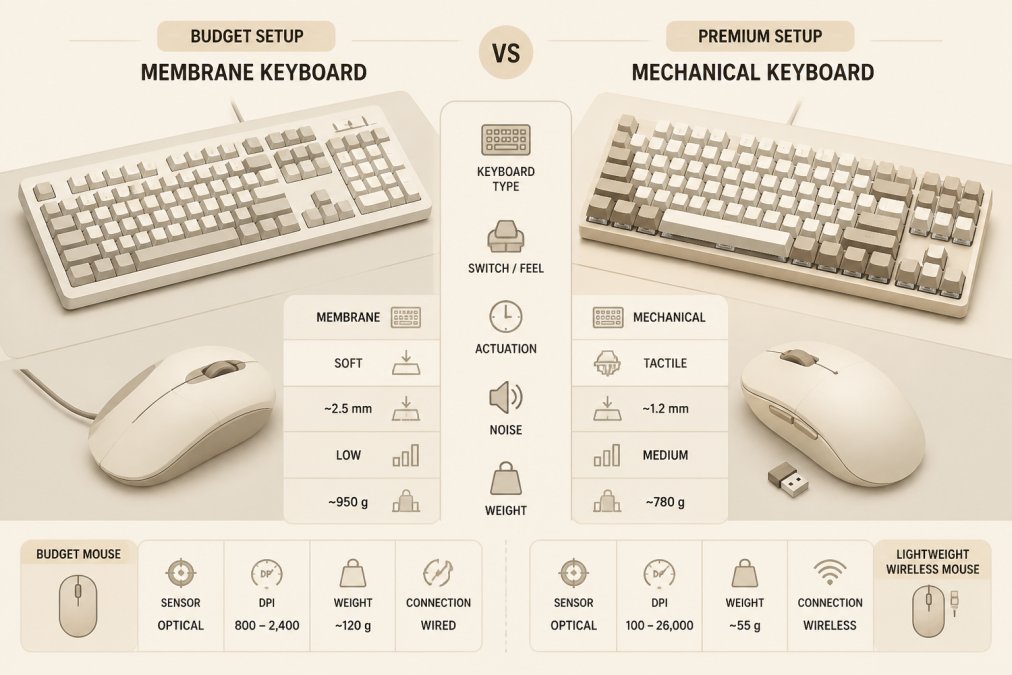
The gap between budget and premium gear is narrower than marketing suggests, but it is not zero. What separates the tiers is not a single spec, it is the combination of sensor consistency, build longevity, and the small latency reductions that only matter once your mechanics are already sharp.
Here is how the tiers actually break down across the peripherals that matter most:
| Category | Budget Tier | Premium Tier | Real-World Difference |
|---|---|---|---|
| Mouse sensor | Standard optical, 125-500Hz polling | High-DPI optical, 1000Hz+ polling, stable wireless | Noticeable in tracking and flick consistency |
| Mouse build | Plastic shell, heavier frame | Reinforced shell, sub-70g frame | Less fatigue, longer service life |
| Connectivity | Wired only | Tri-mode wireless (2.4GHz, Bluetooth, wired) | Setup freedom without measurable lag penalty |
| Keyboard switches | Membrane dome | Mechanical, low actuation force | Tactile feedback, 50M+ keystroke lifespan |
| Monitor | 60Hz, 5ms+ response | 144Hz+, 1ms response, adaptive sync | Largest single competitive gain |
| Audio | Stereo, no imaging | Wide soundstage, positional imaging | Better footstep and directional cues |
Where the money actually goes. The biggest returns sit in monitors and mice. A 144Hz panel with adaptive sync changes how you track targets; a lighter mouse with a consistent sensor changes how reliably you hit them. Keyboards and audio deliver smaller competitive gains but larger comfort and communication gains, a mechanical keyboard mainly reduces fatigue and missed inputs over long sessions, and good audio mainly improves awareness rather than raw aim.
The skill floor vs. skill ceiling angle. Most buying guides assume gear helps everyone equally. It does not. Gear raises your skill ceiling, the best you can possibly perform, but it does nothing for your skill floor until your mechanics are consistent enough to expose the hardware's limits.
What you are actually paying for at each tier:
- Budget ($20-$60 per peripheral): Functional, serviceable, and fine for casual play. Expect shorter lifespans and less consistent sensors.
- Mid-tier ($60-$150): The sweet spot for most serious players. You get 1000Hz polling, mechanical switches, and reliable build quality without paying for specs you cannot perceive.
- Premium ($150+): Justified when you compete, when your current gear is the bottleneck, or when you want the longest service life. Diminishing returns are real here, see the next section.
Diminishing Returns: When Pro Gear Stops Helping
Diminishing returns hit hard once you pass the mid-tier, but they hit different peripherals at different points. The honest way to think about it is a performance-to-price matrix: some upgrades deliver measurable competitive gains, some deliver comfort gains, and some deliver nothing but aesthetics.
Where returns fall off, peripheral by peripheral:
- Monitor refresh rate: 60Hz → 144Hz is the largest single jump most players will ever feel. 144Hz → 240Hz is a real but smaller gain, most noticeable in fast tracking. 240Hz → 360Hz is marginal for the vast majority of players, the perceptual difference is small and the cost premium is large.
- Mouse polling rate: 125Hz → 1000Hz is a clear, felt improvement in input latency. 1000Hz → 4,000Hz or 8,000Hz is measurable in lab conditions but rarely perceptible in normal play. The bottleneck is almost always the player's reaction time, not the polling interval.
- Mouse DPI: Sensors far beyond what your hand can control add cost without adding performance. A 42,000 DPI sensor does not make you more accurate than a 16,000 DPI sensor, it just gives you more headroom you will never use.
- Keyboard: Mechanical switches improve consistency and lifespan, but a $200 board does not make you faster than a $70 board with the same switch type. The gain is in feel and durability, not speed.
- Audio: Positional imaging matters for awareness in shooters. Beyond a certain point, higher-priced headsets mostly add build quality and comfort, not competitive edge.
- RGB lighting, cable aesthetics, branded mousepads: Zero measurable performance gain. These are cosmetic purchases and should be budgeted as such.
- Performance-relevant: Monitor refresh rate and response time, mouse sensor consistency and weight, audio positional imaging. These can move your K/D ratio.
- Comfort-relevant: Keyboard switch feel, mouse shape, chair ergonomics, headset padding. These improve how long and how comfortably you can play, which indirectly affects performance over long sessions.
- Cosmetic: RGB, cable color, branded desk mats, decorative lighting. These affect how your setup looks, not how you play.
Ergonomics and Long-Term Health: The Hidden Value of Pro Gear
Ergonomics is where professional gear quietly earns its price. A lightweight mouse and an adjustable chair reduce wrist strain and shoulder tension across long sessions. That matters whether you compete or work from a desk all day.
Is Professional Gaming Gear Worth It? A Decision Framework
Professional gaming gear is worth it when your goals, your budget, and your weak points line up. Use this framework to decide:
- Do you compete, or play ranked seriously? If no, mid-tier gear is enough.
- Is your monitor still 60Hz? Upgrade this first.
- Does your mouse cause wrist fatigue or tracking errors? Replace it next.
- Are you chasing specs you cannot perceive? Stop at mid-tier.
- Do you sit for long sessions? Prioritize ergonomics.
Frequently Asked Questions
Do gaming mice really make a difference in competitive play?
Yes, but the difference depends on your current gear. A mouse with a higher polling rate and accurate optical sensor reduces input lag and improves tracking consistency. For example, the Mchose A7 V2 Pro Ultra offers up to 42,000 DPI and tri-mode connectivity, which can help with fine aiming control. However, if you already use a decent mouse, upgrading may yield smaller gains than improving your aim through practice.
Is professional gaming gear worth the extra cost for casual players?
For casual players, the value depends on how often you play and what bothers you about your current setup. If you experience wrist strain or frequent lag, investing in ergonomic gear and a reliable wireless mouse can improve comfort and consistency. But if you play a few hours a week, a mid-range option like the Mchose A7 V2 Pro Ultra at $80.99 often delivers most of the benefit without the premium price tag.
What are the tangible benefits of high-polling rate gaming mice?
A higher polling rate means the mouse reports its position to your PC more frequently, reducing the delay between your hand movement and the cursor response. Going from 125Hz to 1000Hz can make aiming feel smoother and more immediate. Some pro-grade mice support even higher rates, but the improvement becomes harder to notice past 1000Hz unless you have a monitor with a very high refresh rate.
Are high-refresh-rate monitors necessary for non-competitive gaming?
Not strictly necessary, but they make a noticeable difference in how smooth motion looks. A 144Hz monitor reduces motion blur and screen tearing compared to a standard 60Hz display, which can make games feel more responsive even in single-player titles. If you play fast-paced games or just want a more comfortable viewing experience, a high refresh rate monitor is a worthwhile upgrade.
Deciding what to upgrade first is the hard part, and buying the wrong gear at the wrong time wastes money. The Techie Den carries performance-focused peripherals built for exactly this decision, from tri-mode wireless gaming mice to ergonomic seating that supports long sessions. Browse the collection, match your gear to your actual goals, and add to cart with confidence.


