

Table of Contents
- Start With Your Platform and Playstyle
- Sound Quality: Frequency Response, Impedance, and Driver Size
- Open-Back vs Closed-Back for Gaming: Which Soundstage Do You Need?
- Wired vs Wireless Gaming Audio: Latency, Interference, and Convenience
- Gaming Audio Latency Explained: What Milliseconds Actually Cost You
- Comfort, Microphone Quality, and Build Quality for Long Sessions
- Software, EQ Customization, and Hearing Health
- Budget and Value: Matching Gaming Audio Gear to Your Needs
- Frequently Asked Questions
Last Updated: September 14, 2026
Start With Your Platform and Playstyle
Choosing the right gaming audio gear starts with two questions: what do you play on, and how do you play? A competitive first-person shooter player on PC needs different priorities than someone playing story-driven adventures on a console. This guide from The Techie Den walks through the specs that actually matter, in plain language.
Platform dictates connectivity before anything else. PC players can use USB DACs, 3.5mm jacks, or wireless dongles freely. Console players are more restricted: many consoles support USB audio and 3.5mm controllers, but Bluetooth audio is often limited or delayed. Handheld players need low-impedance, easy-to-drive gear.
Playstyle shapes the rest. Competitive players prioritize directional audio, low latency, and a clear boom mic. Casual and immersive players can lean toward comfort, soundstage, and wireless convenience.
Sound Quality: Frequency Response, Impedance, and Driver Size
Sound quality in gaming audio comes down to three specs, frequency response, impedance, and driver size, but the spec sheet is only the starting point. What you actually hear depends on how those specs interact with your source device, your software, and your ears.
Frequency response is the range of pitches a headset can reproduce, usually written as something like 20Hz-20kHz. A wider, flatter response means more accurate audio across bass, mids, and treble. In gaming, the critical range is the mid-to-upper treble where footsteps, reloads, and callouts live, roughly 2kHz to 8kHz. A headset with a boosted bass shelf can sound exciting in a trailer and muddy in a firefight.
Impedance, measured in ohms, tells you how much power a headset needs. Low-impedance sets (under roughly 50 ohms) run fine from a controller or phone. High-impedance sets need an amplifier or DAC to reach proper volume and dynamic range. If your headset sounds thin or quiet at max volume on your controller, impedance mismatch is the likely cause, not a defective unit.
Driver size (measured in millimeters) affects how much air the transducer moves, which influences bass and overall fidelity. Bigger drivers are not automatically better; tuning matters more than raw size. A well-tuned 40mm driver routinely outperforms a poorly tuned 50mm one.
| Spec | What It Means | Why It Matters |
|---|---|---|
| Frequency response | Range of reproducible pitches | Accuracy across bass, mids, treble |
| Impedance (ohms) | Power needed to drive the set | Determines if you need a DAC or amp |
| Driver size (mm) | Air moved by the transducer | Affects bass and overall fidelity |
Software and EQ Customization: The Spec Sheet You Control
Most buying guides stop at the spec sheet. The bigger lever is the software layer. An equalizer (EQ) lets you boost the footstep frequency range and cut boomy bass for competitive play, or do the reverse for immersive single-player games. Many headsets ship with companion software that stores multiple audio profiles, so you can switch between a competitive preset and a cinematic one in seconds.
This matters because two headsets with identical frequency response specs can sound completely different once EQ is applied. A headset with flat, neutral tuning and good software is often a better competitive tool than a bass-heavy set with no EQ control, even if the bass-heavy set costs more.
Look for software that offers: a parametric or at least multi-band graphic EQ, saveable presets, and per-game profile switching. Some platforms also expose virtual surround processing, which we cover in the soundstage section.
Hearing Health and Volume Management
Prolonged loud volume causes gradual, permanent hearing damage, and gaming sessions are long. A practical rule: keep volume at a level where you can still hear someone talking to you from across the room, and take short breaks every hour during long sessions. Volume-limiting features and volume monitoring in gaming software help, but the habit matters more than the tool.
Open-Back vs Closed-Back for Gaming: Which Soundstage Do You Need?
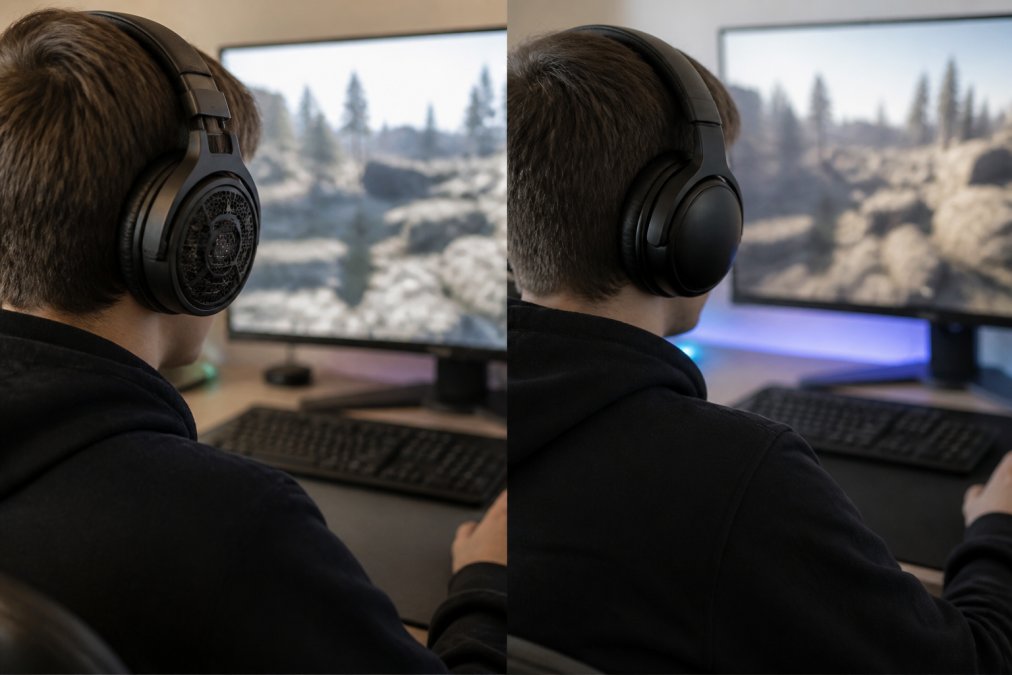
Open-back vs closed-back for gaming is the single biggest design decision you will make. Open-back headphones let air move freely behind the driver, producing a wider soundstage, better imaging, and more natural spatial awareness. The trade-off is that they leak sound in both directions and offer almost no passive isolation.
Closed-back designs seal the ear cup, blocking outside noise and keeping your audio private. They usually deliver stronger bass but a narrower soundstage. For competitive FPS gaming where directional audio decides fights, many players prefer open-back. For noisy rooms, shared spaces, or commuting, closed-back wins.
Passive Isolation and Environmental Noise
Passive isolation is how much outside noise a closed-back headset blocks without any electronics. In a loud room, a well-sealed closed-back set can meaningfully reduce background sound, which helps you hear footsteps and callouts. Open-back sets do the opposite: they let the room in. If your environment is noisy, closed-back is the practical choice, even if you sacrifice some soundstage.
Wired vs Wireless Gaming Audio: Latency, Interference, and Convenience
Wired vs wireless gaming audio is not a single decision, it is a decision about which wireless protocol you are using and what you are willing to trade for freedom from a cable. The gap between a wired connection and a good 2.4GHz dongle is small enough that most players cannot feel it. The gap between either of those and Bluetooth is large enough to lose fights.

Here is how the three connection types actually compare:
| Connection | Typical Latency | Interference Risk | Battery Needed | Best For |
|---|---|---|---|---|
| Wired (3.5mm or USB) | Effectively instant | None | No | Competitive play, zero-compromise setups |
| 2.4GHz dongle | Roughly 20-40ms | Low, but 2.4GHz band is crowded | Yes | Competitive wireless, PC and console |
| Bluetooth | Often 100ms or more | Moderate to high | Yes | Casual, mobile, single-player |
A wired 3.5mm or USB connection carries uncompressed audio with no battery to manage and no pairing to break. The cable is the only cost. For players who sit at a desk and never roam, wired remains the reference point against which every wireless option is measured.
A 2.4GHz dongle is the wireless option that competitive players actually use. It operates on a dedicated radio link rather than the shared Bluetooth stack, which keeps latency low and stable. The trade-off is that 2.4GHz is a crowded band, Wi-Fi routers, cordless phones, and even microwave ovens share it. A dongle that ships with its own extension cable or a USB-C adapter you can position away from the PC chassis reduces dropouts noticeably.
Bluetooth is the convenience option, not the performance option. It is fine for single-player games, music, and mobile play, but the delay is real and it varies by codec and device. If you want a middle ground, many headsets now support multiple connection modes, letting you switch between low-latency and convenience depending on the session.
The Techie Den offers tri-mode options that cover wired, 2.4GHz, and Bluetooth in one device, so you are not locked into a single connection type.
Gaming Audio Latency Explained: What Milliseconds Actually Cost You
Gaming audio latency explained simply: it is the delay between the game producing a sound and you hearing it. Latency is measured in milliseconds (ms). Under about 40ms, most players cannot consciously detect a delay. Above roughly 100ms, audio and video start to feel disconnected, and competitive reactions suffer.
Latency sources stack up. Bluetooth adds the most, typically 100ms or more depending on the codec. Dedicated 2.4GHz dongles usually stay in the 20-40ms range. Wired connections are effectively instant.
Codecs, Dongles, and Bluetooth Versions
Codecs determine how audio is compressed over wireless. Basic SBC and AAC codecs prioritize compatibility over speed, while low-latency codecs cut delay at the cost of some fidelity. Bluetooth version matters too: newer versions like 5.2 and 5.3 improve connection stability and power efficiency, though they do not automatically eliminate latency. A dedicated 2.4GHz dongle remains the most reliable choice for competitive wireless audio.
Comfort, Microphone Quality, and Build Quality for Long Sessions
Comfort decides whether you actually keep wearing a headset past hour two. Ergonomics come down to weight, clamp force, ear cup padding, and headband design. Lightweight sets with breathable fabric pads stay comfortable longer than heavy, tightly clamped ones. If you wear glasses, look for softer padding that does not press the frames into your temples.
Microphone quality matters more than most buyers expect. A boom mic that extends toward your mouth picks up voice clearly and rejects background noise. Built-in mics on the ear cup are convenient but pick up keyboard clatter and room noise.
Build quality affects longevity. Metal-reinforced headbands and replaceable ear pads outlast all-plastic frames. For long sessions, prioritize comfort and mic clarity over cosmetic features.
Software, EQ Customization, and Hearing Health
Software and EQ customization are the angles most buying guides skip, yet they change how a headset performs more than any single spec. An equalizer (EQ) lets you boost footsteps and cut boomy bass for competitive play, or do the reverse for immersive single-player games. Many headsets ship with companion software that stores multiple audio profiles, so you can switch between a competitive preset and a cinematic one in seconds.
Hearing health matters just as much. Prolonged loud volume causes gradual, permanent hearing damage. A practical rule: keep volume at a level where you can still hear someone talking to you from across the room, and take short breaks every hour during long sessions. Volume-limiting features and volume monitoring in gaming software help, but the habit matters more than the tool.
Budget and Value: Matching Gaming Audio Gear to Your Needs
Budget and value should follow function, not the other way around. A casual weekend player does not need a studio-grade DAC or a 42,000 DPI mouse; a competitive player should not cut corners on latency or mic clarity. Match your spend to the spec that actually limits your experience.
For casual players, a low-impedance closed-back headset with a decent boom mic covers everything. For competitive players, prioritize low latency, directional audio, and EQ control. For mixed PC and console use, tri-mode connectivity saves you from buying two headsets.
The Techie Den carries audio options across the price range, from budget ear-hook sets to dedicated gaming gear, so you can match the spec to the session. If you are unsure where to start, the Mchose A7 V2 Pro Ultra wireless mouse pairs well with any of our audio picks for a complete low-latency setup.
| Player Type | Priority Spec | What to Look For |
|---|---|---|
| Casual weekend | Comfort, mic clarity | Low impedance, closed-back, boom mic |
| Competitive FPS | Latency, directional audio | 2.4GHz or wired, EQ software |
| Mixed PC and console | Connectivity | Tri-mode: wired, 2.4GHz, Bluetooth |
| Noisy environment | Passive isolation | Well-sealed closed-back ear cups |
Frequently Asked Questions
Should I use 48kHz or 96kHz for gaming?
For gaming, 48kHz is the standard and more than enough. Most game audio is mastered at 48kHz, and higher sample rates like 96kHz won't improve positional accuracy or soundstage. Stick with 48kHz to avoid unnecessary processing and potential compatibility issues with your gaming audio gear.
Is 5.1 or 7.1 better for gaming?
Virtual 7.1 surround sound creates a wider soundstage for better spatial awareness in FPS gaming, but it can distort audio quality. True 5.1 with multiple drivers offers more precise directional audio but requires more setup. For most gamers, a good stereo headset with strong imaging outperforms budget virtual surround.
What is the difference between open-back and closed-back gaming headphones?
Open-back headphones let air move freely, creating a wider soundstage and more natural audio, but they leak sound and offer no passive isolation. Closed-back models seal around your ears, blocking environmental noise and providing stronger bass, which suits noisy rooms and competitive play where isolation matters.
Do I need a dedicated sound card for gaming audio?
Most modern motherboards and consoles have adequate built-in audio. A dedicated DAC or amplifier helps only if your headphones have high impedance (above 50 ohms) or you hear static. For typical gaming headsets, onboard audio is fine. Invest in a DAC only if you notice distortion or low volume.
Choosing gaming audio gear is not about buying the most expensive set; it is about matching specs to how you actually play. The Techie Den carries high-performance gaming peripherals, tri-mode wireless mice, and audio equipment built for immersive sessions, with reliable connectivity across PC, console, and mobile. Get started with The Techie Den and build a setup that keeps up with your playstyle.


