

Quick Summary
Gaming gear warranty coverage protects you when a product fails under normal use, typically by covering defects in materials and workmanship for a set period. It usually does not cover accidental damage like drops or spills, so reading the terms before buying matters. For expensive parts, a protection plan can add coverage, but only if the plan price and deductible are less than the cost of one covered failure.
- Manufacturer warranties typically cover defects in materials and workmanship, so a graphics card that dies after six months of normal gaming should be repaired or replaced.
- Accidental damage such as drops or spills is rarely covered by a standard warranty, unless an extended protection plan applies.
- Compare the plan price, deductible, likely repair cost and failure likelihood over the full term before buying an extended plan.
- Many warranties treat overclocking, opening sealed components and unauthorized repairs as misuse that voids coverage.
- Gather proof of purchase, the serial number, a clear description of the failure and photos before filing a claim.
Table of Contents
- What Gaming Gear Warranties Actually Cover
- Manufacturing Defects Versus Accidental and User-Caused Damage
- Manufacturer Warranties Versus Extended Warranties: A Side-by-Side Comparison
- Is an Extended Warranty Worth It for a Gaming PC?
- What Voids a Gaming PC Warranty
- Filing a Gaming Gear Warranty Claim and Documenting Failures
- Checking Your Gaming PC Warranty Coverage Before You Buy
- Frequently Asked Questions
What Gaming Gear Warranties Actually Cover
Last Updated: November 17, 2026
Gaming gear warranties exist to protect you when a product fails under normal use. A warranty from the manufacturer typically covers defects in materials and workmanship for a set period.
Coverage usually includes:
- Parts: Faulty components such as power supplies, motherboards, or disc drives
- Labor: Some warranties cover the cost of repair work, while others only cover the replacement part
- Component failures: Cooling fans, keyboards, controllers, and headset cables that stop working on their own
The details vary by brand and product category. Read the terms before you assume a plan covers everything. Safeware guidance on warranty and protection plan fine print
Watch out: many warranties end at the first sign of physical damage, so a dropped laptop or a cracked mouse shell may not be covered even if the internal parts fail later.
Manufacturing Defects Versus Accidental and User-Caused Damage
A manufacturing defect is a problem that existed when the product left the factory. Examples include a faulty solder joint, a bad capacitor, or a keyboard switch that fails early.
Accidental and user-caused damage works differently. Spilling a drink on a keyboard, dropping a controller, or running a graphics card with an unsafe overclock falls outside standard coverage.
Here is a simple way to sort the most common failures:
| Failure type | Example | Usually covered? |
|---|---|---|
| Manufacturing defect | Dead power supply out of the box | Yes |
| Normal wear | Worn mouse buttons after years of use | Varies by plan |
| Accidental damage | Cracked headset from a fall | Usually no, unless a protection plan applies |
| User-caused damage | Fried motherboard from a bad BIOS update | Usually no |
Knowing which bucket a failure falls into helps you decide whether a claim is worth filing.
Manufacturer Warranties Versus Extended Warranties: A Side-by-Side Comparison
A standard manufacturer warranty is included with the purchase. An extended warranty or protection plan is an optional add-on that you buy separately, often from the retailer or a third party. The two work together, not against each other.
| Feature | Manufacturer warranty | Extended warranty or protection plan |
|---|---|---|
| Cost | Included in the price | Extra, often a percentage of the item price |
| Typical length | Often 1 to 3 years | Adds 1 to several years on top |
| Covers accidental damage | Rarely | Sometimes, depending on the plan |
| Who handles claims | The manufacturer | The plan provider or retailer |
Pros of an extended plan:
- Protection after the standard warranty ends
- Can cover accidental drops or spills on portable gear
- Reduces out-of-pocket repair costs for expensive parts
Cons of an extended plan:
- Adds upfront cost to the purchase
- Exclusions can be long and confusing
- Some plans duplicate coverage you already have
For high-end gaming peripherals, an extended plan can make sense if the item is expensive and you use it hard. For a budget mouse, it often does not.
Is an Extended Warranty Worth It for a Gaming PC?
Most coverage guides stop at "it depends." A transparent calculation is more useful. The idea is to compare four numbers over the life of the plan: the plan price, the deductible per claim, the out-of-pocket cost of the failure you are most worried about, and your realistic chance of filing a claim during the coverage period.
The four-number comparison
- Plan price. Note the full cost, not the monthly teaser. Multiply monthly pricing by the term length so you compare like with like.
- Deductible. Many protection plans charge a service fee per claim. A $0 deductible and a $75 deductible change the break-even point.
- Likely repair or replacement cost. Price the single most expensive part you would hate to replace out of pocket. On a gaming PC that is usually the graphics card or the power supply.
- Failure likelihood over the term. Use your own history and the plan term as a guide. A part that has already survived two years of heavy use is past the early-failure window that manufacturing defects tend to cluster in.
A worked example (illustrative numbers)
Suppose a protection plan for a desktop costs $180 for three years with a $50 deductible, and the graphics card you would replace costs $500. If the card fails once during the term, you pay $50 instead of $500, so the plan plus deductible ($230) still comes out ahead by $270. If the card never fails, you spent $180 for nothing. The break-even is roughly one covered failure in three years.
When the math favors a plan
- The most expensive component costs several times the plan price.
- The plan covers accidental damage and you move portable gear between rooms or to events.
- The deductible is low relative to the repair cost.
- You keep gear for the full term rather than upgrading early.
When the math favors skipping it
- The plan price approaches the replacement cost of the item.
- The deductible is high enough that a single claim erases the savings.
- The plan duplicates a manufacturer warranty that already covers the part for most of the term.
- You upgrade frequently, so the back half of the term is wasted.
Watch out: a plan that only reimburses depreciated value can pay far less than the replacement cost you used in your calculation, so check whether claims settle at replacement cost or at current market value before you treat the plan as equivalent to a repair.
Our take: run the four numbers for your own build. If one covered failure would cost more than the plan price plus deductible, the plan is defensible. If not, the standard manufacturer warranty plus a small repair fund usually wins.
What Voids a Gaming PC Warranty
Several common actions can void a warranty, even when the part itself fails:
- Opening sealed components without authorization, such as a sealed power supply
- Overclocking beyond the manufacturer's limits
- Physical damage from drops, liquid spills, or impact
- Unauthorized repairs by a third party shop
Keeping the system clean and cool also helps prevent failures that could lead to disputes. Our tips on essential gaming PC maintenance explain how to do that without risking coverage. When cleaning consoles, follow safe steps as well. See how to clean your gaming console safely.
Filing a Gaming Gear Warranty Claim and Documenting Failures
A claim goes much faster when you have good records. Before you contact support, gather these items:
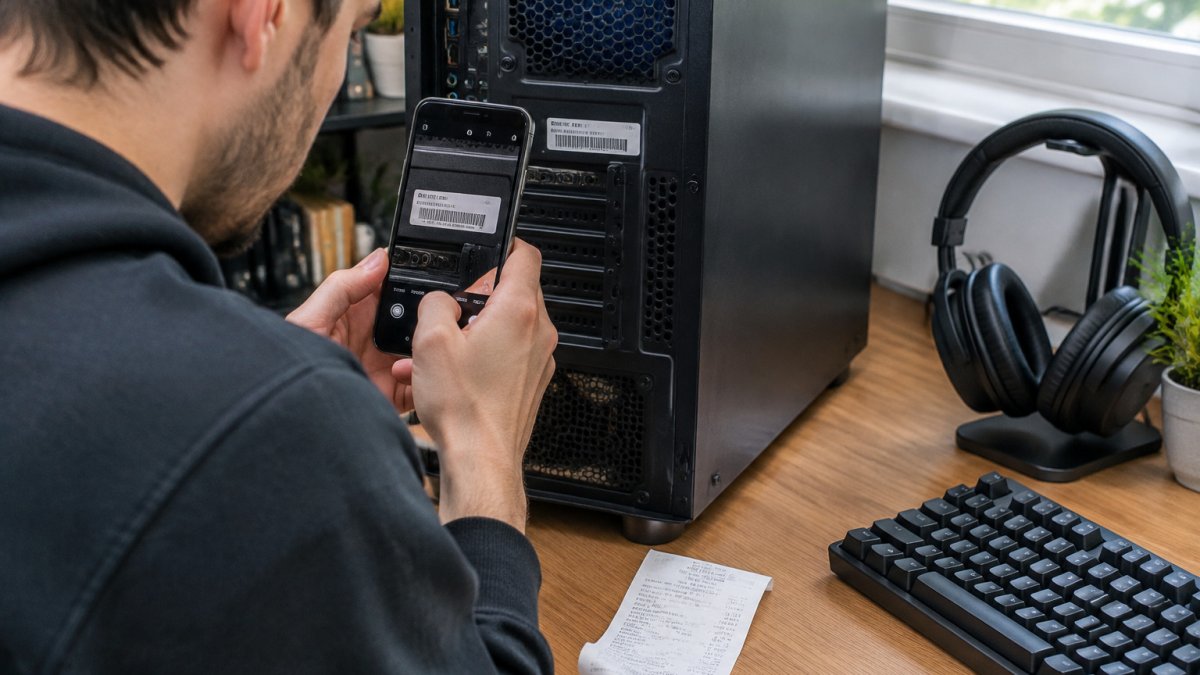
- Your proof of purchase or receipt
- The product's serial number, usually on a label on the case or base
- A clear description of the problem and when it started
- Photos or a short video showing the failure
Document the problem as it happens. Note any error messages, unusual noises, or performance drops. If you suspect overheating, check your cooling and temperatures before you file. Read more about spotting thermal paste replacement signs.
Performance problems like frame drops can also have many causes. Diagnose them first so your claim describes the real issue. Our guide on troubleshooting gaming PC frame drops walks through the common ones.
Here is a short claim checklist:
- Receipt or proof of purchase saved
- Serial number recorded
- Failure described with dates and symptoms
- Photos or video of the problem
Checking Your Gaming PC Warranty Coverage Before You Buy
Coverage terms differ sharply by gear category, so a single checklist is not enough. Compare the terms for the category you are buying, then confirm the details that decide whether a claim succeeds.
Coverage by gear category
| Gear category | What manufacturer warranties commonly cover | What they commonly exclude or limit | What to confirm before buying |
|---|---|---|---|
| Prebuilt gaming PC | Defects in materials and workmanship; parts and sometimes labor | Accidental damage, user upgrades, overclocking | Whether labor is included and whether opening the case voids coverage |
| Graphics card | Manufacturing defects and component failure | Overclocking beyond rated limits, physical damage, mining use on some terms | Length of coverage and whether the card must be returned to the board partner or the retailer |
| Console | Defects under normal use | Liquid damage, drops, unauthorized repair | Whether the serial number must be intact and how long the term runs |
| Controller | Stick drift and button failures under normal use | Wear from heavy use on some terms, liquid damage | Whether stick drift is treated as a defect or as wear |
| Headset | Driver and connection failures | Cracked headbands from drops, cable damage from pulling | Whether the cable and ear cushions are covered |
| Keyboard | Switch and connection failures | Liquid spills, keycap wear, modification | Whether hot-swap sockets and custom keycaps affect coverage |
| Monitor | Panel defects and backlight failure | Dead pixels below a stated threshold, physical damage | The dead-pixel policy and whether the panel or the whole unit is replaced |
The terms that decide a claim
- Parts versus parts and labor. A parts-only warranty leaves you paying for the repair work.
- Coverage start and end dates. Coverage usually begins at purchase or delivery, not at first use, and the term may differ for components inside a PC.
- Accidental damage. Standard warranties rarely cover spills, drops, or surges. A protection plan may, for an extra cost.
- Overclocking and modification. Many terms treat overclocking, BIOS changes, or opening sealed components as misuse.
A pre-purchase comparison checklist
- Coverage length recorded for each component, not just the whole system
- Parts-only versus parts-and-labor confirmed
- Accidental damage and liquid damage status confirmed
- Overclocking and modification rules read
- Deductible and claim limits noted for any protection plan
Watch out: a warranty that requires registration within a short window can lapse silently if you file the receipt and forget, so register the product the day it arrives and keep the confirmation.
A short check now can save a lot of trouble later. Gaming gear warranty coverage is easy to overlook, but it shapes what you pay when something goes wrong.
Frequently Asked Questions
Is a warranty really worth it for gaming gear?
It depends on the item and your budget. Manufacturer warranties typically cover defects in materials and workmanship under normal use, and they usually come at no extra cost. Extended protection plans add coverage for longer periods and sometimes for accidental damage, but they carry their own price. Compare the plan cost against what a replacement or repair would cost you, and read the exclusions. Gaming peripherals like mice and keyboards are often covered for only one year, so a longer plan can matter more for expensive components than for inexpensive accessories.
What does a gaming gear warranty usually cover?
Most gaming gear warranties cover manufacturing defects and component failures that appear under normal use, such as a dead switch on a mouse or a failed power supply in a desktop. Coverage often includes parts and labor for repairs during the coverage period. Accidental damage, cosmetic wear, and damage from misuse are commonly excluded. Always check the terms for coverage duration, eligibility requirements, and whether you need your purchase receipt or serial number to file a claim.
What can void a gaming PC warranty?
Opening a sealed component, removing a warranty sticker, and certain overclocking or modifications can void coverage for the affected part, depending on the manufacturer's terms. Physical damage from drops, liquid spills, or power surges is usually not covered. Installing unsupported hardware or running components outside rated limits may also give the manufacturer grounds to deny a claim. Keep your build records and read the warranty terms before making upgrades.
How do you make a warranty claim for gaming gear?
Start by gathering your proof of purchase, the product's serial number, and a clear description of the failure. Photograph the problem and note when it began. Then contact the manufacturer's support team through their website or phone line, and follow their return or repair instructions. Keep copies of every email, ticket number, and shipping confirmation. Acting quickly and documenting everything makes the claim process smoother if the manufacturer asks for more information.


