

Last Updated: November 13, 2026
Quick Summary
Signs your console needs thermal paste replacement include loud fans running constantly, automatic shutdowns during long gameplay sessions, and unusually hot or cool exhaust air. Clean the vents and check airflow first, since dust causes similar symptoms. Thermal paste is typically replaced every 2 to 5 years.
- Watch for loud fans that stay at high speed even during menus or light tasks.
- Shutdowns appearing after 20 to 30 minutes of play suggest degraded paste more than a startup fault.
- Clean dust from vents and fan with short bursts of compressed air before replacing paste.
- Most consoles need thermal paste replacement every 2 to 5 years, sooner with heavy use or warm rooms.
- Confirm whether your console uses liquid metal before buying paste, since the repair differs.
Table of Contents
- How Thermal Paste Affects Your Console's Cooling
- Symptoms That Point to Failing Thermal Paste
- Rule Out Dust and Blocked Vents Before Blaming the Paste
- Step-by-Step Troubleshooting Flow Before Replacement
- How Often to Replace Console Thermal Paste
- PS5 Liquid Metal vs Thermal Paste: What Changes
- When to DIY, When to Get Professional Repair
- Book Your Next Step: Check Temperatures and Clean the Vents This Weekend
- Frequently Asked Questions
How Thermal Paste Affects Your Console's Cooling
Thermal paste replacement becomes relevant because thermal paste is the thin layer that sits between your console's processor and its heatsink. Its job is to move heat away from the chip so the fan can push it out. When that paste dries out, heat gets trapped, and your console works harder to stay cool.
Here's the thing most people miss: the paste itself rarely fails all at once. It degrades slowly over years, so the symptoms creep in gradually. Recommended replacement intervals are typically every 2 to 5 years, according to general hardware maintenance guidance shared by TikTok hardware maintenance creator @gg.sheed.
Questions about thermal paste replacement come up often among console owners who want to know whether their system needs attention. The short answer is that a few specific signs point to aging thermal paste. Below, we'll walk through seven of them, plus a safe way to check before you open anything.
Symptoms That Point to Failing Thermal Paste
Not every noisy console needs new paste. But a cluster of these symptoms together is a strong hint. Check each one against how your console actually behaves, and use the rough thresholds below to separate normal operation from a fault.
Loud or constantly running fans
A fan that roars during light tasks is one of the most common complaints. When paste dries out, the chip runs hotter, so the fan spins faster to compensate.
Watch for:
- Fan noise during menus or simple games
- A fan that keeps running after you shut down a game
- A steady hum that gets louder over months
A common pattern is that the fan ramps up within a minute or two of starting a game and stays at high speed even in menus. If the console is cool to the touch on the top panel but the fan is still at full tilt, that points to heat trapped at the processor rather than heat in the room.
Automatic shutdowns during gameplay
If your console turns itself off mid-session, heat may be the cause. Many consoles shut down to protect the processor when temperatures climb too high.
Look for:
- Sudden shutdowns during demanding games
- Shutdowns that happen after a long session, not right at startup
- Warning messages about overheating before the power cuts out
A shutdown within the first few minutes of a cold start is less likely to be paste-related and more likely to be a fan or ventilation problem. Shutdowns that appear after 20 to 30 minutes of play, once the heatsink has soaked up heat, are more consistent with degraded paste.
Hot or unexpectedly cool exhaust air
Check the air coming out of the back vent. Hot exhaust is normal, but unusually hot air can point to heat building up inside.
The opposite signal matters too: if the exhaust feels cool while the console is loud and the case is warm, heat may not be reaching the heatsink efficiently. That is a classic sign of a dried paste layer acting as an insulator.
Measurable temperature checks before you open anything
You can get a rough read on console health without disassembly by using an infrared thermometer or a vent-temperature probe. Point the probe at the exhaust vent during a demanding game and note the reading after 15 minutes.
As a rough guide, many current consoles exhaust air in the range of about 100°F to 130°F (38°C to 54°C) under load. Readings that climb well above that range, or that keep rising instead of leveling off, suggest the cooling system is struggling. Readings that stay low while the fan runs at maximum suggest heat is not moving from the chip to the heatsink.
Watch out: vent temperature is not the same as processor temperature, and a single reading does not diagnose paste failure. Use it as one data point alongside fan behavior and shutdown history, not as a stand-alone test.
Changes in performance or console behavior
Heat stress can show up as more than noise. Look for:
- Frame rate drops that appear after 10 to 15 minutes of play
- Menu lag that clears after the console cools down
- A console that runs fine when first turned on but degrades as the session continues
These patterns are consistent with a paste layer that transfers heat poorly once the system reaches steady-state temperatures.
Rule Out Dust and Blocked Vents Before Blaming the Paste
Before you blame the paste, clean the console. Dust is the most common cause of overheating, and it is far cheaper to fix than replacing paste.
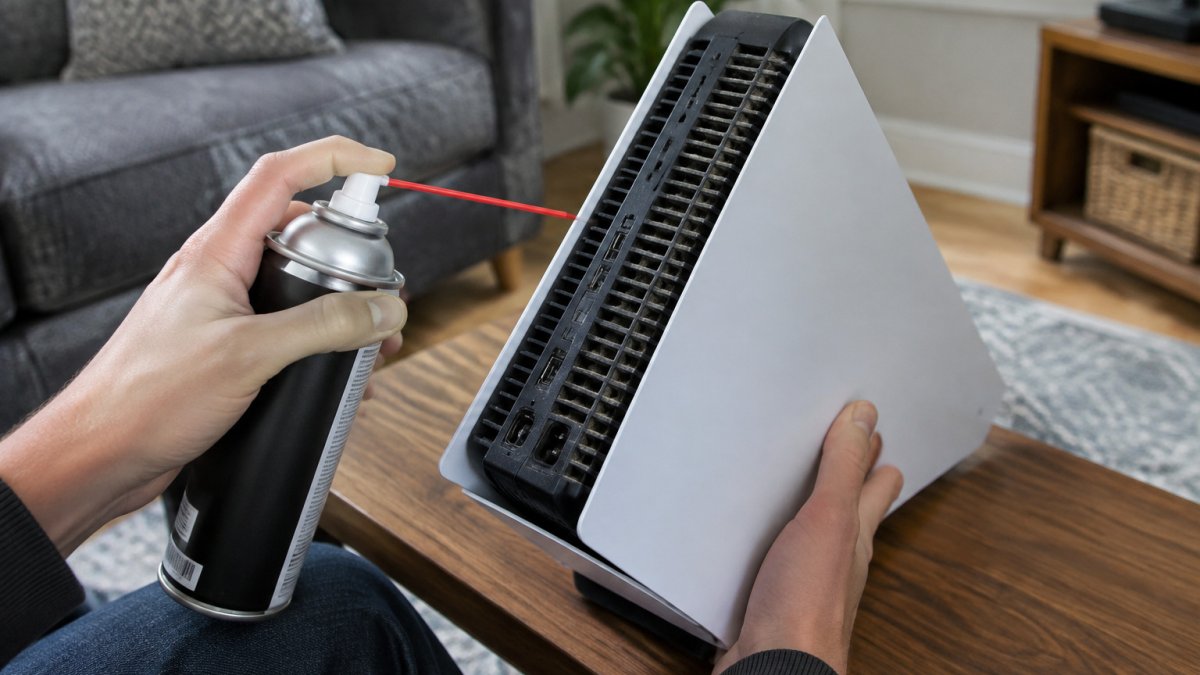
Dust clogs the fan and the heatsink fins. It blocks airflow, which causes heat to build up even when the paste is fine.
Start with these checks:
- Use compressed air to clear the vents and fan area
- Make sure the console has at least several inches of clearance on every side
- Keep it off carpets and away from heaters or direct sunlight
- Check the room temperature, since a warm room makes any console run hotter
Step-by-Step Troubleshooting Flow Before Replacement
Work through these steps in order. Stop as soon as you find the fix.
- Clean the vents and fan. Use short bursts of compressed air. Hold the can upright so no liquid sprays out.
- Improve airflow. Move the console to an open shelf or stand. Avoid enclosed cabinets.
- Check the room. Cool the room if it runs hot, and keep the console out of sun.
- Monitor the console during a session. Note the fan noise and any warnings. Compare the behavior before and after cleaning.
- Update the system software. Some fan curves and thermal settings improve through updates.
- Only then consider paste replacement. If the symptoms remain after steps 1 to 5, the paste may be the problem.
Watch out: Opening your console can void its warranty. Check your warranty terms before you remove any screws.
How Often to Replace Console Thermal Paste
Most consoles can go several years before the paste needs replacing. The typical window is every 2 to 5 years. Consoles used for long daily sessions, or those kept in warm rooms, may need it sooner.
Consider your console's age and how you use it. A machine that runs heavy games for hours each day will age faster than one used lightly. Once your console is out of warranty, many owners plan to refresh the paste as preventive maintenance.
PS5 Liquid Metal vs Thermal Paste: What Changes
This is the section most guides skip, and it matters before you buy a tube of paste. Not every console uses conventional thermal paste. Some PlayStation 5 units ship with liquid metal between the processor and the heatsink, and that changes the repair decision entirely.
Liquid metal is a gallium-based alloy that conducts heat far better than standard paste. It is also electrically conductive and reacts with aluminum. A small spill or a poor barrier can cause short circuits or corrosion, and the repair is not a simple wipe-and-reapply job.
What this means in practice:
- If your console uses liquid metal, do not substitute conventional thermal paste without understanding the trade-off. Paste is safer to apply but generally transfers less heat, and a paste swap on a liquid-metal console can lead to higher temperatures.
- Liquid metal reapplication requires a barrier or gasket around the die to contain the alloy. Reusing or damaging that barrier is a common failure point.
- Professional service is generally a safer choice for liquid-metal consoles unless you have specific experience with the material.
For consoles that use conventional paste, a good quality non-conductive thermal paste is the safer choice. Liquid metal makes sense only for people with advanced repair experience who understand the risks.
Watch out: before ordering supplies, confirm which material your exact model uses. Treating a liquid-metal console as a paste console can turn a maintenance job into a board-level repair.
When to DIY, When to Get Professional Repair
Use this table to decide your next step.
| Situation | Best Next Step |
|---|---|
| Loud fan, but vents are clean | Try the troubleshooting flow first |
| Shutdowns persist after cleaning | DIY paste replacement, if comfortable |
| Console is under warranty | Contact the manufacturer |
| No experience opening electronics | Professional repair |
| Liquid metal is the only option | Professional repair |
Be honest with yourself. A botched repair can cost more than a professional service. Also note that improper paste application can make temperatures worse, not better.
Book Your Next Step: Check Temperatures and Clean the Vents This Weekend
You don't need to open your console to start solving the problem. Spend this weekend cleaning the vents, moving the console to a better spot, and watching how it behaves during a normal session. If the symptoms stick around, you'll know the paste is worth a closer look.
For more on keeping your system safe while you troubleshoot, read how to clean your gaming console safely. If you're weighing cooling options, our guide on whether liquid cooling beats air cooling for gaming explains the trade-offs. And if you're comparing the latest consoles, PS5 Pro vs PS5 Slim breaks down how their thermal designs differ. Finally, if you're planning ahead, how long next-gen consoles last can help you decide when maintenance makes sense.
Frequently Asked Questions
What are the signs that a console needs new thermal paste?
The most common signs are a fan that runs loudly or constantly, overheating warnings, automatic shutdowns during heavy gameplay, and performance drops under load. Because these symptoms overlap with dust buildup and blocked vents, check airflow and clean the console first. If the symptoms persist after cleaning and the console is more than a few years old, dried or degraded thermal paste becomes a more likely cause and is worth investigating further.
Can old thermal paste cause a PS5 or Xbox to overheat?
Yes. Thermal paste fills the microscopic gaps between the processor and heatsink to move heat away from the chip. Over time it can dry out or degrade, which reduces heat transfer and makes the fan work harder. Overheating caused by degraded paste usually appears gradually and worsens under heavy load. Confirm dust and blocked vents are not the cause before assuming the paste is at fault.
How often should console thermal paste be replaced?
A common guideline is every two to five years, though console age, usage, and operating environment all affect timing. Consoles that run hot, sit in enclosed cabinets, or are used for long sessions may need attention sooner. Thermal paste is typically replaced when the console is out of warranty and symptoms appear, since opening the console can affect warranty coverage.
Is it safe to replace thermal paste on a PS5 or Xbox yourself?
It can be done carefully, but it carries real risks, including damaging components, breaking clips, or applying the paste incorrectly, which can make temperatures worse. Opening a console will usually void the manufacturer warranty. If the console is under warranty, or you are not comfortable with disassembly, professional repair is the safer choice. Always power the console off and unplug it before starting.


