

Quick Summary
Build quality is the physical craftsmanship behind a device, covering materials, internal components, assembly and durability. It often decides whether a device keeps its performance after a year of daily use, since strong specs fade when heat, weak parts or loose assembly take over.
- Build quality covers four areas: materials, components, assembly and durability.
- Heat is a major threat, since chips slow themselves down through thermal throttling.
- Run the same benchmark for 15-20 minutes and compare to the new-device baseline.
- Battery capacity loss of roughly 10-20% in the first year is typical; faster fade points to heat or charging stress.
- Accept lower peak specs before accepting weak cooling or a fragile chassis.
Table of Contents
- What Build Quality Means for Electronic Devices
- Smartphone Build Quality Factors That Shape Performance
- How Thermal Design and Device Performance Are Linked
- Build Quality and Reliability Over Time
- Build Quality vs. Specifications: Which Matters More?
- A Practical Checklist for Judging Build Quality Before You Buy
- Choosing Reliable Chargers and Accessories for Your Setup
- Frequently Asked Questions
What Build Quality Means for Electronic Devices
Last Updated: November 22, 2026

Build quality is the physical craftsmanship behind a device: the materials, the parts inside, how they're put together, and how well they hold up over time.
Connected devices are growing fast. According to IoT Analytics' 2025 connected-device figures, the number of connected IoT devices reached 21.1 billion globally in 2025, up 14%.
Here's the simple version. Build quality covers four areas:
- Materials: The metals, plastics and glass used in the housing
- Components: The chips, circuit boards, batteries and connectors inside
- Assembly: How tightly and precisely the parts are put together
- Durability: How the device handles heat, drops and years of wear
A device with strong specs but weak build quality can slow down, overheat or fail early. A well-built device with modest specs often runs steadier for longer.
Smartphone Build Quality Factors That Shape Performance
Smartphones show build quality differences most clearly. They pack a lot of hardware into a small case, and they get carried, dropped and heated every day.
Several factors matter most:
- Chassis and frame: A rigid frame protects the internal board from bending and stress
- Internal layout: Good spacing keeps heat and power paths clean
- Seals and fit: Tight seals help block dust and moisture that can damage parts
- Cable and connector quality: Loose or cheap connectors cause charging and signal problems
Materials and Component Quality
Materials set the baseline. A metal frame usually resists flexing better than thin plastic, and better glass handles drops more safely. Inside, the quality of the battery, the circuit board and the power-management chips affects how steady the device stays under load.
Cheap components may work fine at first. Over months, though, weak parts can drift, lose capacity or fail. That's why two phones with the same processor can behave differently over time.
Manufacturing and Assembly Precision
Precision during assembly matters just as much. Loose screws, uneven adhesive or a slightly misaligned board can create hot spots, rattles or intermittent connection drops. These problems are hard to spot in a store and often show up weeks later.
Good manufacturers test each stage. Stress tests, drop tests and temperature cycles catch weak points before the device reaches a buyer. When you're shopping, a solid feel, tight tolerances and consistent finish are early signs of careful assembly.
How Thermal Design and Device Performance Are Linked
Heat is one of the biggest threats to performance. When a chip gets too hot, it slows itself down to protect its circuits.
Thermal design controls how well a device moves heat away from its hardest-working parts. Good designs use:
- Heat spreaders or vapor chambers to spread heat across the body
- Thoughtful placement of the battery and processor
- Vents and airflow paths that don't get blocked easily
Weak thermal design can cause the device to throttle early, drain the battery faster and wear out components sooner. A laptop with a poor cooling layout may run fine for light tasks but struggle with video editing or gaming.
Watch out: A cooling pad can help a laptop that already has decent airflow, but it can't fix a poorly designed one. Blocked vents and dust buildup cause more heat problems than most people expect.
Build Quality and Reliability Over Time
Build quality shows its true value over years, not days. Launch reviews measure a device at its best; reliability is about how it behaves after hundreds of charge cycles, thousands of thermal cycles, and the ordinary knocks of daily carry. To see what coverage can protect you from over those years, read about how warranty terms protect a device over time. The mechanism is cumulative: every heat cycle expands and contracts solder joints and adhesives, every full charge stresses battery chemistry, and every drop or flex event adds micro-stress to the chassis and board. Weak construction accelerates all three.
The wear mechanisms that matter
- Thermal cycling: Repeated heating and cooling fatigues solder joints and thermal interface materials. A device with poor heat spreading runs hotter, so its joints and paste degrade faster.
- Battery chemistry: Lithium-ion cells lose capacity with every full cycle and faster at high temperature. A well-built device keeps the battery cooler and charges it more gently, which slows capacity fade.
- Mechanical stress: Flexing a chassis stresses the motherboard and connector anchors. Rigid frames and reinforced port mounts resist this; thin plastic and poorly anchored ports do not.
- Ingress and contamination: Dust and moisture that slip past weak seals corrode contacts and block airflow, which raises operating temperatures and speeds up the other three mechanisms.
Measurable signs of degradation
You can track reliability without a lab. A common pattern is to record a baseline when the device is new and compare at six and twelve months:
- Battery health: Most operating systems report design capacity versus current capacity. A drop of roughly 10-20% in the first year is typical; much faster fade points to heat or charging stress.
- Sustained performance: Run the same benchmark or export task for 15-20 minutes and note the score or completion time. A large drop from the new-device baseline suggests thermal throttling or degraded cooling.
- Port and button feel: Note any loosening, intermittent charging, or buttons that need extra pressure. These are early mechanical warnings.
- Display uniformity: Check for dead pixels, bright patches, or image retention on a solid-color screen.
Reading the evidence before you buy
Warranty length is a signal, but read what it covers. A long warranty that excludes the battery or accidental damage tells you less than a shorter one with broad coverage.
Watch out: A device that performs well on day one but runs hot is a reliability risk, not just a comfort issue. Heat is the common thread behind battery fade, throttling, and solder fatigue, so thermal design is the best single predictor of how a device will age.
The article breaks down the main wear mechanisms and measurable signs of degradation that determine how a device ages.
| Wear mechanism | What it does | Warning sign |
|---|---|---|
| Thermal cycling | Fatigues solder joints and thermal paste | Runs hotter over time |
| Battery chemistry | Loses capacity with cycles and heat | Faster capacity fade |
| Mechanical stress | Flexes motherboard and port anchors | Loose ports, intermittent charging |
| Ingress and contamination | Corrodes contacts and blocks airflow | Dust or moisture past weak seals |
Build Quality vs. Specifications: Which Matters More?
Specs tell you what a device can do on paper. Build quality tells you whether it will keep doing it. The useful question is not which one matters more in general, but how to weight them for your workload and budget. A practical framework separates the two roles:
- Specs set the ceiling: peak speed, memory, storage, and screen quality determine what the device can handle at its best.
- Build quality sets the floor: cooling, materials, and assembly determine how close to that ceiling the device stays under sustained load and over time.
A use-case decision framework
Start by classifying your workload, then weight build quality accordingly:
- Light daily use (web, email, media): Modest specs are usually enough. Put more weight on build quality, battery health, and port durability, because you will keep the device longer and peak performance matters less.
- Sustained workloads (video editing, gaming, compiling, large data sets): Thermal design and sustained performance matter most. Check reviews that measure performance after 15-30 minutes under load, not just launch-day benchmarks. A device that throttles heavily will feel slower than its specs suggest.
- Mobile and field use: Prioritize chassis rigidity, seals, and port reinforcement. Drops, dust, and moisture are the dominant failure modes, so materials and assembly outweigh small spec differences.
- Budget-constrained buyers: Accept lower peak specs before accepting weak cooling or a fragile chassis. A mid-range device with solid build quality often delivers a better long-term experience than a flagship with poor thermals.
Where the tradeoff actually bites
Two devices with the same processor can diverge sharply because one has a vapor chamber and the other a small heatsink. The first holds its clock speed under load; the second throttles within minutes. Similarly, two phones with the same chip can age differently because one manages charging heat better.
Watch out: Very low specs cannot be rescued by good build quality. If the hardware is too weak for your tasks, no amount of cooling or rigidity will make it sufficient. Clear the spec threshold for your workload first, then let build quality decide among the options that qualify.
A Practical Checklist for Judging Build Quality Before You Buy
You don't need a lab to spot build quality. Use this checklist in a store or while reading reviews: for a fuller guide to judging durable tech for remote work before you buy.
- Hold the device and check for flex, creaks or rattles
- Look for even gaps between panels and buttons
- Press buttons and test ports for a firm, consistent feel
- Check the material: metal and quality glass beat thin plastic for durability
- Read long-term reviews, not just launch-day impressions
- Look for drop test, heat test or stress test data from reputable reviewers
- Check the warranty length and what it covers
- Ask whether replacement parts, like batteries, are easy to get
For a deeper look at picking gear that holds up in daily use, see our guide to Why Choose Reliable Tech Accessories: Build Quality That Lasts. It covers what to look for in accessories as well as main devices.
Choosing Reliable Chargers and Accessories for Your Setup
Chargers and cables are often overlooked, but they affect performance too. A weak charger can cause slow charging, overheating or damage to the battery over time. Good chargers use better components and stable power delivery.
If you're upgrading your charging setup, start with a high quality charging cable that matches the power your device needs. For a compact option, the UGREEN GaN 35W Charger is a solid choice for phones and laptops.
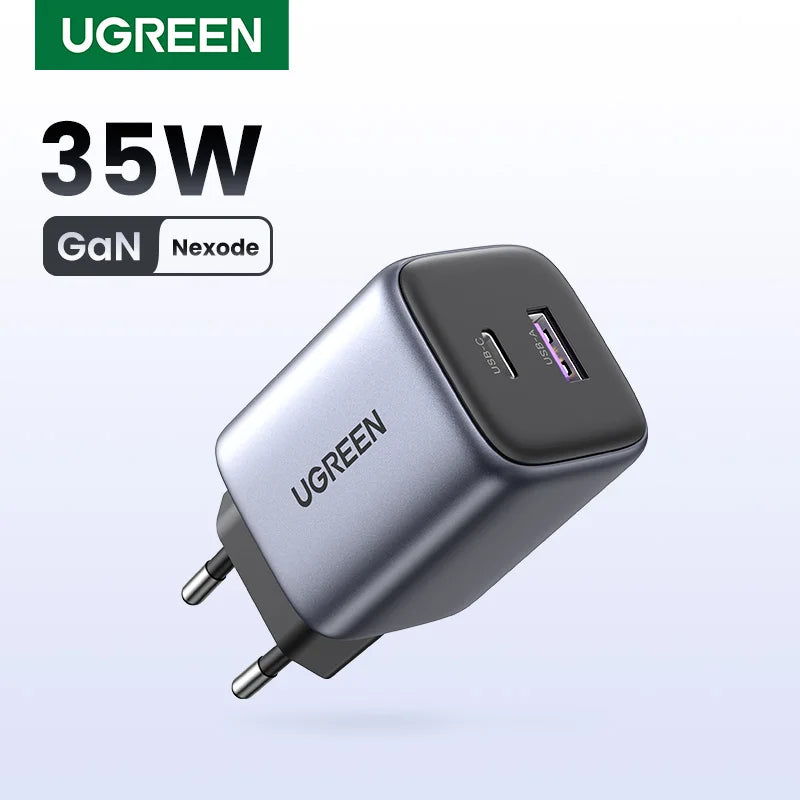
For a multi-device desk, the 320W Charger USB C Fast Desktop 8-port is worth a look. Its 8-port layout can power several devices at once, and its 320W max output is listed in its specs.
Watch out: Don't mix a high-wattage charger with a cheap cable. The cable can limit how much power actually reaches your device.
Frequently Asked Questions
What does build quality mean in a device?
Build quality describes how well a device is designed, assembled and constructed. It covers the materials used, how components are fitted together, the precision of the manufacturing process, and how well the device holds up under heat, pressure and daily handling. Good build quality means fewer loose parts, consistent component performance and a lower chance of early failure. It does not automatically mean higher raw speed, but it influences whether that speed stays stable over months and years of use.
Does better build quality make a device last longer?
Generally, yes. Devices with stronger components, better thermal management and tighter assembly tend to experience fewer hardware failures and slower performance degradation. Build quality is hard to judge from a short-term review, though, and the effects often appear after a few years of use. Checking owner reports, warranty terms and repairability before buying gives a clearer picture than a single hands-on session.
Can poor build quality cause overheating or slow performance?
It can. Weak thermal design, poor airflow or inadequate heat spreaders can make a device throttle its processor to protect internal components, which reduces speed. Loose connections or low-grade components can also cause intermittent problems. If a device runs hot under light use or slows down quickly during demanding tasks, the cause may be thermal design or assembly rather than the processor itself.
Is build quality more important than specifications?
For long-term value, build quality often matters as much as specifications, and sometimes more. A device with strong specs but weak construction may deliver high peak performance that fades quickly. A moderately specified device with solid thermal design and quality components can deliver steadier results. The right balance depends on your use case: heavy gaming or video editing rewards strong specs, while everyday work rewards reliability.


