

Table of Contents
- Why Charging Cables Fail: The Most Common Causes
- Signs of a Damaged Charging Cable You Shouldn't Ignore
- How to Fix Charging Port Issues: Step-by-Step
- How to Prevent Cable Fraying and Extend Lifespan
- Why Cheap Chargers and Cables Fail Faster
- Upgrade to Reliable Charging Solutions
- Conclusion: Stop the Cycle of Cable Failure
- Frequently Asked Questions
Last Updated: September 18, 2026
Why Charging Cables Fail: The Most Common Causes
Charging cables fail because of mechanical stress, internal wire damage, and connector wear, not because they "just wear out." Almost all of these failure modes trace back to how a cable is used, bent, and stored. This guide explains why charging cables fail, how to spot the warning signs early, and what extends their life.
Physical Stress and Mechanical Damage
The connector-to-cable junction is the weakest point on any charging cable. Yanking a cable out by the cord concentrates force exactly where the internal wiring is most exposed. Over hundreds of plug-unplug cycles, that stress separates the outer jacket from the strain relief, and once that seal breaks, the conductors inside flex in ways they were never designed to handle.
Internal Wire Fraying and Connector Pin Wear
Fraying is the visible symptom of invisible damage. Inside every cable are copper conductors wrapped in insulation and shielding, and each sharp bend stresses those strands. Eventually the strands crack, contact resistance rises, and the cable delivers intermittent charging instead of steady current.
Signs of a Damaged Charging Cable You Shouldn't Ignore
The clearest signs of a damaged charging cable are intermittent charging, a loose connector, visible fraying near the plug, and a cable or adapter that runs unusually hot. Any one of these means it is time to test or replace the cable.
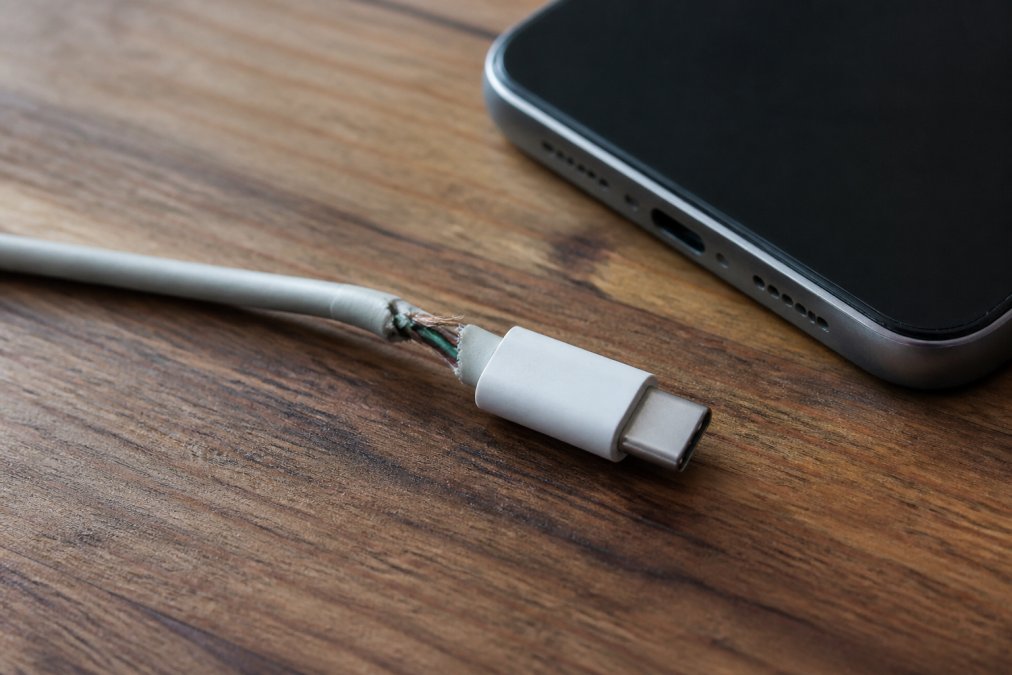
Watch for these specific warning signs:
- Intermittent charging: the device charges only when you hold the cable at a certain angle
- Slow or no fast charging: the phone reports a slower charge than usual with the same adapter
- Heat at the connector: the plug or port feels warm after a short charge
- Physical damage: cracked insulation, a bent connector, or exposed copper conductors
- Loose fit: the connector no longer clicks firmly into the port
How to Fix Charging Port Issues: Step-by-Step
Most charging port problems are caused by debris, not a broken port. A lint-packed USB-C or Lightning port blocks the connector from seating fully, mimicking a dead cable.
Cleaning the Port Safely
Follow these steps to clear port debris without damaging the contacts:
- Power off the device and unplug everything.
- Inspect the port with a flashlight for visible lint or dust.
- Use a wooden toothpick or plastic toothpick to gently lift debris out. Never use metal.
- Blow out loose particles with short bursts of compressed air held at an angle.
- Test the cable again before assuming the port is faulty.
When to Seek Professional Repair
Bent or broken connector pins, a wobbling port, or moisture corrosion all require a technician. Do not push a toothpick deeper than the port opening or bend pins back yourself. A repair shop can replace a worn port, far cheaper than replacing the device.
How to Prevent Cable Fraying and Extend Lifespan
Preventing cable fraying comes down to three habits: remove cables by the plug, respect the bend radius, and store them with an over-under coil instead of a tight wrap. A cable never yanked, folded sharply at the connector, or twisted into a tight loop can last years longer.
- Pull the plug, not the cord. Grip the connector housing every time. The strain relief collar absorbs force, but only if it arrives straight on.
- Respect the bend radius. Never fold a cable sharply at the connector. A gentle curve spreads stress; a crease concentrates it on a few copper strands.
- Store with an over-under coil. More below, because it is the habit most people get wrong.
- Avoid heat. Do not leave cables on a hot dashboard or near a radiator. Sustained heat softens the jacket polymer and accelerates oxidation on the copper inside.
- Match the adapter to the cable. Use a power delivery adapter rated for your device rather than a high-amperage brick that pushes more current than the conductors were built to carry.
Why Over-Under Coiling Matters
Most people coil a cable around their hand or a charger, putting a half-twist into every loop. Those twists do not disappear when you uncoil the cable; they migrate down the jacket and accumulate at the connector junction, slowly rotating the internal conductors against each other. Over months, that twisting produces the kink that becomes a break.
Match the Cable Jacket to How You Actually Use It
The jacket material determines how a cable handles abuse. Three materials dominate the market, and they fail differently.
- PVC (polyvinyl chloride): The cheapest and stiffest option. It resists moisture but becomes brittle with age and cold, cracking rather than flexing at the strain relief. A PVC cable that stays on a desk can last a long time; one coiled into a bag daily will crack at the connector within months.
- TPE (thermoplastic elastomer): Softer and more flexible than PVC, which is why it is common on cables bundled with phones. It tolerates repeated bending well but is prone to stretching and picking up oils and grime. A reasonable middle ground for a cable that stays mostly in one place.
- Braided nylon (over a TPE or PVC core): The braid is an abrasion layer, not a conductor. It protects the jacket underneath from rubbing and from the small sharp bends that crack unbraided jackets. The trade-off: a braid can hide internal damage, looking fine while the conductors inside are already frayed. Best for cables that travel, but they still need the same bend-radius discipline.
The Habits That Actually Move the Needle
If you change one thing, change how you unplug. The connector junction is where nearly every cable dies, and pulling by the plug removes the largest source of stress. If you change two, add over-under coiling. Those habits do more for cable lifespan than any jacket material or price point.
UGREEN GaN 35W Charger USB Charger →
Why Cheap Chargers and Cables Fail Faster
Cheap cables fail faster because they cut corners on the parts you cannot see: thinner copper conductors, minimal shielding, and weak strain relief. The failure is electrical, and it shows up as heat.
The Electrical Mechanism: Resistance, Voltage Drop, and Heat
Every conductor has resistance, and resistance converts electrical energy into heat. Thinner copper has higher resistance, so more of the power your adapter sends arrives as heat in the cable instead of charge in your battery.
What 'Cheap' Actually Means Inside the Cable
The difference between a budget cable and a well-built one shows up in three places:
- Conductor gauge: Thinner copper raises resistance and voltage drop. A cable rated for high-wattage power delivery needs enough copper cross-section to carry that current without cooking itself. Budget cables often use the minimum gauge that passes a basic charge test, not the gauge that survives years of fast charging.
- Shielding: Poor or absent shielding lets the charging and data lines interfere with each other and with nearby signals, causing unstable data transfer, dropped connections, and charges that cut in and out for no visible reason.
- Strain relief: A short, stiff collar concentrates stress at the weak point instead of distributing it along the jacket. A long, flexible strain relief is one of the clearest visual signals of a cable built to last.
The Software Side: When the Cable Is Not the Problem
Before replacing a cable, rule out the software features that mimic cable failure. Modern phones and laptops manage charging deliberately, and their behavior can look identical to a dying cable.
- Optimized or adaptive battery charging: Many devices delay charging past a certain percentage until they predict you will need the phone. The battery sits at a lower level for hours, which looks like a stalled charge but is the device working as designed.
- Thermal throttling: If the device or cable is warm, the system reduces charge rate to protect the battery. A cable that charges slowly only in a hot car or under a pillow is often being throttled, not failing.
- Charge-rate negotiation: USB Power Delivery negotiates wattage between adapter, cable, and device. A cable without the right e-marker or negotiated profile is limited to lower wattage even if the adapter can do more. The device may report 'slow charging' when the cable simply cannot speak the right protocol.
The adapter and the cable are a system. A high-quality charger cannot compensate for a failing cable, and a great cable cannot fix an underpowered adapter. Match the two, and match both to the device's negotiated charging profile.
Upgrade to Reliable Charging Solutions
Reliable charging starts with gear built to handle daily plug-unplug cycles. The Techie Den carries charging solutions designed to hold up where budget cables give out.
| Solution | Best For | Why It Helps |
|---|---|---|
| UGREEN GaN 35W Charger | Travel and single-device charging | Intelligent charge control protects battery |
| 320W 8-Port Desktop Charger | Multi-device desks | One adapter, fewer cable swaps |
| 3 In 1 Wireless Station | Apple phone, watch, earbuds | Eliminates plug-unplug wear |
Conclusion: Stop the Cycle of Cable Failure
Replacing cheap cables every few months costs more than buying one that lasts, and intermittent charging is entirely avoidable. The fix is part habit, part hardware: pull by the plug, respect the bend radius, store cables loosely, and pair them with an adapter that manages power properly.
Frequently Asked Questions
What is the lifespan of a charging cable?
A well-made charging cable typically lasts one to three years with regular use. Factors that shorten lifespan include frequent bending, pulling by the cord instead of the connector, and exposure to heat. Cables used daily and stored improperly may fail in six months. To maximize lifespan, use strain relief, avoid tight bends, and store cables loosely coiled. Investing in quality cables with reinforced connectors can extend usable life significantly.
Why do my charging cables keep going bad?
Charging cables fail repeatedly due to mechanical stress at the connector, internal wire fraying, and poor manufacturing quality. If you frequently plug and unplug, yank the cord, or wrap it tightly around your hand, the copper conductors inside break. Dust and debris in the charging port also cause intermittent connections. Using a cable with poor strain relief accelerates damage. Switching to braided cables and adopting gentler handling habits can break the cycle.
Can a frayed charging cable be safely repaired?
A frayed charging cable should not be repaired with tape or exposed wire. The internal damage often extends beyond the visible fray, and a compromised cable can short circuit, overheat, or damage your device. The safest option is to replace the cable. If the fray is at the connector, the cable is structurally weakened and may fail unpredictably. For safety and reliability, discard frayed cables and choose a new one with proper certification.
How does heat affect the longevity of a USB cable?
Heat accelerates thermal degradation of the cable jacket and insulation, making them brittle and prone to cracking. It also increases resistance in the copper conductors, which can lead to voltage drop and slower charging. Leaving cables in a hot car or under direct sunlight shortens their life. To protect your cables, store them in a cool, dry place and avoid covering them while charging. Using a charger that matches your device's power needs reduces excess heat.


