

Table of Contents
- Why Cheap Chargers Fail and What It Costs You
- Signs of a Low-Quality Charger You Should Never Ignore
- How Cheap Cables Damage Charging Ports and Batteries
- MFi Certification Benefits and Other Safety Standards That Matter
- How to Choose a Reliable Power Adapter for Every Device
- Overheating, Power Surges, and the Fire Risk Cheap Gear Creates
- Diagnostic Tools and Smart Charger Compatibility Checks
- Frequently Asked Questions
Last Updated: September 16, 2026
Why Cheap Chargers Fail and What It Costs You
Avoiding cheap tech charging failures starts with understanding what actually breaks inside a budget charger. The answer is almost always the same: missing or faked safety components. This guide from The Techie Den breaks down how to spot bad gear before it damages your devices.
A knockoff charger often skips the circuitry that regulates voltage and limits current. Without that regulation, your phone absorbs whatever the wall delivers. Voltage spikes that a certified adapter would absorb pass straight into your battery and charging port.
The cost isn't just a dead charger. It's a swollen battery, a loose charging port, or a device that won't hold a charge past lunchtime. Repair shops see this constantly, and the fix is rarely cheap.
Below, we'll show you exactly how to identify failing gear, verify real certifications, and pick adapters that last.
Signs of a Low-Quality Charger You Should Never Ignore
The clearest warning signs of a low-quality charger are physical: a plug that wobbles in the outlet, a cable that warms up during charging, or a housing that flexes when you squeeze it. Any of these means the internal build is compromised.
Weight tells you something too. Genuine adapters use real transformers, capacitors, and shielding, so they feel dense for their size. A featherweight brick that claims high wattage is usually lying about its output.
Watch for these red flags:
- No manufacturer name or model number on the housing
- Certification logos printed in blurry or mismatched colors
- A price far below what the components could cost
- A plug that fits loosely or sparks when inserted
- A cable that gets hot near the connector, not just warm
A common mistake is assuming a charger is fine because it hasn't failed yet. Cheap units often work for months before a component drifts out of spec and takes your battery with it.
How Cheap Cables Damage Charging Ports and Batteries
Cheap cables damage charging ports through two mechanisms: mechanical stress and electrical resistance. Thin conductors and weak strain relief put pressure on the connector pins every time you plug in. Over time, those pins bend, corrode, or break free from the board.
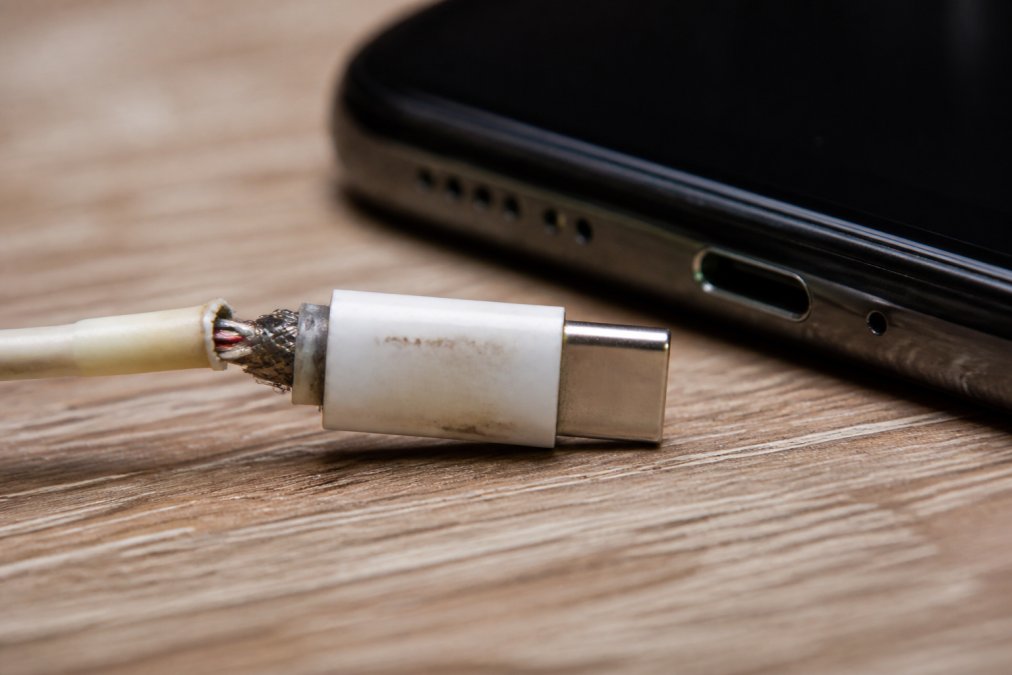
Electrically, undersized wire raises internal resistance. The charger pushes more current to compensate, which generates heat at the connector. That heat accelerates wear on both the port and the battery.
Battery health suffers in a quieter way. Poor voltage regulation means your phone's charge controller works harder to smooth out fluctuations. Lithium-ion battery cells degrade faster when they repeatedly absorb unstable current, and capacity loss shows up as shorter runtime and unexpected shutdowns.
Warning Signs Your Charging Port Is Already Damaged
A failing charging port announces itself before it dies completely. The most common sign is a cable that only charges at a specific angle. If you have to wiggle the plug to get a connection, the port's pins are already worn or dirty.
UGREEN GaN 35W Charger USB Charger →
Other signals include:
- Charging that starts and stops without movement
- A port that feels loose when the cable is inserted
- Visible debris, bent pins, or discoloration inside the port
- The device only fast-charges with one specific cable
Clean the port first with a wooden toothpick and compressed air. If the problem persists, the damage is internal and needs a repair.
MFi Certification Benefits and Other Safety Standards That Matter
MFi certification benefits come down to verified compliance, not marketing. MFi, short for Made for iPhone, is a licensing program run by Apple. Accessories that pass it carry an authentication chip, so the device recognizes the cable and negotiates charging instead of defaulting to a slow, unregulated trickle. A non-certified cable can still physically fit an iPhone port, but the phone may refuse to fast-charge, throw a "This accessory may not be supported" warning, or, worse, accept current with no negotiation at all.
The other marks on a charger each cover a different failure mode. Knowing which is which tells you what the product was actually tested for:
- UL Listing / UL Recognized Component, Underwriters Laboratories tests the finished product for fire, shock, and electrical hazards. A UL file number (often printed as "E" followed by digits) is traceable in UL's public database.
- FCC Part 15, Covers electromagnetic interference. Every powered device sold in the U.S. must comply, and the FCC ID is searchable in the FCC's Equipment Authorization database.
- RoHS, Restricts lead, mercury, cadmium, and other hazardous materials in electronics. It is a materials rule, not a safety-performance rule.
- USB-IF certification, The USB Implementers Forum tests cables and chargers against the USB Power Delivery and USB Type-C specifications. Certified products appear in the USB-IF Integrators List and may carry the trident logo.
- Energy Star / DOE efficiency rules, Govern standby power draw, not charging safety, but a compliant adapter wastes less power as heat.
How to Verify a Certification Before You Buy
Verification takes about two minutes and requires only the product's own paperwork or housing. Start with the manufacturer's listing, then cross-check against the certifying body's public database, never trust the seller's screenshot of a certificate.
- UL: find the UL file number on the charger or its packaging, then search it in UL Product iQ. A valid file number returns the manufacturer name and the specific product category.
- FCC: locate the FCC ID (usually on the housing, formatted like a grantee code plus product code) and look it up in the FCC Equipment Authorization database.
How to Choose a Reliable Power Adapter for Every Device
Use this checklist before buying:
- Confirm the adapter lists USB PD or your device's fast-charge protocol
- Check for UL, FCC, and RoHS markings with verifiable numbers
- Match total wattage to your highest-draw device plus headroom
- Count your ports: phones, tablets, watches, and laptops add up
- Buy from a seller that publishes full specifications
Overheating, Power Surges, and the Fire Risk Cheap Gear Creates
Overheating is the failure mode that turns a bad charger into a dangerous one.
Diagnostic Tools and Smart Charger Compatibility Checks
- Measure real output. Plug the meter in, load the device, and compare the reading to the label. A large gap means the adapter is overstating its rating or has drifted out of spec.
- Watch for voltage sag. A regulated 5V charger should hold close to 5V under load. If the meter shows the voltage dropping noticeably as current rises, the regulation circuit is weak or absent.
- Test the cable separately. Swap in a known-good cable and re-measure. If output jumps, the cable was the bottleneck, not the brick.
- Do a thermal check. Feel the adapter and the cable ends after 30 minutes of charging. Warm is normal; hot to the touch is a failure signal.
- Check the device's own reporting. Many phones and laptops expose battery health, charge cycles, and charging wattage in settings or a manufacturer app. A device that reports slower charging than it used to is often telling you the cable or adapter has degraded.
Why Smart Home and IoT Devices Fail on the Wrong Charger
Before pairing any charger with a smart device:
- Read the device's stated input (voltage and amperage) and match it, not exceed it wildly.
- Prefer a charger that lists USB Power Delivery or the device's stated protocol rather than a fixed-output brick.
- Avoid daisy-chaining a high-wattage laptop charger onto a low-power hub unless the hub explicitly supports the higher voltage.
- Keep one known-good 5V/2A adapter on hand for testing IoT devices, it isolates the device from the charger as a variable.
Frequently Asked Questions
Is it bad to charge your phone with a cheap charger?
Yes. Uncertified chargers often skip voltage regulation, so they can push unstable current into your phone. That stresses the lithium-ion battery and can shorten its lifespan over hundreds of charging cycles. Cheap adapters also lack proper shielding, which raises the risk of overheating and, in rare cases, short circuits. A UL-listed or MFi-certified charger costs a little more but protects the device you already paid hundreds for. If you want to avoid charging failures, start with a certified power adapter.
How can you tell if a charging cable is MFi certified?
Look for the MFi badge on the packaging. You can also verify the brand on Apple's official MFi accessory database. Counterfeit cables often have misspelled logos, loose connector pins, or packaging that feels flimsy. If the price seems too low for a licensed cable, it probably is not certified. The MFi certification benefits include guaranteed compatibility and built-in safety protections that knockoff cables skip entirely.
What are the signs of a failing charging port?
Common signs include a cable that only charges at a certain angle, intermittent charging that stops and starts, a port that feels loose when you plug in, or visible debris and bent connector pins inside. Heat around the port during charging is another red flag. If you notice any of these, stop using the cable immediately and inspect both the port and the cable end. Continuing to charge through a damaged port can worsen internal resistance and lead to permanent device damage.
Can a faulty charger permanently damage a smartphone battery?
It can. Unregulated voltage and current fluctuation from a faulty charger accelerate battery health degradation, sometimes permanently reducing capacity. In severe cases, a short circuit or thermal runaway can damage the charging port or the battery itself. Replacing an uncertified adapter with a UL-listed option is the simplest way to protect device longevity.


