

Table of Contents
- Assess Your Cable Setup
- Best Cable Management Tools for Your Workspace
- Under Desk Cable Management Ideas That Work
- Label and Identify Your Cables
- Cable Management Best Practices for Long-Term Organization
- Managing Charging Stations and Power Strips
- Safety Considerations for Electrical Cords
- Frequently Asked Questions
Last Updated: September 3, 2026
Assess Your Cable Setup
Before organizing home office cables, spend 15 minutes understanding what you're dealing with. Most people skip this step and jump straight to buying organizers, that's the mistake.
Unplug everything safely and lay out every cable on a flat surface. Count them, categorize by type (power, data, charging), and note which devices are active versus unused. This audit prevents organizing cables you don't need. Next, trace where each cable runs and identify tangled clusters. This reveals your pain points and tells you exactly where to focus.
Check your power situation too. How many outlets do you have? Are you daisy-chaining power strips? Poor power distribution forces cables into awkward paths that tangle easily. Understanding your electrical layout prevents creating a system that fights against your actual setup.
Best Cable Management Tools for Your Workspace
The right tools make organizing straightforward. You don't need expensive solutions, combine a few strategic purchases with smart placement.
Velcro cable ties are the foundation. Unlike zip ties, they're adjustable and grip cables firmly without crushing them. Cable sleeves consolidate multiple cables into one clean bundle, protecting them from damage. Adhesive clips mount directly to your desk or walls, routing cables along specific paths without drilling holes.
Cable trays and raceways work best for under-desk organization. Trays mount underneath your desk surface; raceways are channels that run along walls or desk edges. Cable boxes contain power strips and excess cable length, hiding the mess and protecting against accidental unplugging.
The Techie Den carries several solutions that work well together. For charging stations, the 3 In 1 Wireless Charging Station For Apple Watch Charger at $96.99 consolidates charging for multiple Apple devices into one compact unit. For power distribution, the 320W Charger USB C Fast Desktop 8-port at $38.99 gives you eight ports in one unit, meaning fewer individual chargers scattered across your desk.


Under Desk Cable Management Ideas That Work
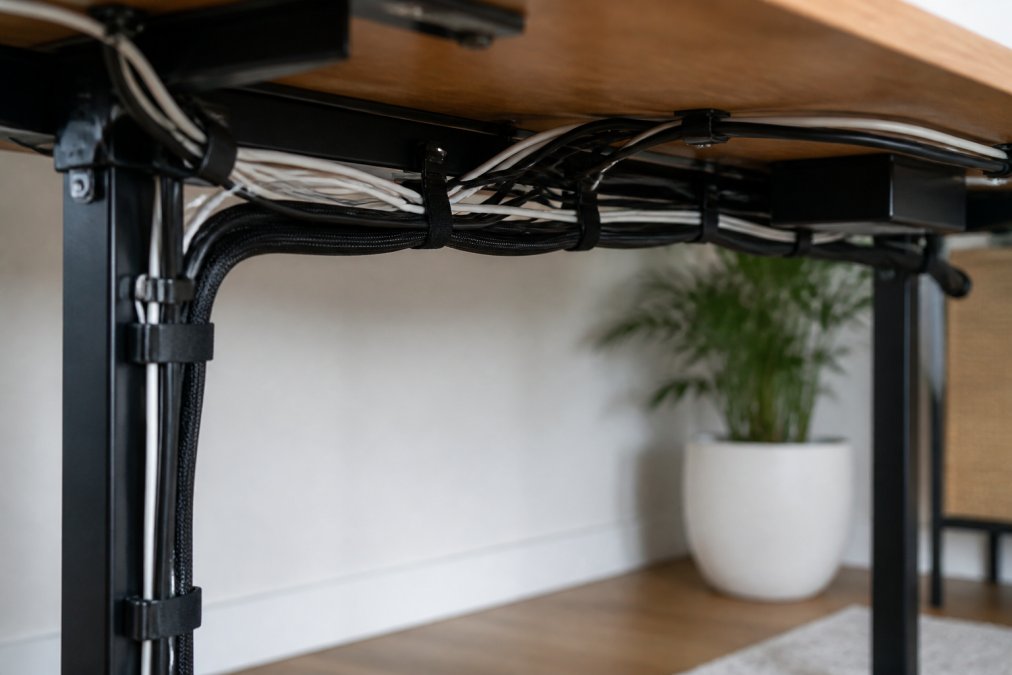
The underside of your desk is prime real estate for cable organization. Mount a cable tray directly underneath your desk surface. This transforms your setup, cables that would normally dangle now sit neatly out of sight. For standing desks, a tray is essential since cables move with the desk.
Use adhesive clips to create a cable highway along the underside, placing them every 12-18 inches to guide cables toward the power strip. Bundle cables using velcro straps at regular intervals, keeping bundles compact without crushing them. For longer distances, cable sleeves work better than straps, threading multiple cables through a single sleeve for a unified look.
Cable routing clips with adhesive backing mount to the back of your monitor stand or desk side, guiding cables downward and away from your work area. Consider a cable management raceway if cables run along the wall, these channels mount flush and contain cables inside, creating a clean vertical line.
Label and Identify Your Cables
Unlabeled cables become a nightmare when you need to unplug something or troubleshoot. Spend 10 minutes now to save yourself hours later.
Use cable labels or colored tape to mark each cable at both ends. Color-code by type: one color for power cables, another for data, another for charging. Your brain processes color faster than text, so you'll instantly know what type of cable you're looking at. For rarely-used cables, be specific: "USB Hub Backup" is better than "USB."
Take a photo of your labeled cables and save it to your phone for future reference. Create a simple spreadsheet with cable inventory: what each cable is, where it connects, whether it's in use, its length, and type. This becomes your reference guide for upgrades or troubleshooting.
Cable Management Best Practices for Long-Term Organization
Organizing cables once is one thing. Keeping them organized as your setup evolves is another. These practices prevent backsliding into chaos.
Label every new cable immediately, this takes 30 seconds and prevents the "I'll do it later" problem. Review your cable setup every three months and unplug anything unused. When adding a new device, reroute cables thoughtfully instead of just plugging it in wherever. Keep velcro straps and clips on hand to tighten cables immediately rather than letting them pile up.
Document your setup with photos from multiple angles. If you need to troubleshoot or move your desk, these photos remind you of the original routing. Avoid permanent solutions like hot glue for cables you might move, velcro and clips are reversible.
Managing Charging Stations and Power Strips
Charging stations are cable organization's greatest challenge. Multiple devices, multiple chargers, and overlapping cables create tangled mess. Strategic organization here pays massive dividends.
Consolidate chargers whenever possible. Instead of five individual power adapters, use multi-port chargers. The UGREEN GaN 35W Charger USB Charger at $30.99 delivers multiple charging protocols from a single compact unit, reducing cable count significantly.

Position your charging station on a shelf or elevated surface rather than your desk. Use a cable management box to contain the power strip and excess cable length, routing cables into the box from the back so only charger ports face outward. Label each charging cable with the device it charges. Coil excess cable length neatly inside the management box using velcro straps.
Mount power strips to the underside of your desk or wall behind it using adhesive strips or mounting brackets. This gets them off the floor where they're a tripping hazard and off your desk where they take up space.
Safety Considerations for Electrical Cords
Cable organization isn't just about aesthetics, it's about safety. Poorly managed cables create electrical and physical hazards.
Never run cables under rugs or carpets. This traps heat and increases fire risk. Avoid creating tight knots or severe bends in cables, as repeated bending cracks insulation. Use cable sleeves and gentle curves instead. Don't daisy-chain power strips, this creates overload risk. If you need more outlets, upgrade to a higher-capacity power strip or install additional wall outlets.
Check cables regularly for damage. Fraying insulation, exposed wires, or discolored areas indicate immediate replacement. Ensure power strips have surge protection. Keep cables away from water sources and ensure nothing blocks ventilation on power strips or chargers, these devices need airflow to dissipate heat.
Organizing home office cables transforms your workspace from chaotic to functional. The process is straightforward: assess what you have, choose the right tools, implement a system, and maintain it. Most work happens in the first session, then takes just minutes per week to maintain.
The Techie Den offers charging and power solutions that make this easier. Whether consolidating chargers with the wireless charging station or reducing cable count with multi-port USB chargers, the right equipment simplifies cable management. Start with your current setup, implement one organizing strategy at a time, and you'll find that a clean cable system makes your entire office more professional and functional.
Frequently Asked Questions
What's the fastest way to organize home office cables?
Start by unplugging everything and laying cables out to identify what you actually use. Group cables by device type, then use velcro straps or cable sleeves to bundle them. Route bundles under your desk using adhesive clips or cable trays, and label each cable at both ends. Most people complete this in 30-45 minutes. The 3 In 1 Wireless Charging Station eliminates multiple cable clutter by consolidating charging for phones, watches, and earphones into one device.
How do I prevent cables from tangling in a home office?
Tangling happens when cables loop freely. Prevent it by using cable sleeves or wraps to bundle related cables together, routing them along fixed paths using cable trays or channels, and securing them with velcro straps every 12-18 inches. Store unused cables in a cable management box rather than coiling them loosely. Label both ends so you can identify cables without unplugging them, reducing the need to rearrange bundles repeatedly.
What cable management tools should I buy first?
Start with velcro straps or adhesive clips, they're inexpensive and work on any desk. Add a cable tray or raceway if you have multiple cables running the same route. For charging stations, consolidate devices with a multi-port charger like the 320W Charger USB C Fast Desktop 8-port ($38.99), which reduces cable clutter by handling multiple devices from one power source. Label makers or cable tags cost under $10 and pay for themselves by preventing accidental unplugging.
Is it safe to bundle all my power cords together?
Bundling power cords is safe if done correctly. Use velcro straps or cable sleeves rather than tight zip ties, which can damage insulation. Avoid bundling high-power cables (like those for monitors or space heaters) too tightly, leave small gaps for airflow. Never bundle cables in ways that create sharp bends or kinks, as this damages the internal wiring. Keep power cords away from water sources and ensure surge protectors aren't overloaded. If you're charging multiple devices, use a certified multi-port charger instead of chaining multiple power strips.
This article was written using GrandRanker


