

Table of Contents
- Why Most Gaming Keyboards Fail at Typing
- The Best Switches for Typing and Gaming
- Best Mechanical Keyboard for Gaming and Typing: What to Look For
- Full-Size vs TKL Gaming Keyboard vs Compact: Layout Trade-Offs
- Gaming Keyboard for Office Use: Noise, Comfort, and Shared Spaces
- Wired vs Wireless: Latency, Battery Life, and Reliability
- How to Test a Keyboard Before You Commit
- Conclusion: Match the Board to Your Actual Day
- Frequently Asked Questions
Last Updated: October 12, 2026
Why Most Gaming Keyboards Fail at Typing
A gaming keyboard for typing and gaming has to serve two masters, and most boards only satisfy one. Search Reddit's mechanical keyboard community and you'll find the same complaint repeated for years: a board that feels fast in a match feels punishing by hour three of real work. This tension often comes down to switch choice, layout, and noise rather than brand.
The Two Jobs Your Keyboard Has to Do
Gaming rewards speed and low input latency. Typing rewards comfort, consistent feedback, and low fatigue over long sessions. These goals overlap more than most buyers assume, but they pull in different directions on key feel.
- Gaming: fast actuation, light springs, and switches that reset quickly for rapid key presses
- Typing: moderate resistance, clear tactile or linear feedback, and keycaps that don't wobble under sustained typing
Most "gaming" boards optimize the first list and ignore the second. That's the core mistake.
The Best Switches for Typing and Gaming
The best switches for typing and gaming are light-to-medium linear or tactile switches in the 45-55g range, not the ultra-light speed switches marketed for esports. That range gives fast enough actuation for gaming without the accidental key presses and finger fatigue that come with featherweight springs.
Linear, Tactile, and Clicky: What Each Feels Like
- Linear switches (like Cherry MX Red or Gateron Red): smooth travel, no bump, quiet-ish, and popular for gaming. Great for rapid inputs, weaker for typing feedback.
- Tactile switches (like Cherry MX Brown or Gateron Brown): a small bump at actuation, good for typing feel, still fast enough for most gaming.
- Clicky switches (like Cherry MX Blue): audible click plus tactile bump. Superb for typing, but the noise makes them a poor fit for shared offices or late-night gaming.
Actuation Force and Key Travel Numbers That Matter
Two specs decide how a board feels: actuation force and key travel. Standard mechanical switches actuate around 2mm into a 4mm total travel, with 45-55g of force. Speed switches shorten the actuation distance to roughly 1-1.2mm, which helps in competitive play but increases typos during normal typing. Choose speed switches only if gaming is your priority and your typing is short-form.
A Side-by-Side Scoring Method for Typing and Gaming
Most roundups recommend a board for one use and hand-wave the other. Instead, score any switch on a 1-5 scale across both jobs, then weight the scores to your actual week. A simple, repeatable method:
| Criterion | What to Measure | Typing Weight | Gaming Weight |
|---|---|---|---|
| Actuation force | Grams to actuate (45-55g is the balanced band) | High | Medium |
| Tactile feedback | Presence and clarity of the bump | High | Low-Medium |
| Actuation distance | 2mm standard vs 1-1.2mm speed | Medium | High |
| Reset point | How quickly the switch re-arms for the next press | Medium | High |
| Noise | Perceived loudness in a quiet room | High | Low |
| Keycap stability | Wobble when pressing key edges | High | Medium |
Score each switch 1-5 per row, multiply by the weight, and total. A 50/50 user who types long-form and games casually will usually land on a 45-55g tactile. A competitive player who types in short bursts will usually land on a 45g linear. This is the same logic reviewers use, made explicit so you can apply it to any board you are considering.
How Switch Choice Changes Typing Accuracy and Speed
A common pattern among people who switch from speed switches to standard-travel switches is fewer accidental keystrokes during normal typing, because the shorter actuation distance that helps in a match also triggers on light, incidental presses. The trade-off is a slightly longer press before the input registers. For most mixed-use buyers, that trade favors standard travel. If you compete at a high level, keep a speed-switch board for matches and a standard-travel board for work.
Noise and Feel in Shared or Quiet Spaces
Office suitability is about more than whether a switch is "quiet." Three factors drive perceived noise:
- Switch type: clicky switches are the loudest; silent linear switches are the quietest; standard tactile and linear sit in between.
- Keycap material and thickness: thicker PBT keycaps tend to produce a lower, less sharp sound than thin ABS caps.
- Case and mounting: a board with sound-dampening foam and a gasket mount will sound noticeably softer than a hollow, tray-mount case with the same switches.
For late-night typing or a shared office, a silent linear switch in a dampened case is the practical combination. If you want tactile feedback without the click, a silent tactile switch gets you most of the typing feel with far less noise.
For a genuine 50/50 split between typing and gaming, a 45-55g tactile or linear switch is the safest compromise. Score it against your own typing-to-gaming ratio rather than trusting a single "best" label, and treat speed switches as a specialist tool, not a default.
switch force and travel specifications
Best Mechanical Keyboard for Gaming and Typing: What to Look For
The best mechanical keyboard for gaming and typing balances five things: switch type, layout, build quality, connectivity, and noise. Get those right and the brand matters far less than most buyers think.
Our buying checklist:
- Switch type matches your typing-to-gaming ratio
- Layout fits your desk and workflow
- Keycaps are stable and comfortable
Full-Size vs TKL Gaming Keyboard vs Compact: Layout Trade-Offs
A TKL gaming keyboard drops the number pad but keeps the arrow and navigation keys, which is the sweet spot for most people who type and game on the same board. Full-size boards keep the number pad; compact 60-65% boards cut almost everything for maximum desk space.
| Layout | Number Pad | Navigation Keys | Desk Space | Best For |
|---|---|---|---|---|
| Full-size | Yes | Yes | Least | Data entry, spreadsheets |
| TKL | No | Yes | Moderate | Mixed typing and gaming |
| Compact (60-65%) | No | Often no | Most | Minimalist setups, mouse room |
What You Actually Lose When You Drop the Number Pad
Dropping the number pad frees significant desk space and gives your mouse more room, which matters for low-sensitivity gaming. The trade-off is real for anyone who enters numbers regularly, like finance, coding, or spreadsheet work. If you type numbers all day, a full-size board usually wins despite the footprint.
The Keys Compact Boards Hide Behind Layers
Compact boards rarely delete keys outright. They move them to a function layer, so the key is still there but requires a modifier press. What that means in practice:
- Arrow keys: often on a layer on 60% boards, so cursor movement becomes a two-key press.
- Function row: usually on a layer, which slows media and shortcut use.
- Navigation cluster (Home, End, Page Up/Down): frequently layered, which is the biggest productivity cost for writers and coders.
If you use any of those keys more than a few times an hour, a 65% or TKL board will usually feel faster than a 60% board, because you stop reaching for a modifier.
How Layout Affects Comfort Over Long Sessions
Layout is a comfort variable, not just a desk-space variable. Three mechanisms matter:
- Key spacing and reach: a full-size board pushes your mouse hand farther right, which can increase shoulder strain during long gaming sessions. A TKL or compact board brings the mouse closer to your body.
- Wrist angle: a narrower board lets you keep your typing hands closer to shoulder width, which most people find more neutral than a wide, full-size stance.
- Keycap profile and height: a sculpted profile (like OEM or Cherry) can guide fingers to the home row, while a flat profile (like XDA or DSA) can reduce reach but offers less tactile guidance. Neither is universally better; the trade-off is guidance versus travel distance.
A Decision Framework by User Type
- Writers who game: TKL or 65% with a 45-55g tactile switch. You keep arrows and navigation, gain mouse room, and avoid the number-pad reach you rarely use.
- Competitive players who type often: TKL with a 45g linear switch. You keep navigation for work and get fast, consistent inputs for play.
- Shared-workspace users: TKL or full-size with silent linear switches and a dampened case. Layout matters less than noise here; pick the size that fits your desk.
Budget Tiers Without Guessing
Rather than naming specific models, match your budget to the features that actually change the experience:
- Entry tier: prioritize a standard 45-55g switch and a stable keycap set. Skip RGB and wireless if the budget is tight; they do not affect typing or gaming feel.
- Mid tier: add a dampened case, PBT keycaps, and hot-swap sockets so you can change switches later without buying a new board.
- Upper tier: add a gasket mount, a metal or reinforced case, and tri-mode connectivity if you want one board for multiple devices.
If you are unsure between TKL and full-size, measure your desk and your mouse movement first. The layout that keeps your mouse hand comfortable is usually the one you will keep using.
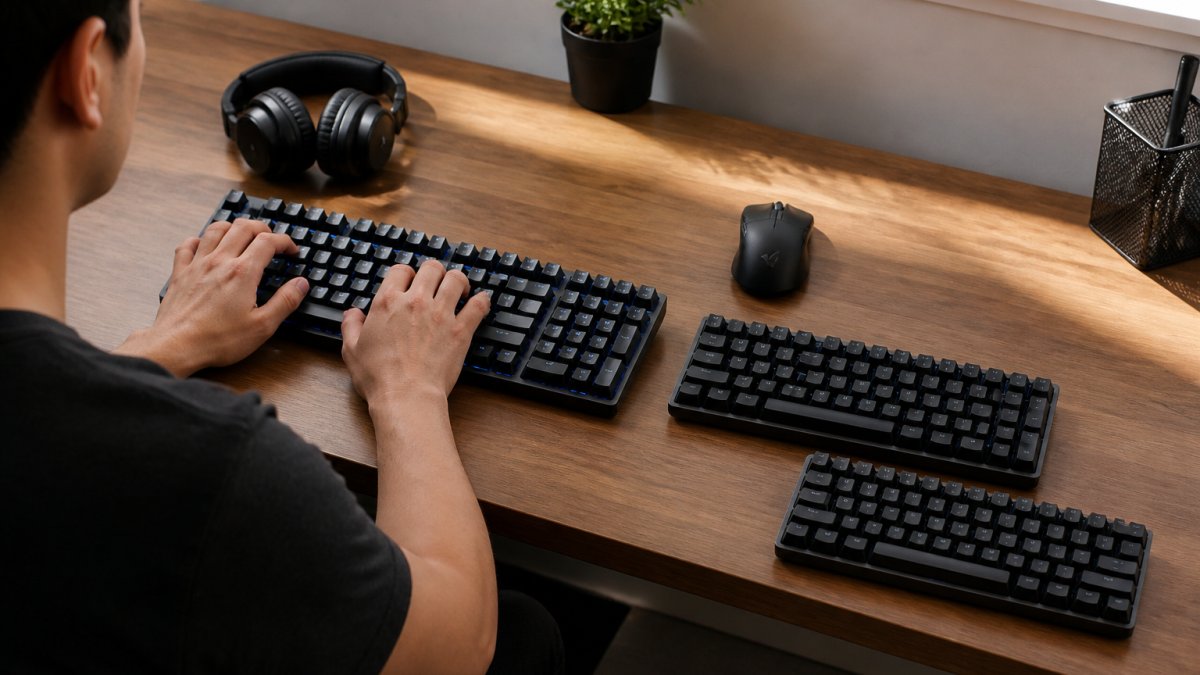
Gaming Keyboard for Office Use: Noise, Comfort, and Shared Spaces
A gaming keyboard for office use should favor linear or silent switches, a wrist-friendly angle, and a design that won't annoy coworkers.
Noise level is the spec buyers ignore and regret. Silent linear switches reduce the clack without killing the feel.
Wired vs Wireless: Latency, Battery Life, and Reliability
Wired connections remain the safest choice for competitive gaming because they eliminate battery and interference concerns. Modern wireless boards have closed most of the latency gap, but battery life and charging habits still matter.
- Wired: zero charging, lowest latency, one more cable on your desk
- Wireless (2.4GHz): near-wired latency, needs charging, cleaner desk
- Bluetooth: convenient for switching devices, higher latency, best for casual use
For a single desk setup used for both work and gaming, a wired board or a 2.4GHz wireless board with a long battery life is the practical pick.
How to Test a Keyboard Before You Commit
Test in person if you can. Switch feel is subjective, and the only reliable test is your own fingers on the keys.
- Type a full paragraph, not just a few keys
- Try the switches you're actually considering, not a demo unit with different switches
- Check keycap stability by pressing the edges of keys
If you can't test in person, buy from a retailer with a clear return policy. The Techie Den stocks gaming peripherals and accessories. Check our current selection for options built for both typing and gaming.
Conclusion: Match the Board to Your Actual Day
The right gaming keyboard for typing and gaming is the one that fits how you actually spend your hours, not the one with the flashiest spec sheet.
At The Techie Den, we carry high-performance gaming peripherals, including tri-mode wireless mice and boards designed for mixed work-and-play setups, plus the adapters and charging gear to keep a multi-device desk running. Add to cart when you're ready.
Frequently Asked Questions
What is a good keyboard for both gaming and typing?
A mechanical keyboard with tactile or linear switches, a tenkeyless or full-size layout, and anti-ghosting support handles both jobs well. Tactile switches give you feedback for long typing sessions, while linear switches feel smoother for fast gaming inputs. Look for a board with programmable keys so you can remap controls for games without losing your normal typing layout. The Techie Den stocks options across both switch types.
What are the best switches for typing and gaming?
Tactile switches sit at the sweet spot for mixed use because they give a bump you can feel when typing without the loud click that bothers coworkers. Linear switches are popular for gaming since they actuate smoothly with no bump, but some typists find them less satisfying. Clicky switches feel great to type on but the noise carries in shared spaces. If you split your day between work and games, start with tactile and adjust from there.
Is a TKL keyboard practical for work and gaming?
A TKL gaming keyboard drops the number pad but keeps the arrow keys and navigation cluster, so spreadsheets and document editing still work fine. You gain desk space and mouse room, which matters if you play with low sensitivity. The trade-off is entering numbers in a spreadsheet without a dedicated pad, which slows some finance and data work. If you rarely type long strings of digits, TKL is a practical compromise.
Are wireless gaming keyboards good for typing and gaming?
Modern 2.4GHz wireless connections report latency low enough that most players will not notice a difference from wired. Bluetooth is fine for typing but can lag during fast gaming inputs, so look for a board with both modes and switch between them. Battery life varies widely, and RGB lighting drains it faster. If you want one board for work and play, a tri-mode wireless keyboard with a wired fallback covers the most ground.


