

Table of Contents
- Best Gaming Console Bundles: Quick Comparison
- 1. Hyper Base M1: Best Overall Gaming Console Bundle
- 2. Retro Gaming Bundle: Budget-Friendly Option with 86,000+ Games
- 3. Handheld Gaming Bundle: Portable Gaming on the Go
- How to Choose a Gaming Console Bundle That Fits Your Needs
- Gaming Console Accessories Checklist: Complete Your Setup
- Gaming Setup Optimization Tips for Maximum Performance
- Family-Specific Bundle Recommendations
Last Updated: August 18, 2026
Best Gaming Console Bundles: Quick Comparison
Choosing the right gaming console bundle is overwhelming with dozens of options at different price points. Most gamers fall into one of three clear categories, and there's a bundle built for each. At The Techie Den, we offer a curated selection of products designed to elevate your digital lifestyle.
The real question isn't which console is "best", it's which matches your actual use case. A budget-conscious player eyeing 86,000+ retro games has completely different needs than someone hunting for 4K performance.
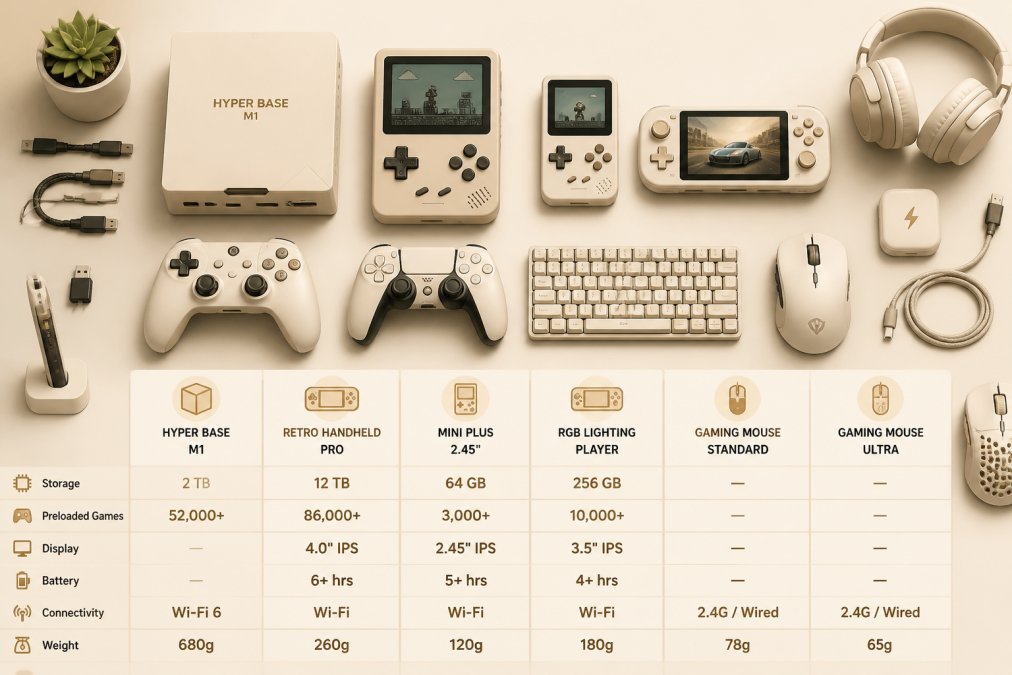
Quick Picks:
- Best Overall: Hyper Base M1, dual-system powerhouse with 52,000+ games and Windows 11 Pro
- Best Budget Option: 12TB Gaming HDD with 86,000+ Retro Games, massive library at a fraction of the cost
- Best Portable: Retro Handheld Video Game Console, fits in your pocket with 10,000 classic games
- Best for Casual Players: Mini Plus Portable Retro Handheld Game Console, lightweight, affordable, expandable
| Bundle | Starting Price | Game Library | Best For | Key Advantage |
|---|---|---|---|---|
| Hyper Base M1 | $507.99 | 52,000+ games | All-in-one gamers | Dual Windows 11 + Batocera OS |
| 12TB Gaming HDD | $297.99 | 86,000+ games | Retro collectors | Largest game selection |
| Retro Handheld (R36S) | $59.99 | 10,000 games | On-the-go players | Pocket-sized portability |
| Mini Plus Portable | $76.99 | Expandable | Casual gamers | Most affordable handheld |
| RGB Smartpro Player | $80.99 | 12,000+ games | Performance seekers | Larger 4.95" IPS screen |
1. Hyper Base M1: Best Overall Gaming Console Bundle
The Hyper Base M1 is a dual-system machine that functions as both gaming console and productivity PC. Built on an Intel N5105 processor with 8GB LPDDR4 memory, it comes preloaded with 52,000+ games across 80+ emulators. It boots into either Windows 11 Pro or Batocera 40 depending on your needs.


What's Included and Performance Specs
The Hyper Base M1 ships with two wireless controllers, HD cable, power adapter, and mounting hardware. It supports 4K UHD output and includes 128GB M.2 SSD storage plus a 2.5-inch TOSHIBA HDD with preloaded games. The 2.5G Ethernet, WiFi 5, and Bluetooth 4.2 provide multiple connectivity options.
The N5105 processor handles most 3D games smoothly with Intel UHD Graphics delivering solid frame rates for retro titles and indie games. The all-copper heat sink and twin-turbo cooling system keep temperatures stable during extended sessions. The dual-system approach is the real advantage: boot into Windows 11 Pro for productivity or streaming, then restart into Batocera 40 for gaming. The 30-language support and 4-player multiplayer capability make it accessible globally and family-friendly.
Total Cost of Ownership: Initial and Long-Term Value
At $507.99, the Hyper Base M1 is a significant upfront investment. Over three years, however, you're getting a full PC, gaming console, and 52,000 games in one box, a value most gamers would spend far more to achieve separately.
The system supports expandable storage through modular hard drive modules, letting you add capacity without replacing the entire unit. The preinstalled 80+ emulators handle everything from PS3 down to NES, eliminating the need for separate hardware across gaming generations.
2. Retro Gaming Bundle: Budget-Friendly Option with 86,000+ Games
The 12TB Gaming HDD with 86,000+ Retro Video Games at $297.99 costs less than half the Hyper Base M1 and delivers the largest game library available. The trade-off: you need to connect it to an existing Windows PC or laptop.
This drive comes preloaded with 250+ game collections and supports five front-end systems: Hyperspin, Launchbox, Retrobat, Playnite, and Kodi. The USB 3.0 connection provides high-speed data transfer with snappy load times. Setup requires installing plugins on your computer, typically 30 minutes, with support available within 12 hours if needed.
With 86,000+ games covering TeknoParrot, PSVita, Xbox 360, PSP, PS2, PS3, MAME, Wii, and WiiU, you're accessing gaming history most people forgot existed. You'll want at least a 7th-generation Intel i5 with integrated graphics to run everything smoothly. PS3 emulation recommends GTX 1060 Ti or better.
3. Handheld Gaming Bundle: Portable Gaming on the Go
The Retro Handheld Video Game Console (BOYHOM R36S model) at $59.99 is the entry point for gaming without being tethered to a desk or TV.

This device packs a 640x480 resolution IPS screen into a 3.5-inch display with crisp visuals for retro titles. The open-source Linux design means the community constantly develops new features. It ships with 10,000 games preloaded and 64GB storage, expandable via microSD cards. The pocket-sized form factor genuinely fits in your pocket with negligible weight and solid durability for travel.
Battery life runs 4-6 hours depending on game intensity, covering a full workday commute or weekend trip. The device charges via USB, and the vibration motor adds tactile feedback. You get smooth emulation of NES, Genesis, and Game Boy-era systems. For more horsepower, the Mini Plus Portable Retro Handheld Game Console at $76.99 offers a larger 3.5-inch screen and dual-core processor.
How to Choose a Gaming Console Bundle That Fits Your Needs
The decision framework comes down to three variables: where you'll play, what you want to play, and your budget.
Performance vs. Budget: What Matters Most
Performance matters less than people assume. On a 1080p TV, the difference between 60fps and 120fps is invisible. For retro titles, frame rate consistency matters more than raw speed. On 4K displays, you need the Hyper Base M1 for UHD output.
Start by asking what you actually play. Are you chasing new releases with ray tracing? Nothing in The Techie Den's lineup handles that. Are you replaying classics? The 12TB Gaming HDD becomes your best choice. Are you gaming during commutes? A handheld device is essential.
Game Library and Exclusive Titles
The Hyper Base M1 covers the broadest range with 52,000+ games across 80+ emulators. The 12TB Gaming HDD goes deeper into retro with 86,000 titles but requires a Windows PC. Handheld options are more limited but still pack thousands of classics.
Research emulator compatibility first. Most systems let you add ROMs yourself, so your library can expand indefinitely. The Hyper Base M1's modular storage design supports this better than fixed-capacity handhelds.
Backward Compatibility and Cross-Platform Play
Backward compatibility is built into these bundles by design. The Hyper Base M1 runs both Windows 11 and Batocera, so you're not locked into one ecosystem. The 12TB Gaming HDD works with any Windows PC from Windows 7 onward. Handheld devices run Linux and are designed for emulation, so they're inherently backward-compatible.
Gaming Console Accessories Checklist: Complete Your Setup
A bundle is only as good as the peripherals supporting it. The right accessories transform a basic setup into something genuinely immersive.
Controllers and Input Devices
The Hyper Base M1 ships with two wireless controllers featuring enhanced haptic feedback. For fighting games or arcade titles, a dedicated fight stick changes everything. The Gaming Converter for Mayflash Magicboots X One Hitbox Fightbox Adaptador at $71.99 bridges third-party controllers to Xbox-compatible systems.
For precision gaming, the Mchose A7 V2 Pro Ultra Tri-Mode Lightweight Wireless Gaming Mouse at $80.99 delivers 42,000 DPI tracking with three connectivity options: 2.4GHz wireless, Bluetooth, and wired. The lightweight design reduces fatigue during extended sessions.
Connectivity and Storage Expansion
The Hyper Base M1 includes 2.5G Ethernet, WiFi 5, and Bluetooth 4.2. For adding external hard drives, USB 3.0 cables and powered hubs become essential. The 12TB Gaming HDD uses USB 3.0, so a quality cable maintains transfer speeds.
The Hyper Base M1's modular design supports additional hard drive modules. Handheld devices support microSD expansion up to 128GB or 256GB. If you're planning to grow your library, budget for expansion storage in your total cost calculation.
Gaming Setup Optimization Tips for Maximum Performance
Setting up your gaming space correctly impacts your experience. This isn't about aesthetics, it's about reducing latency, optimizing frame rates, and creating comfort for long sessions.
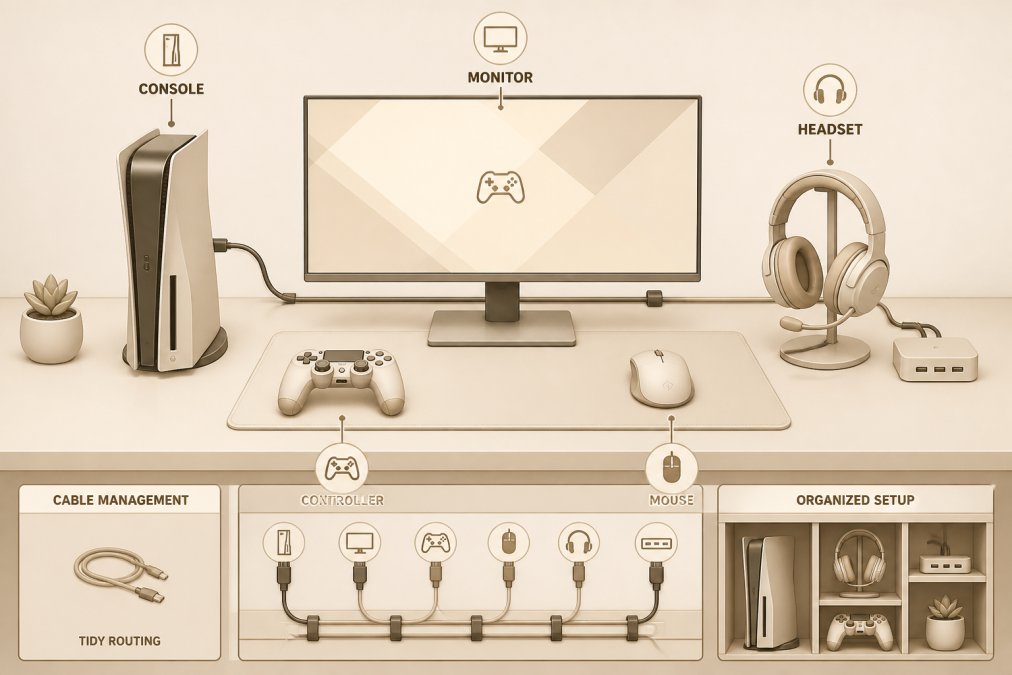
Display and Audio Integration
The Hyper Base M1 supports 4K UHD output, requiring a TV or monitor capable of that resolution. On older 1080p displays, the system scales down flawlessly. Audio quality matters more than expected. A quality headset with low-latency wireless connection transforms the experience. Cable management reduces distractions, route cables behind the monitor or TV and use cable organizers.
Reducing Latency and Frame Rate Optimization
Latency is the enemy of responsive gaming. The Hyper Base M1's 2.5G Ethernet provides wired stability. WiFi 5 is fast enough for most use cases, but wired connections eliminate interference. For handheld devices, local play removes network latency entirely.
Frame rate consistency matters more than raw speed. The Hyper Base M1 handles most retro games at locked 60fps. If experiencing stuttering, check that background processes aren't consuming CPU resources. Batocera 40 OS is optimized specifically for gaming, running leaner than Windows. If experiencing performance issues, booting into Batocera instead of Windows 11 often improves frame rates.
Family-Specific Bundle Recommendations
Gaming isn't just a solo activity. Bundles designed for multiplayer or family use have different priorities than single-player setups.
The Hyper Base M1's 4-player multiplayer support makes it the clear choice for family gaming. Two controllers ship with the system, and additional wireless controllers are widely available. For younger gamers or casual family players, the Mini Plus Portable Retro Handheld Game Console at $76.99 offers a gentler entry point and is affordable enough that multiple family members can each have one.
The 12TB Gaming HDD serves families with broad gaming interests. Parents who grew up on 8-bit and 16-bit games can relive their childhood while introducing kids to gaming history. One Windows PC connected to the family TV becomes the hub, with the external drive providing unlimited gaming variety.
Choosing the right gaming console bundle comes down to honest self-assessment: where you actually game, what you actually play, and your budget. The Hyper Base M1 remains the best all-around choice because it handles productivity, modern Windows applications, and retro gaming in a single compact system with dual-OS flexibility. If your budget is tight and you're primarily chasing retro titles, the 12TB Gaming HDD delivers 86,000+ games for less than $300. If portability matters most, handheld options from The Techie Den start at $59.99 and scale up based on performance needs.
Start with The Techie Den's curated selection, match your needs to the right bundle, and add accessories that fill specific gaps. You'll end up with a setup that actually matches how you game.
Frequently Asked Questions
Are gaming console bundles actually cheaper than buying separately?
Yes, bundles typically save 10-20% compared to purchasing items individually. A gaming console bundle recommendation for 2026 bundles the console, controllers, and often pre-loaded games or storage expansion. For example, the Hyper Base M1 at $507.99 includes 52,000+ games, dual controllers, and Windows 11 Pro, buying these separately would cost significantly more. Compare total value, not just the headline price.
What should I look for in a gaming console bundle in 2026?
Prioritize game library size, hardware specifications (GPU performance, frame rate, 4K resolution support), storage capacity, and included accessories. Check if the bundle offers backward compatibility with your existing games and cross-platform play support. Verify the bundle includes essential peripherals like controllers and cables. Consider your display setup, ensure the console supports your TV's refresh rate and resolution capabilities.
Which console bundle offers the best value for families?
The Hyper Base M1 bundle excels for families with its 52,000+ pre-loaded games, dual controllers for multiplayer gaming, and 4-player support. At $507.99, it provides diverse game genres for all ages. For budget-conscious families, the 12TB Gaming HDD bundle at $297.99 offers 86,000+ retro games with multiple game systems. Handheld bundles like the RGB Lighting Smartpro at $80.99 work well for portable family gaming on trips.
Will there be new gaming console hardware releases in 2026?
Major hardware refreshes typically occur on 5-7 year cycles. Current-generation consoles remain dominant in 2026, but manufacturers may release mid-generation upgrades with improved GPU performance and ray tracing capabilities. Retro and handheld gaming continues to expand with new emulator support and larger game libraries. Before purchasing, verify the bundle's compatibility with future software updates and game releases.
This article was written using GrandRanker


